AI tool · from 35 credits · Refunded if it fails

AI Headshot Generator from One Selfie

Upload one clear, front-facing selfie and get a head-and-shoulders headshot with a professional background and light, framed for a profile picture.

  • InputOne selfie, JPG, PNG or WEBP, 15 MB
  • OutputJPG, 3:4 portrait
  • Pro looks6 looks, from studio to outdoor

Set it up

Quality
Background
Estimated35 credits
Ways to pay less
  • Standard is 35 credits and Pro is 57. If you only need a quick profile picture on a plain background, Standard is enough.
  • Each headshot is one flat price, whatever the size of your selfie and whichever background or look you pick.

Need something else? More Photo & Image tools or all 54 tools

What is an AI headshot generator?

An AI headshot generator is a tool that turns an ordinary photo of you into a professional-looking headshot, with new clothes, light and background. Here you upload one clear selfie, JPG, PNG or WEBP up to 15 MB. Standard (35 credits) gives you a headshot on a Professional, Corporate, Clean or Gradient background. Pro (57 credits) offers six looks, from a grey studio to outdoor light, and keeps your face as it is without retouching. The result is a 3:4 JPG.

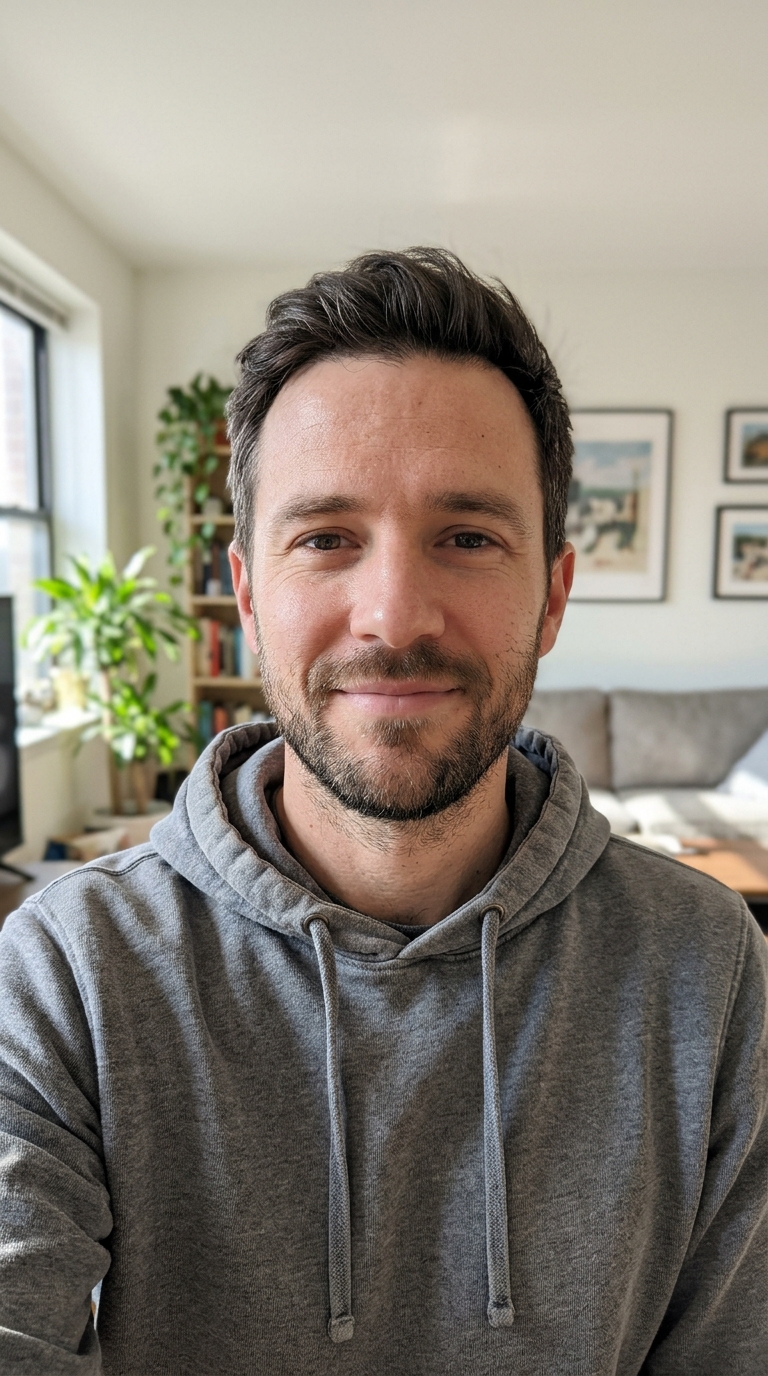
Before
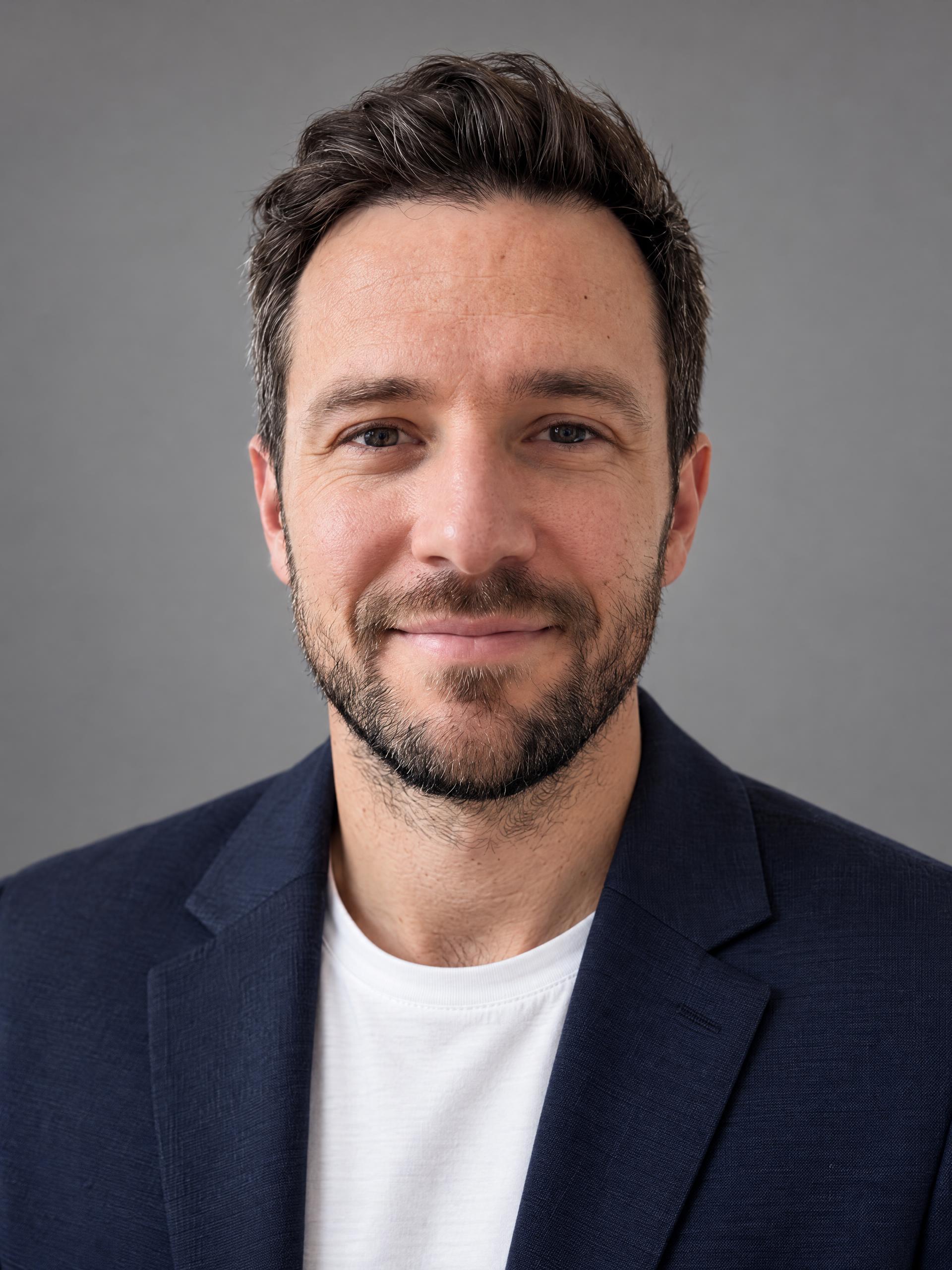
After
A casual phone photo turned into a grey studio headshot with a blazer.ProGrey studio
A casual phone photo turned into a grey studio headshot with a blazer.

How to use AI Headshot Generator in 3 steps

  1. Upload a clear selfie

    Sign in and upload one front-facing photo of yourself: good light, eyes visible, no sunglasses or hat. JPG, PNG or WEBP up to 15 MB.

  2. Pick Standard or Pro

    Standard lets you choose a background; Pro lets you choose one of six looks for your AI headshot, with finer detail.

  3. Make your headshot

    Press Make my headshot. The 3:4 JPG is saved in My Videos, ready to download and upload to LinkedIn or your CV.

What AI Headshot Generator does

One selfie is enough

There's no set of 10 or 20 photos to upload and no waiting for a model to train. One front-facing photo in good light gives you a finished headshot.

Standard: four backgrounds

Pick Professional, Corporate, Clean or Gradient. A quick, affordable headshot for a LinkedIn profile, an email signature or a conference badge.

Pro: six looks

Grey studio with a navy blazer, modern office with window light, outdoor natural light, black and white, creative colour backdrop, or warm and friendly in a softly lit room.

Your face, not a stranger's

Pro is told to keep you instantly recognisable: same face shape, eyes, skin tone, freckles, age and hairstyle. It doesn't slim or beautify the face, so the headshot still looks like you in a video call.

Framed for a profile picture

Every headshot is a 3:4 portrait, head and shoulders, facing the camera. It crops cleanly to the circle or square most profile pictures use.

Comparison

Why use AI Headshot Generator instead of booking a headshot photographer?

A studio session gets you real photos, but it means booking, travelling and waiting for edits. Here one selfie becomes a headshot.

FeatureAI Headshot GeneratorBooking a headshot photographer
What you needOne clear selfie taken at homeA booked session, an outfit and a trip to the studio
Backgrounds and looks4 backgrounds on Standard, 6 looks on ProWhatever the studio sets up that day
Trying another lookRun it again with a different lookBook another session or location
TurnaroundUsually a few minutes, saved in My VideosDays, while the photos are picked and retouched
Framing3:4 head and shoulders, ready for a profile pictureYou pick and crop from a set of shots
Price35 credits Standard, 57 credits ProA session fee, often per look or per edited photo

What you can make with it

A LinkedIn headshot before a job search

Your current profile picture is a cropped holiday photo. You're applying for jobs this month and want a professional headshot without booking a photographer.

  • Take a selfie facing a window in daylight, phone at eye level, with a neutral or small smile.
  • Choose Pro and the Grey studio or Modern office look for a classic corporate feel.
  • Check that it still clearly looks like you, then upload it to LinkedIn and crop to the circle.
  • Use the same headshot on your CV and job sites so recruiters recognise you everywhere.

Matching headshots for a small team page

Your five-person studio needs a team page, but everyone's photo was taken somewhere different.

  • Ask each person to take their own selfie against a plain wall, and to run the tool themselves.
  • Agree on one setting for everyone: for example Pro with Creative colour, or Standard with Clean.
  • The same look and 3:4 framing makes the row of faces look like one shoot.
  • Only make a headshot of a colleague with their permission, from a photo they gave you.

A friendly photo for a freelancer or coach profile

You're a tutor or a personal trainer and your booking page needs a photo that feels approachable, not stiff.

  • Choose Pro with Warm and friendly or Outdoor natural light.
  • Smile naturally in the selfie: the expression in your photo sets the tone of the headshot.
  • Use Black and white for a speaker bio or press page where a timeless look fits better.
  • Pair it with Talking Photo if you'd like a short welcome video from the same picture.

Who it's for

Job seekers

Get a professional headshot for LinkedIn, CVs and job sites from a selfie taken at home.

Freelancers and consultants

Put a polished photo on your website, booking page, proposals and email signature.

Small teams

Give everyone on the team page a consistent look, with each person using their own photo.

Speakers and authors

Have a clean headshot ready for event pages, bios, podcasts and press kits.

Tips for the best result

  • Face the camera straight on with your eyes visible. Side angles, sunglasses and hats make it harder to keep your likeness.
  • Soft daylight from a window in front of you beats a ceiling light above your head.
  • Hold the phone at eye level, not below the chin, and keep your head and shoulders in frame.
  • Use a sharp, recent photo. A blurry or heavily filtered selfie gives a less faithful headshot.
  • Only upload photos of yourself, or of someone who has given you permission. No photos of public figures or children.
  • Not happy with the look? Try a different Pro look before changing the photo; the background and outfit change the feel most.

Frequently asked questions

How do I make a professional headshot from a selfie?

Upload one clear, front-facing selfie, choose Standard or Pro and a background or look, and press Make my headshot. The headshot is saved in My Videos.

How much does an AI headshot cost?

35 credits for Standard and 57 credits for Pro, per headshot.

How many photos do I need to upload?

One. A single clear selfie in good light is enough; there's no training set to upload.

What's the difference between Standard and Pro?

Standard offers four backgrounds: Professional, Corporate, Clean and Gradient. Pro offers six looks with outfit and lighting, finer detail, and is told to keep your face exactly as it is without retouching.

Is the AI headshot good enough for LinkedIn?

Yes, that's what it's made for. Each result is a head-and-shoulders 3:4 portrait facing the camera, which crops cleanly to LinkedIn's round profile picture.

Will the headshot still look like me?

That's the goal, especially with Pro, which keeps your face shape, skin tone, age and hairstyle and doesn't beautify. A sharp, front-facing selfie gives the most faithful result.

Can I make a headshot of someone else?

Only with their permission, from a photo they're happy for you to use. Don't use photos of public figures or children.

What format and size is the headshot?

A JPG in 3:4 portrait shape, head and shoulders.

Do I need an account?

Yes. Sign in with Google or email; each job costs credits from your balance, and the result is saved in My Videos.

What if a job fails?

If a job can't finish, the credits it used go back to your balance automatically.

More AI Video Tools

All 54 tools →

Ready to try AI Headshot Generator?

A professional headshot for LinkedIn and your CV from one everyday selfie. from 35 credits, and the result is saved in My Videos.

Make my headshot