
GPT Image 2.5 Image Generator
GPT Image 2.5 is OpenAI's newest image model, in two tiers: Sunburst, the precision tier for the best likeness and text, and Flare, the fast tier. Create from a prompt or edit and combine up to 16 photos, up to 4K.
- Text to Image
- Image Edit
- Tiers
- Sunburst · Flare
- Resolution
- 1K · 2K · 4K
- References
- Up to 16 photos
- Quality
- Low to Max
- From
- 5 credits
Sunburst or Flare?
Both tiers take the same prompts, references and settings and cost the same. Sunburst is slower and more precise: it keeps faces, small text and fine details closest to what you asked for. Flare is the quick option for drafts and variations.
What you can do with it
- Text to image. Posters, product shots, portraits and scenes with sharp, readable text.
- Photo editing. Upload a photo and describe the change: outfit, background, lighting, style.
- Combine photos. Mix up to 16 reference images into one picture.
- Quality control. Five levels from Low to Max, and 1K, 2K or 4K output in seven aspect ratios.
GPT Image 2.5 pricing
You pay in credits for each image; the price for your exact settings is shown on the Generate button before you start. Failed generations are refunded automatically.
| Quality | 1K | 2K | 4K |
|---|---|---|---|
| Low | 5 | 6 | 12 |
| Medium | 12 | 15 | 27 |
| High | 45 | 57 | 107 |
| Extra high | 80 | 102 | 190 |
| Max | 180 | 227 | 427 |
How to use GPT Image 2.5
- Open the image generator with GPT Image 2.5 selected.
- Pick Sunburst for precision or Flare for speed.
- Write your prompt, and add reference photos if you are editing or combining images.
- Choose quality, resolution and aspect ratio; the price updates as you go.
- Generate and download the image.
GPT Image 2.5 prompt ideas
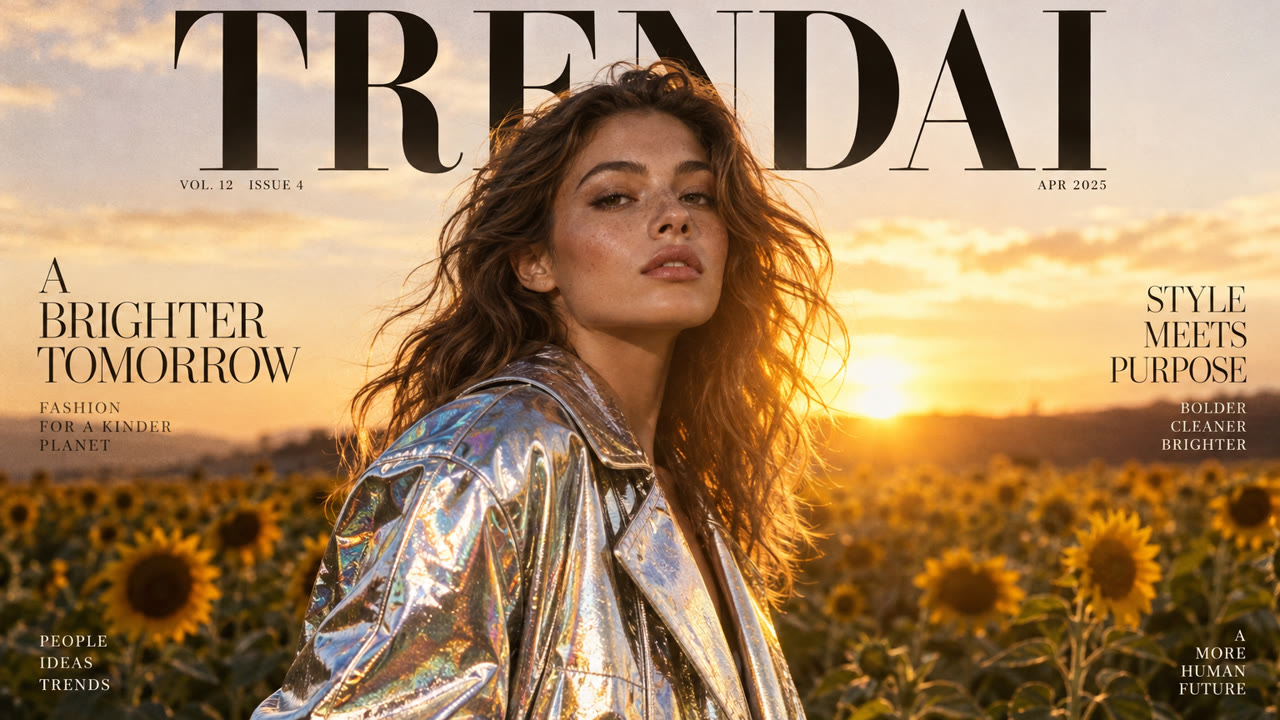
An editorial magazine cover of a model in an iridescent silver jacket in a sunflower field at sunset, warm rim light, the headline "TRENDAI" in elegant serif type at the top.
A matte black coffee tumbler on a slab of travertine, morning window light, soft shadow, a sprig of eucalyptus, minimal premium ad look.
Keep the person exactly as they are and change the background to a rainy Tokyo street at night with neon reflections, matching the lighting on their face.
Frequently asked questions
What is the difference between Sunburst and Flare?
Sunburst is the precision tier, best for likeness, text and fine detail; Flare is the fast tier. They cost the same.
How many photos can I use?
Up to 16 reference photos per image. Each reference adds a small amount to the price.
What sizes can I make?
1K, 2K or 4K on the long edge, in 1:1, 16:9, 9:16, 4:3, 3:4, 3:2 or 2:3.
Which quality should I choose?
High is the best balance for most images. Extra high and Max add detail at a higher price; Low and Medium are good for drafts.
What happens if a generation fails?
The credits are refunded automatically. You are only charged for results you get.
Is adult or 18+ content allowed?
No. Trendai.video is for safe-for-work content only. Nudity, sexual content, real people without their consent and anything illegal are not allowed; prompts and outputs are moderated and accounts that try are removed.
Other models on Trendai.video
- Seedance 2.5ByteDance · Video · 720p · 4–30s · native audio
- Wan 3.0Alibaba · Video · 1080p · 2–30s · native audio
- FLUX 3 MaxBlack Forest Labs · Video · 1080p · 5–20s · native audio
- MiniMax H3 MaxMiniMax · Video · 1080p · 2–15s
- Nano Banana 2.1Google · Image · 4K · mix up to 14 photos
- GPT Image 2OpenAI · Image · 2K · text to image