AI tool · from 83 credits · Refunded if it fails

AI Music Video Generator for Your Song

Upload a song up to 3 minutes, or have the AI write one, and describe what the video is about. The AI plans a shot for about every five seconds, draws each one in your chosen style and cuts them to the track.

  • ShotsOne every ~5 s, up to 36
  • SongYour MP3, WAV or M4A, or an AI song
  • StylesCinematic · Anime · 3D · Documentary
  • Format9:16 or 16:9 MP4

Set it up

Try an example
Format
Song
Visual style
Shots
Estimated373 credits
Ways to pay less
  • With your own song, the price follows its length: 199 credits for 30 seconds, 373 for 60 and 1,069 for 3 minutes with still shots.
  • Still shots cost far less than animated ones: a 60-second song is 373 credits still and 2,929 animated.
  • Uploading your own song skips the AI song: a 60-second video is 373 credits with your track and 475 with an AI song.

Need something else? More Music tools or all 54 tools

What is an AI music video generator?

The AI Music Video Generator is a tool that turns a song into a music video without filming. You upload your own track or have the AI compose one, add a theme and optional lyrics, and the AI plans one shot for about every five seconds, building from a calm opening to a big middle and a quiet ending. Each shot is drawn in your chosen style, kept as a still or animated, and laid on the song at its exact length.

Example
AI songAI-animated30 s
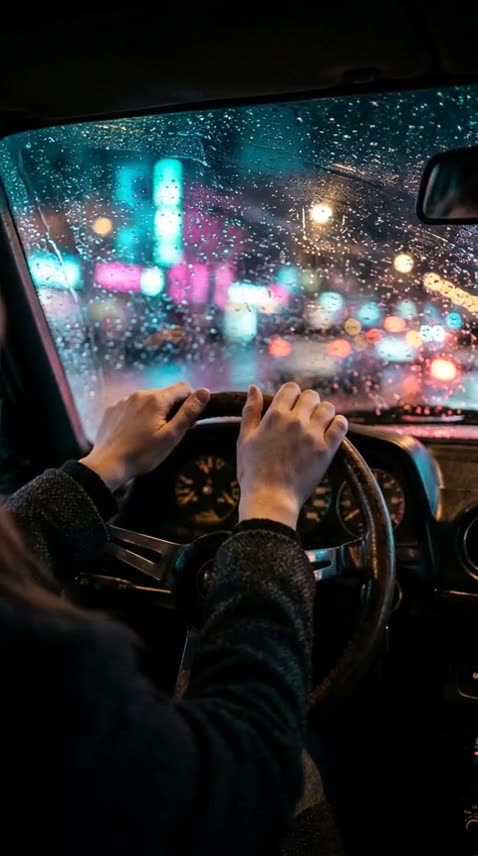
A 30-second AI song about a night drive, with six animated shots cut to it.

Start from an example

How to use AI Music Video Generator in 3 steps

  1. Add your song or make an AI song

    Sign in, then upload your track (up to 3 minutes) or choose "Make an AI song", describe its style and pick a length.

  2. Describe the music video

    Write what the AI music video is about in a sentence, paste the lyrics if you have them, and choose the visual style, format and still or animated shots.

  3. Make the music video

    Press Make the music video; the price is on the button. It usually takes a few minutes, and the MP4 is saved in My Videos.

What AI Music Video Generator does

A shot plan built from your song

The AI writes the shot list from your theme and lyrics: what is in each frame, the setting, the light and the camera. It aims for one main character or place that carries across the video, with a calm start, a big middle and a quiet end.

One new picture about every five seconds

The number of shots follows the song's length: 6 for 30 seconds, 12 for a minute, 36 for a three-minute track. Each shot lasts the same share of the song, and the video ends exactly when the music does.

Your song or an AI song

Upload an MP3, WAV or M4A of a song you have the rights to use, up to 3 minutes. Or pick "Make an AI song", describe the style and choose 30 seconds to 2 minutes; paste lyrics and the AI song sings them, leave them empty for an instrumental.

Four visual styles

Cinematic film stills, hand-drawn anime, 3D animated feature or documentary photography. The style is applied to every shot so the video looks like one piece.

Still shots or AI-animated shots

Still shots hold each picture for its share of the song, then cut to the next. AI-animated shots turn every frame into a short clip with camera or subject motion; this is available for songs up to 60 seconds.

Lyrics shape the imagery

Pasted lyrics are read for mood and images, so a line about rain on a window can become a shot of rain on a window. The lyrics are not printed on screen, and frames are drawn without text or logos.

Comparison

Why use AI Music Video Generator instead of shooting a music video?

A shoot needs a crew, a location and an edit before anyone sees the song. Here the shots are planned, drawn and cut to the track from a sentence.

FeatureAI Music Video GeneratorShooting a music video
PlanningThe AI writes a shot list from your theme and lyricsWrite a treatment and a shot list yourself
FootageA new picture about every 5 seconds, in one of four stylesFilm on location with a camera, lights and people
EditingShots laid on the song and cut to its exact lengthCut each shot to the music on a timeline
MotionStill shots, or AI-animated shots for songs up to 60 sWhatever was captured on the day
No song yetAn AI song made in the same jobRecord and mix the track first
PriceFrom 83 credits; 373 for a 60-second song with still shotsCrew, location and editing costs

What you can make with it

A vertical clip for a new single

You're releasing a track and need something to post on Reels and TikTok the same day, without a shoot.

  • Upload a 30-second hook of the song rather than the full track: it's 199 credits with still shots.
  • Choose 9:16 and AI-animated shots; at 30 seconds the animated version is 1,477 credits.
  • Write the theme as a scene, e.g. "a night drive through a neon city, missing someone".
  • Paste the chorus lyrics so the shots pick up its images.

A full-length video for a YouTube upload

A three-minute song needs a video for its YouTube upload, and a static cover image won't hold viewers.

  • Upload the whole track up to 3 minutes and choose 16:9 landscape.
  • Use still shots: animation is only for songs up to 60 seconds, and stills keep a 3-minute video at 1,069 credits.
  • You get 36 shots, one about every five seconds, following the song from intro to outro.
  • Want the words on screen? Make a lyric video with the lyric video maker instead.

A song and its video from one idea

No track yet: you want a short song and a video for it in one job, for a birthday, a story or a channel intro.

  • Choose "Make an AI song" and describe it: genre, mood, vocals and tempo.
  • Paste lyrics for a sung song, or leave the box empty for an instrumental.
  • Pick 30 or 60 seconds if you want AI-animated shots.
  • A 30-second AI song with still shots costs 250 credits.

Who it's for

Independent musicians

Give every single a video for streaming, YouTube and short-form feeds without booking a director or a location.

Producers and beatmakers

Put instrumentals in front of an audience with visuals that change with the track instead of a still cover.

Faceless music channels

Pair AI songs with matching AI videos in one job, in a style that becomes the channel's look.

Hobbyists and gift makers

Turn a song you wrote for a friend, a party or a family event into a video you can send.

Tips for the best result

  • Describe a scene, not a genre: "a lighthouse keeper waiting for a boat in winter" plans better shots than "sad song".
  • Paste the lyrics even for an uploaded song. They give the AI the song's images and mood.
  • Each frame is drawn separately, so a recurring character can look a little different from shot to shot. A place or object as the main subject stays more consistent.
  • Cinematic suits ballads and pop, anime suits upbeat and emotional tracks, documentary suits folk and acoustic songs.
  • For AI-animated shots, the song must be 60 seconds or shorter. Cut a longer track to its best minute first.
  • Only upload songs you have the rights to use, and don't ask for real people in the shots: frames are drawn without names, text or logos.

Frequently asked questions

How do I make a music video with AI?

Upload your song or choose "Make an AI song", describe what the video is about, pick a style, format and still or animated shots, and press Make the music video. The AI plans, draws and cuts the shots to the song.

How much does an AI music video cost?

From 83 credits for a very short song. With your own track and still shots it's 199 credits for 30 seconds, 373 for 60 and 1,069 for 3 minutes; AI-animated shots cost 1,477 at 30 seconds and 2,929 at 60.

How long can the song be?

Up to 3 minutes for an uploaded song. An AI song can be 30 seconds, 60 seconds, 90 seconds or 2 minutes.

Can I animate the shots of a long song?

No. AI-animated shots work on songs up to 60 seconds. Longer songs use still shots, or you can cut the track to its best minute.

How many shots does the video have?

About one every five seconds: 6 shots for 30 seconds, 12 for a minute and 36 for 3 minutes.

Does it show the lyrics on screen?

No. Lyrics guide the imagery but aren't printed; frames are drawn without text. For on-screen words, use the lyric video maker.

Can I use any song?

Only songs you have the rights to use, such as your own music or a song you made with the AI song option.

Does it work for vertical and landscape videos?

Yes. Choose 9:16 for Reels, TikTok and Shorts, or 16:9 for YouTube.

Do I need an account?

Yes. Sign in with Google or email; each job costs credits from your balance, and the result is saved in My Videos.

What if a job fails?

If a job can't finish, the credits it used go back to your balance automatically.

More AI Video Tools

All 54 tools →

Ready to try AI Music Video Generator?

A music video for your song: AI-planned shots cut to the track, still or animated. from 83 credits, and the result is saved in My Videos.

Make the music video