AI tool · from 30 credits · Refunded if it fails

AI Photo Style

Upload one photo, pick a look, and the AI redraws it in that style while keeping the same people, pose and framing. Eight styles, from a hand-painted anime film still to 16-bit pixel art.

  • Styles8 looks
  • InputJPG, PNG or WEBP, 15 MB
  • OutputA JPG image
  • QualityStandard or Pro

Set it up

Try an example
Style
Quality
Estimated30 credits
Ways to pay less
  • Standard is 30 credits and Pro 57, so testing styles on Standard and running only the winner on Pro saves 27 credits per test.
  • The price is one flat fee per photo whatever its size, so there's nothing to gain by shrinking it first; upload the best copy you have.

Need something else? More Photo & Image tools or all 43 tools

What is an AI photo style tool?

An AI photo style tool is a tool that redraws your photo in a new art style, such as an anime film still, a 3D animated movie frame or an oil painting, while keeping the same people, pose and scene. Here you upload one JPG, PNG or WEBP up to 15 MB, choose one of eight styles and a quality level, and get a JPG back in My Videos. Standard costs 30 credits and Pro 57 credits.

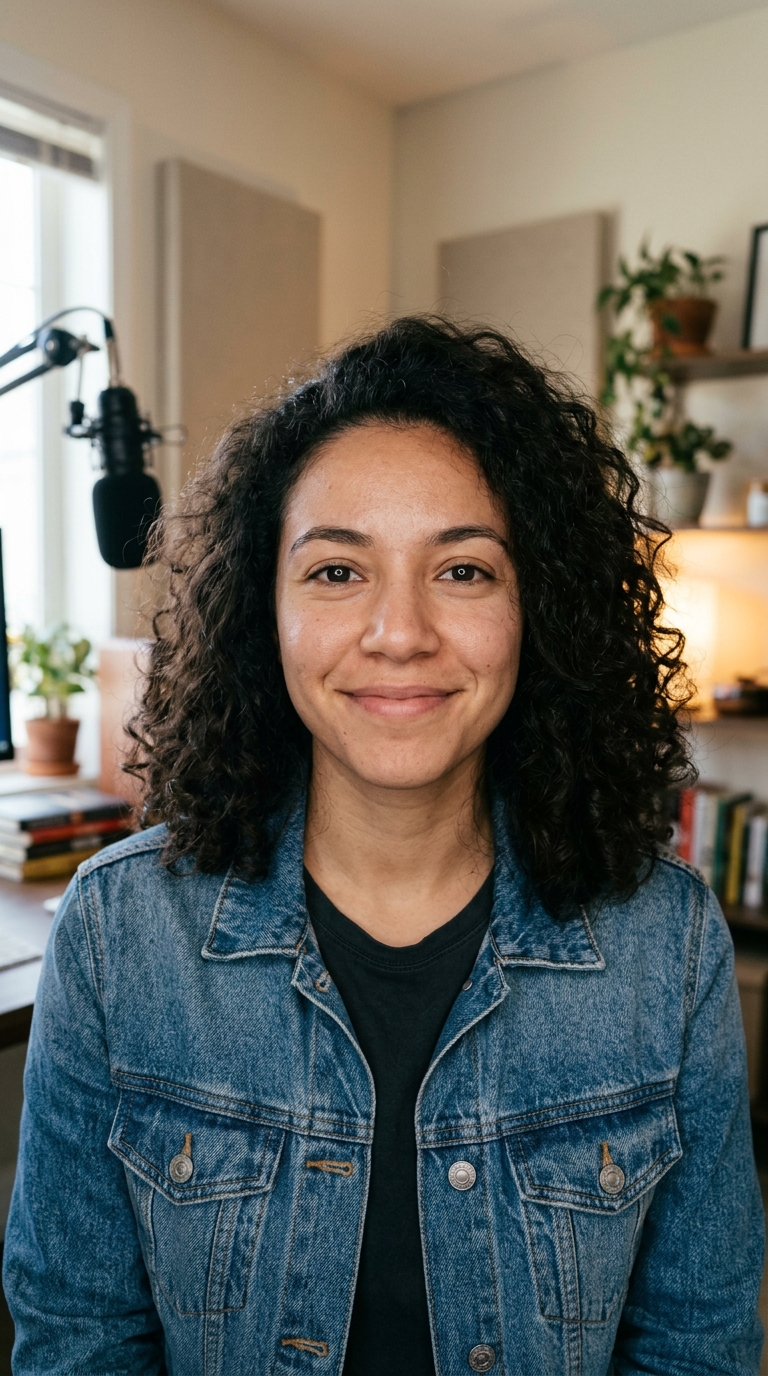
Before
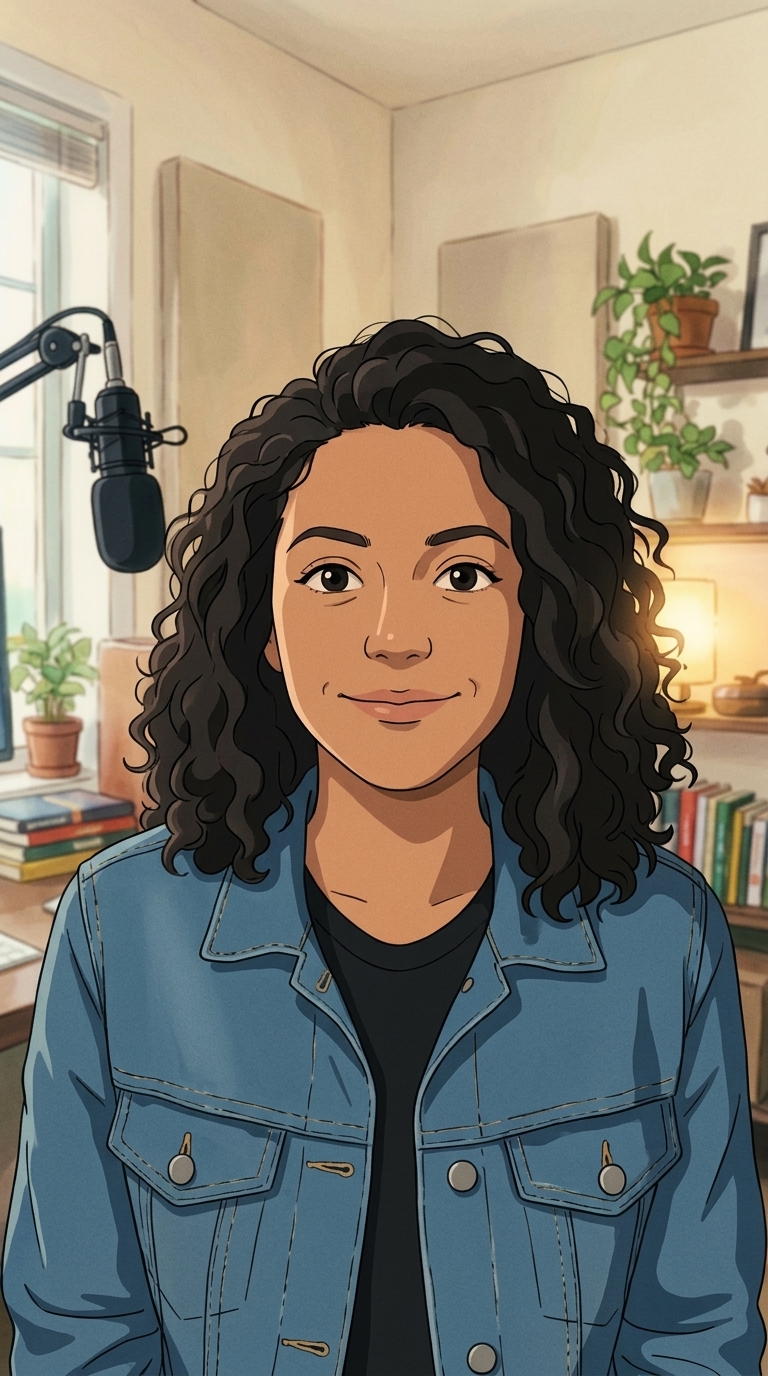
After
One photo redrawn as a hand-painted anime film still.Hand-painted anime filmStandard
One photo redrawn as a hand-painted anime film still.

Start from an example

How to use AI Photo Style in 3 steps

  1. Upload your photo

    Sign in and upload one JPG, PNG or WEBP up to 15 MB. A clear photo of people, a pet or a place works best, and it should be one you have the right to use.

  2. Pick the AI photo style and quality

    Choose a look from the Style menu, then Standard (30 credits) or Pro (57 credits). The price shows on the button before you start.

  3. Restyle the photo

    Press Restyle photo. The new JPG is saved in My Videos when it's ready, and you can download it from there.

What AI Photo Style does

Eight looks in one menu

Hand-painted anime film, 3D animated movie, modern anime, comic book, claymation, watercolour painting, oil painting and pixel art. Each style is a written description of the look, so you choose a result, not a filter strength.

The same people, still recognisable

The AI is told to keep each person's face shape, hairstyle, skin tone, age and expression, plus the pose, clothing colours, background layout and framing. Only the art style changes, so a family photo still reads as your family.

Standard or Pro quality

Standard runs a faster image model for 30 credits and suits social posts and quick tests. Pro runs a high-detail model at 2K for 57 credits, with finer hair, fabric and background detail for prints and profile pictures you'll keep.

Shape follows your photo

On Pro, the result is square, 4:3 or 3:4, whichever is closest to the photo you upload. A portrait phone photo stays a portrait and a wide landscape stays wide.

No text or stamps added

The AI is asked not to add words, logos or watermarks, so the picture is clean and ready for a caption of your own or a further edit.

Comparison

Why use AI Photo Style instead of commissioning a drawn portrait?

A hand-drawn portrait takes an artist days. For a quick avatar, card or post, the AI redraws your photo in the style you pick.

FeatureAI Photo StyleCommissioning a drawn portrait
InputOne photo and a style from the menuReference photos and a written brief to an artist
StylesEight looks, from anime film to pixel artWhatever the artist you hire draws
Trying optionsRun the same photo in another style for 30 creditsEach extra version is a new request and a new fee
TurnaroundA JPG in My Videos, usually within minutesDays to weeks
LikenessKeeps face, pose and framing from the photoDepends on the artist and rounds of feedback
Price30 credits on Standard, 57 on ProAn artist's rate per portrait

What you can make with it

A cartoon profile picture

You want an avatar that looks like you but drawn, for a social profile, a gaming handle or a newsletter byline.

  • Use a well-lit head-and-shoulders photo with your face turned toward the camera.
  • Try 3D animated movie for a rounded, friendly cartoon look, or modern anime for crisp outlines.
  • Test on Standard first, then run your favourite style on Pro for the final 2K image.
  • Crop to a circle or square in your profile settings after downloading.

A family photo turned into a keepsake

A holiday group photo on the beach becomes a painting to frame or print as a card.

  • Pick watercolour painting for soft washes, or oil painting for rich brushstrokes and warm light.
  • Choose Pro: the extra detail matters at print size.
  • Group photos keep their layout, so everyone stays where they stood.
  • Faces that are tiny in the frame get simplified, so pick a shot where people are reasonably close.

Posts and covers with a drawn look

A run of posts, a podcast cover or a thumbnail series that needs one consistent illustrated style.

  • Pick one style, such as comic book or pixel art, and use it for every image in the set.
  • Shoot the photos in similar light so the results match each other.
  • Add your own title text afterwards; the AI leaves the picture without words.
  • Want it moving? Take the styled JPG into Photo to Video and animate it.

Who it's for

Creators

Make drawn avatars, cover art and thumbnails in a consistent style for a channel or a series.

Families

Turn holiday, wedding and pet photos into paintings and cartoon prints for frames, cards and albums.

Small brands

Give team photos or product scenes an illustrated look for posts and ads for your brand.

Gift makers

Redraw a couple or a pet as a claymation scene or a watercolour as a personal present.

Tips for the best result

  • Use a sharp, well-lit photo. The AI keeps the composition, so a blurry or dark original gives a blurry or dark painting.
  • Faces that fill more of the frame stay more recognisable than faces in a wide crowd shot.
  • Each style changes the photo differently: claymation and 3D animated movie reshape faces the most, watercolour and oil painting the least.
  • Run the same photo through two or three styles on Standard to see which one fits, then use Pro for the keeper.
  • Busy backgrounds become busy paintings. A plain wall or open sky gives a cleaner result.
  • Only upload photos you took or have permission to use, and avoid photos of public figures.

Frequently asked questions

How do I turn a photo into a cartoon?

Upload the photo, choose a style such as 3D animated movie, modern anime or comic book, and press Restyle photo. The cartoon version is saved as a JPG in My Videos.

How much does it cost?

30 credits per photo on Standard and 57 credits on Pro. The price is the same for any photo size.

What's the difference between Standard and Pro?

Standard uses a faster model and is good for quick tests and social posts. Pro uses a high-detail model at 2K, with finer hair, texture and background detail.

Can I make a Ghibli-style or Pixar-style picture?

Yes, in a look inspired by those styles: choose Hand-painted anime film or 3D animated movie. Trendai.video isn't affiliated with any animation studio, and the AI draws an original image in that general style.

Will the people still look like themselves?

Usually, yes. The AI is told to keep face shape, hairstyle, skin tone, age, expression and pose, though stylised looks like claymation change features more than a painting does.

Which file types can I upload?

JPG, PNG and WEBP, up to 15 MB. The result is always a JPG.

Can I restyle several photos at once?

No. Each job restyles one photo in one style, so a set of five photos is five jobs.

Can I turn the styled photo into a video?

Yes. Download the JPG and upload it to Photo to Video to animate it as a 5 or 10 second clip.

Do I need an account?

Yes. Sign in with Google or email; each job costs credits from your balance, and the result is saved in My Videos.

What if a job fails?

If a job can't finish, the credits it used go back to your balance automatically.

More AI Video Tools

All 43 tools →

Ready to try AI Photo Style?

Turn a photo into an anime film still, a 3D cartoon, a comic or a painting. from 30 credits, and the result is saved in My Videos.

Restyle photo