
AI tool · from 106 credits · Refunded if it fails

Talking Baby AI Video

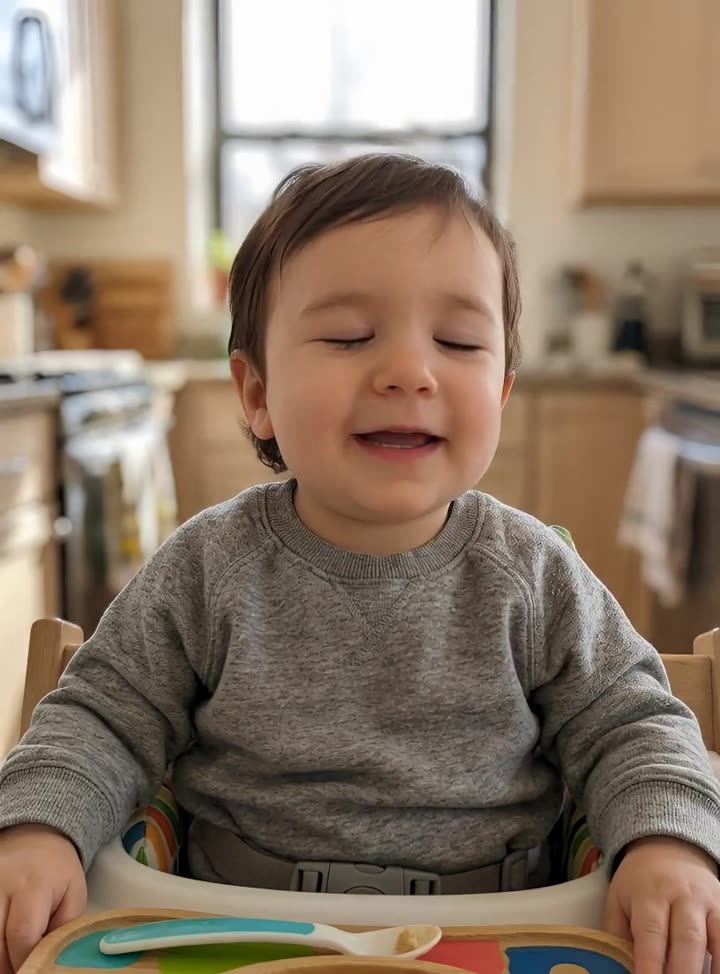
Upload a clear photo of an adult. The AI redraws them as a one-year-old with the same eyes, hair and face shape, sitting in a high chair, then the baby says whatever you type, with lip sync and head movement.

  • InputOne photo of an adult
  • MessageUp to 800 characters
  • Voices22 AI voices
  • QualityStandard · Pro

Set it up

Try an example
Look
Voice
Quality
Estimated662 credits
Ways to pay less
  • The price follows the message length: our default message for Mia costs 662 credits on Standard and 1,201 on Pro.
  • The baby makeover adds 30 credits. Keep my photo as it is skips it, so the same default message costs 632 on Standard.
  • Standard costs about half of Pro: 48 credits per second of video against 90, plus the voice.

Need something else? More AI Video tools or all 43 tools

What is a talking baby AI?

Talking Baby is a tool that turns a photo of an adult into a short video of a baby version of that person speaking. The AI first redraws the face as a chubby-cheeked one-year-old with the same eye colour, hair colour and features. Then one of 22 AI voices reads your message, up to 800 characters, and the baby's lips, blinks and head move with the words. Leave the message empty and it reads our own joke script.

Before
After
Baby versionVoice: Liam
An adult photo turned into a baby version of them, reading our default line.

Start from an example

How to use Talking Baby in 3 steps

  1. Upload a photo of an adult

    Sign in and upload a clear, front-facing photo of one adult, as a JPG, PNG or WEBP up to 15 MB. Use only photos you have the right to use, such as your own or a friend who agreed.

  2. Type a name and a message

    Add who it's for, keep Make them a baby selected, then type the message or leave it empty for ours. Pick a voice and Standard or Pro.

  3. Make the talking baby video

    Press Make the baby talk. The price is on the button. The AI draws the baby, records the voice and animates the face, usually within a few minutes, and the talking baby video is saved in My Videos.

What Talking Baby does

A baby version of the same face

The AI keeps what makes the person recognisable: face shape, eye colour, hair colour, skin tone and expression. It places the baby in a high chair in a bright kitchen, looking at the camera, so the joke lands in the first second.

Says the name you type

Type who the video is for, up to 40 characters, and it goes into the message. Leave the message empty and the baby reads our script, which asks that person who ate its snacks.

Your own message, or ours

Write up to 800 characters, about a minute of speech. Short punchy lines work best: a complaint, a confession or a big announcement delivered with a straight face.

22 AI voices

Liam, an energetic young male voice, is picked by default because it plays well against a baby face. You can switch to any of the 22, from Jessica's lively female voice to Bill's trustworthy older male.

Keep the photo as it is

Choose Keep my photo as it is to skip the baby makeover. The photo you upload is animated directly, and the makeover's 30 credits come off the price.

Comparison

Why use Talking Baby instead of a baby filter app plus a video editor?

Baby-face filters give you a still picture, and making it talk usually means a second app and a recorded voice. Here the baby version and the speech come out as one video.

FeatureTalking BabyA baby filter app plus a video editor
InputOne photo of an adult and a typed messageA selfie through a filter, then a separate app to animate it
LikenessSame face shape, eye colour and hair colour, drawn as a one-year-oldDepends on the filter; many only smooth the face
Voice22 AI voices read your message, up to 800 charactersRecord yourself and pitch it up by hand
Lip syncThe mouth, blinks and head movement follow every wordUsually none, or lips that don't match
PriceAbout 660 credits for a 13-second message on StandardSubscriptions to one or two apps and your editing time

What you can make with it

A birthday or anniversary joke from the baby version of you

Send your partner a clip of baby-you saying the thing you always say.

  • Upload a well-lit selfie where you look straight at the camera.
  • Type their name in Who is it for, so the message can use it.
  • Write two or three short lines, around 140 characters, for a clip of about 13 seconds.
  • Standard is enough for a message sent in a chat.

A team announcement nobody scrolls past

A colleague agreed to be the baby, and the baby reads out the Friday update.

  • Ask first, then use a headshot with nothing covering the mouth.
  • Write it like a formal memo: a serious tone from a baby face is the joke.
  • Pick a calm or authoritative voice, such as Daniel or Roger, to play against the face.
  • Choose Pro if it will be shown on a big screen, for more natural motion.

A short comedy clip for your page

A recurring character: baby-you reacting to everyday adult problems.

  • Use the same source photo each time so the baby looks the same from post to post.
  • Keep each message to one joke, 80 to 160 characters.
  • Make one clip per joke and join them in the Merge Videos tool if you want a longer post.
  • Add captions afterwards so the joke works with the sound off.

Who it's for

Friends and partners

Make a birthday, anniversary or inside-joke video starring the baby version of yourself or someone who said yes.

Comedy and meme pages

Build a recurring baby character from one photo and give it a new line in every post.

Teams and party planners

Open a meeting, a farewell or a party slideshow with a baby-face announcement from a willing colleague.

Parents-to-be

Imagine aloud what a baby version of you or your partner might say, for a lighthearted family group chat.

Tips for the best result

  • Use a sharp, evenly lit photo of one adult looking at the camera. Sunglasses, hats and hands near the face make the baby look less like them.
  • Upload a photo of an adult only. Photos of real babies or children are not for this tool, and neither are celebrities or public figures.
  • Write the message the way it should sound: short sentences, a comma where you want a pause, and a deadpan last line.
  • You can write {name} anywhere in your message; it is replaced with the name you typed. With no name, it says friend.
  • If the baby doesn't look enough like the person, try a different photo with a clearer, front-on face.

Frequently asked questions

How do I turn a photo into a talking baby?

Upload a front-facing photo of an adult, type a name and a message, and press Make the baby talk. The AI draws a baby version of the person and animates it saying your words.

How much does a talking baby video cost?

Our default message costs 662 credits on Standard and 1,201 on Pro, including the 30-credit baby makeover. Longer messages cost more, and the price is shown before you start.

Can I use a photo of my child or a real baby?

No. Upload a photo of an adult, such as yourself; the AI makes the baby version. Photos of children, celebrities and public figures are not allowed.

Will the baby look like the person?

Usually, yes. The AI keeps the face shape, eye colour, hair colour, skin tone and expression, so a clear front-facing photo gives the closest likeness.

How long can the video be?

Up to about a minute. The message can be up to 800 characters, and the video is capped at 60 seconds.

Can I write my own message?

Yes. Type up to 800 characters. Leave it empty and the baby reads our snack script with the name you entered.

Can the baby use my real voice?

No. This tool uses one of 22 built-in AI voices. To use a recording of your own voice, use Talking Photo with your own photo.

What is the difference between Standard and Pro?

Standard gives clean lip sync at about 48 credits per second. Pro costs about 90 credits per second and gives more natural expressions and head movement.

Do I need an account?

Yes. Sign in with Google or email; each job costs credits from your balance, and the result is saved in My Videos.

What if a job fails?

If a job can't finish, the credits it used go back to your balance automatically.

More AI Video Tools

All 43 tools →

Ready to try Talking Baby?

Turn a photo into a talking baby version of the person, saying anything you type. from 106 credits, and the result is saved in My Videos.

Make the baby talk