
AI tool · from 106 credits · Refunded if it fails

Birthday Video Message with Their Name

Upload a photo of yourself, type who it's for, and get a short video where your photo says happy birthday to them by name. The AI can add a party hat, balloons and streamers first, then one of 22 AI voices speaks with lip sync.

  • InputOne photo of the sender
  • MessageUp to 800 characters
  • Voices22 AI voices
  • QualityStandard · Pro

Set it up

Try an example
Look
Voice
Quality
Estimated710 credits
Ways to pay less
  • The price follows the message length: our default wish for Mia costs 709 credits on Standard and 1,290 on Pro.
  • Add a party look costs 30 credits. Keep my photo as it is skips it, so the same default message costs 679 on Standard.
  • Standard costs about half of Pro: 48 credits per second of video against 90, plus the voice.

Need something else? More AI Video tools or all 43 tools

What is a birthday video message maker?

Birthday Video Message is a tool that turns one photo of the sender into a short talking video that wishes someone happy birthday by name. You upload a front-facing photo, type the person's name and, if you like, your own message of up to 800 characters. The AI can give the photo a party look with a hat, balloons and streamers, then one of 22 AI voices reads the message while the face moves and the lips match.

Before
After
Party lookFor Mia
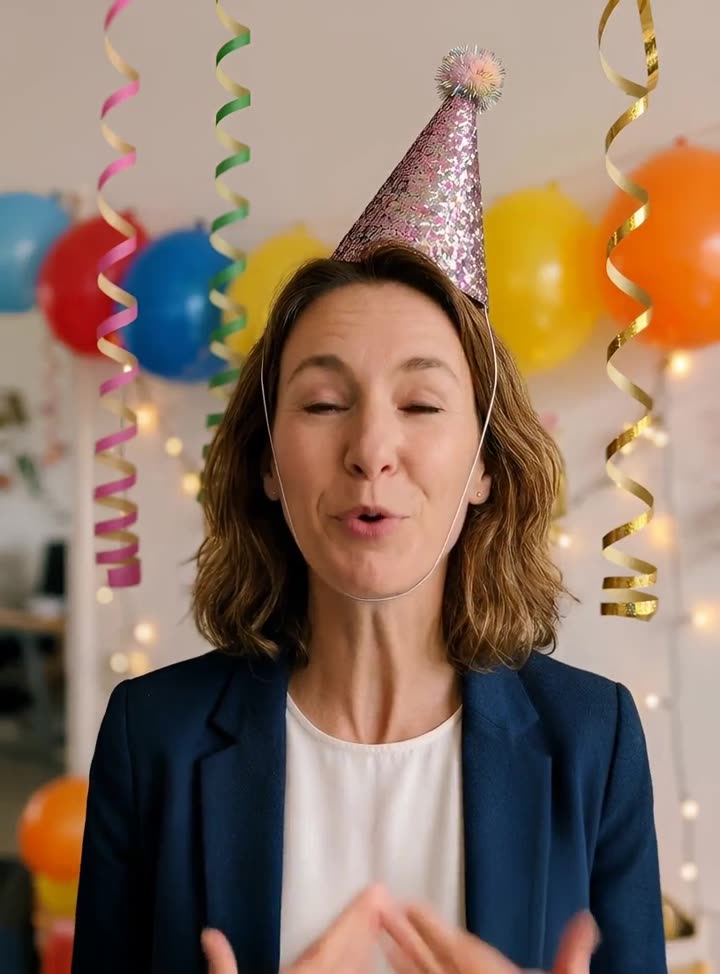
A photo with a party look saying happy birthday to Mia.

Start from an example

How to use Birthday Video Message in 3 steps

  1. Upload a photo of the sender

    Sign in and upload a clear, front-facing photo of you or whoever the message is from, as a JPG, PNG or WEBP up to 15 MB. Use only photos you have the right to use.

  2. Type their name and your message

    Add who the birthday video message is for, choose Add a party look or keep your photo, and type a message or leave it empty for ours. Pick a voice and quality.

  3. Make the birthday video

    Press Make the birthday video. The price is on the button. It's usually ready within a few minutes in My Videos, as an MP4 you can send in any chat.

What Birthday Video Message does

Their name, spoken

Type who it's for, up to 40 characters: a first name, a nickname or Grandma. Our default message greets them by name; in your own message, write {name} wherever it should go, or just type it.

A party look in one click

Add a party look gives the photo a sparkly party hat, colourful balloons and streamers behind you in a soft blur, and warm festive light, while keeping your face recognisable.

Or keep your photo as it is

Already have a photo with a cake or candles? Pick Keep my photo as it is and the photo is animated directly, without the 30-credit makeover.

Write it, or use ours

Leave the message empty and the photo reads our warm birthday wish with their name. Or write up to 800 characters, about a minute: a memory, an inside joke, a toast.

22 AI voices

Jessica, a young, lively female voice, is picked by default. Switch to Bill for a warm grandfatherly tone, Charlie for a relaxed Australian one, or any of the other 22 voices.

Comparison

Why use Birthday Video Message instead of filming a birthday video on your phone?

A filmed birthday message needs good light, a quiet room and a few takes. Here it takes one photo and a few lines of text.

FeatureBirthday Video MessageFilming a birthday video on your phone
InputOne photo of the sender, the name and a messageSet up the phone, find good light and record
Party lookHat, balloons and streamers added by the AI for 30 creditsBuy decorations or film at the party
Voice22 AI voices read your wordsYour own voice, recorded in one take
RetakesChange a word and make it againFilm the whole message again
LengthUp to 800 characters, about a minuteAs long as you like
PriceAbout 710 credits for our 14-second message on StandardNo cost, but your time and several takes

What you can make with it

A birthday wish when you can't be there

You live in another city, and a text feels too small for a big birthday.

  • Upload a recent selfie, smiling and looking at the camera.
  • Keep Add a party look on so the video looks like a celebration, not a passport photo.
  • Write one memory you share and one wish for the year ahead, 150 to 250 characters.
  • Pick Pro if it's a milestone birthday, for more natural expressions.

One video from the whole family

The grandkids want to say happy birthday to Grandma together.

  • Use one front-facing photo of a parent as the speaker; one face per photo works best.
  • Type Grandma in Who is it for.
  • Write the message as we: we miss you, we love you, see you soon.
  • Choose a warm voice such as Matilda or Bill.

A team birthday in the work chat

A colleague's birthday falls on a remote day, and the card is digital anyway.

  • Use a photo of the person sending it, such as the team lead, with their permission.
  • Keep it short, two or three lines, so it plays well in a busy channel.
  • Standard is enough for a chat message.
  • Post the MP4 straight from My Videos.

Who it's for

Friends far away

Send a personal happy birthday video with their name when you can't be at the party.

Families

Make one video from the family for a grandparent, aunt or cousin, with a shared message.

Teams and managers

Wish a colleague happy birthday in the group chat with something warmer than a sticker.

Party hosts

Open a party slideshow or a group video call with a birthday message that says the guest of honour's name.

Tips for the best result

  • Use a sharp, well-lit photo where your face is front-on and fully visible. Sunglasses and hands near the mouth make the lip sync weaker.
  • Upload one face only. With a group photo, the AI may animate the wrong person.
  • Use only photos of yourself or of a sender who agreed. Celebrities, public figures and children are not allowed.
  • Spell names the way they are said if the voice gets them wrong, for example Shivon instead of Siobhan.
  • End on one short line, like Have the best day, so the video closes on a smile.

Frequently asked questions

How do I make a birthday video message with someone's name?

Upload a photo of yourself, type their name, and press Make the birthday video. The photo says happy birthday to them by name, with lip sync.

How much does a birthday video message cost?

Our default message costs 709 credits on Standard and 1,290 on Pro, including the 30-credit party look. A longer message costs more, and the price is shown before you start.

Can I write my own birthday message?

Yes. Type up to 800 characters, about a minute of speech. Leave it empty and the photo reads our birthday wish with the name you entered.

Whose photo should I use?

The sender's: yours, or someone who agreed to it. Photos of children, celebrities and public figures are not allowed.

Can it use my own voice?

No. Birthday messages use one of 22 built-in AI voices. To speak in your own voice, upload your photo and a recording to Talking Photo.

How long is the birthday video?

Our default message is about 14 seconds. Your own message can run up to about a minute, and the video is capped at 60 seconds.

Can I send it on WhatsApp or Instagram?

Yes. It's an MP4 saved in My Videos, so you can download it and send it in any chat or post it as a story.

How long does it take?

Usually a few minutes. You can leave the page; the video appears in My Videos when it's ready.

Do I need an account?

Yes. Sign in with Google or email; each job costs credits from your balance, and the result is saved in My Videos.

What if a job fails?

If a job can't finish, the credits it used go back to your balance automatically.

More AI Video Tools

All 43 tools →

Ready to try Birthday Video Message?

A personal birthday video: a photo that says happy birthday with their name. from 106 credits, and the result is saved in My Videos.

Make the birthday video