
AI tool · from 106 credits · Refunded if it fails

Personalized Santa Video Message

Upload a photo of an adult, such as Mum or Dad, and type your child's name. The AI dresses the photo as Santa by the fireplace, then Santa speaks your message by name, with lip sync and a warm older voice.

  • InputOne photo of an adult
  • MessageUp to 800 characters
  • Voices22 AI voices
  • QualityStandard · Pro

Set it up

Try an example
Look
Voice
Quality
Estimated759 credits
Ways to pay less
  • The price follows the message length: our default message for Mia costs 758 credits on Standard and 1,380 on Pro.
  • The Santa makeover adds 30 credits. Keep my photo as it is skips it, so the same default message costs 728 on Standard.
  • Standard costs about half of Pro: 48 credits per second of video against 90, plus the voice.

Need something else? More AI Video tools or all 43 tools

What is a personalized Santa video message?

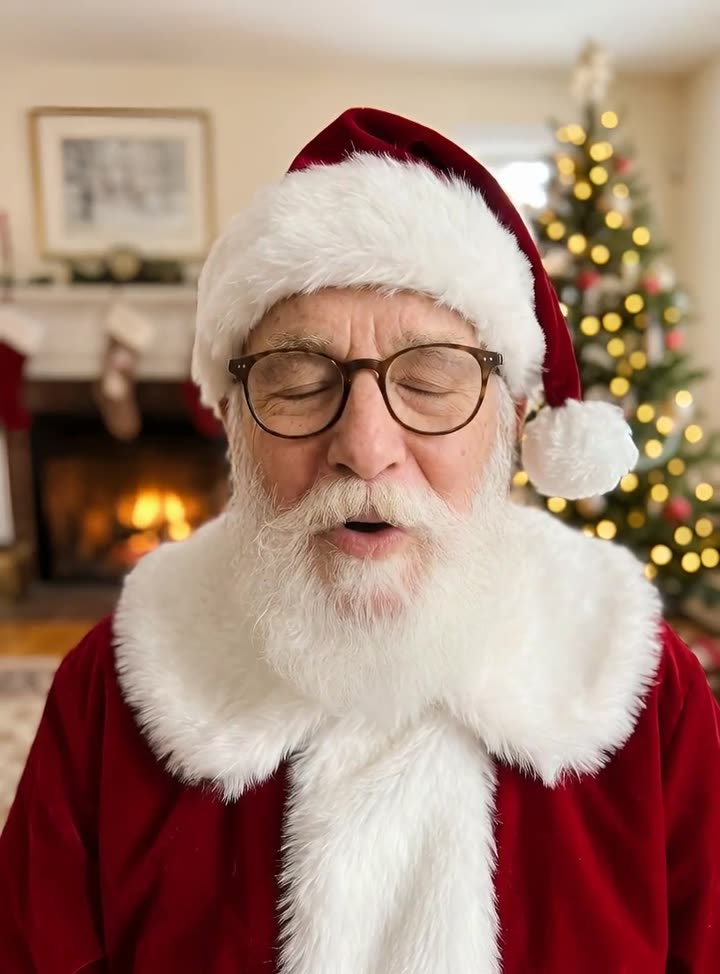
Santa Video Message is a tool that turns a photo of an adult into Santa Claus speaking to a child by name. You upload a front-facing photo of a parent or another grown-up, type the child's name and, if you like, your own message of up to 800 characters. The AI adds a red suit, a white beard, a Santa hat and a cosy room with a fireplace and tree, then one of 22 AI voices reads the message with lip sync.

Before
After
Santa costumeFor Mia
An adult's photo dressed as Santa, with a message for Mia.

Start from an example

How to use Santa Video Message in 3 steps

  1. Upload a photo of an adult

    Sign in and upload a clear, front-facing photo of a grown-up, such as a parent, as a JPG, PNG or WEBP up to 15 MB. Do not upload a photo of a child; the child is the one who watches.

  2. Type the child's name and a message

    Add who the Santa video message is for, keep Turn the photo into Santa selected, and type a message or leave it empty for ours. Pick a voice and quality.

  3. Make the Santa video

    Press Make the Santa video. The price is on the button. It's usually ready within a few minutes in My Videos, as an MP4 you can play on a phone or a TV.

What Santa Video Message does

An adult photo, dressed as Santa

The AI adds a red velvet suit with white fur trim, a Santa hat and a full white beard, and sets the scene in a cosy room with a fireplace and a decorated tree softly blurred behind. The face stays recognisable underneath.

Says your child's name

Type the name, up to 40 characters. Our default message tells them the elves say they've been very good and their name is at the top of the list.

Your own words from the North Pole

Write up to 800 characters, about a minute: mention a new skill, a kind thing they did or a bedtime reminder. Write {name} anywhere and it becomes the name you typed.

A warm Santa voice

Bill, a trustworthy older male voice, is picked by default. You can switch to any of the 22 AI voices, such as George for a warm British Santa or Brian for a deep one.

Keep the photo as it is

Already have a photo of someone in a Santa costume? Choose Keep my photo as it is to animate it directly and skip the 30-credit makeover.

Comparison

Why use Santa Video Message instead of hiring a Santa or buying a costume?

A personal visit from Santa usually means booking a performer or dressing up and filming. Here a parent's photo becomes Santa, and Santa says the name.

FeatureSanta Video MessageHiring a Santa or buying a costume
InputOne photo of an adult, the child's name and a messageA booked performer, or a costume, a beard and a camera
Santa lookRed suit, white beard, hat and a fireplace scene added by the AIRent or buy the costume and decorate a room
The child's nameSpoken in the message, plus any detail you writeBrief the performer, or remember your lines on camera
RetakesChange a line and make it againSet up and film again
Voice22 AI voices, a warm older male by defaultThe performer's voice, or yours in disguise
PriceAbout 760 credits for our 15-second message on StandardA performer's fee or a costume, plus your time

What you can make with it

A message from Santa on Christmas Eve

Play it after dinner, before the stockings go up.

  • Use a well-lit photo of a parent or grandparent looking at the camera.
  • Mention one real thing from the year: learning to swim, a first school play, helping a sibling.
  • Keep it to 150 to 200 characters so a young child stays with it.
  • Pick Pro for the one you'll play on the big screen.

A bedtime nudge in December

Santa reminds them that the reindeer are asleep, and they should be too.

  • Write a short, gentle message about brushing teeth and getting into bed.
  • Make it once and replay it on the nights you need it.
  • Standard is enough for a phone screen.
  • Choose a calm voice, such as Bill or River.

One message for the whole family

Cousins are visiting and Santa wants to greet everyone at once.

  • Type everyone or the family's name in Who is it for.
  • List each child's name in the message so nobody is left out.
  • Use a photo of the host or a grandparent as Santa.
  • Play the MP4 from My Videos on the TV during the gathering.

Who it's for

Parents

Make a Santa message that says your child's name and mentions something from their year, using your own photo.

Grandparents

Send a Christmas video from Santa to grandchildren who live far away, with a photo of yourself as Santa.

Teachers and club leaders

Play a group Christmas message from Santa at the end of term, made from an adult volunteer's photo.

Family hosts

Open a holiday gathering or video call with Santa greeting everyone by name.

Tips for the best result

  • Use a photo of an adult only. Photos of children are not allowed, and neither are celebrities or public figures.
  • Pick a sharp, front-on photo with the whole face visible; glasses are fine, sunglasses and hands near the mouth are not.
  • Leave space around the head in the photo so the beard and hat fit in the frame.
  • Write how Santa talks: short sentences, a Ho ho ho at the start, and the child's name early on.
  • Spell unusual names the way they sound if the voice says them wrong.

Frequently asked questions

How do I make a personalized Santa video for my child?

Upload a front-facing photo of an adult, type your child's name, and press Make the Santa video. The AI dresses the photo as Santa, and Santa says your message with the name.

Can I upload a photo of my child?

No. Upload a photo of an adult, such as a parent, to be turned into Santa. Photos of children are not allowed; the child is the one who watches the video.

How much does a Santa video message cost?

Our default message costs 758 credits on Standard and 1,380 on Pro, including the 30-credit Santa makeover. A longer message costs more, and the price is shown before you start.

Can I write what Santa says?

Yes. Type up to 800 characters, about a minute of speech. Leave it empty and Santa reads our good-list message with the name you entered.

How long is the Santa video?

Our default message is about 15 seconds. Your own message can run up to about a minute, and the video is capped at 60 seconds.

Can Santa use my voice?

No. Santa speaks in one of 22 built-in AI voices, with Bill, a trustworthy older male voice, picked by default.

Can I play it on the TV?

Yes. The Santa video is an MP4 in My Videos, so you can download it and play it on a phone, a tablet or a TV.

How long does it take to make?

Usually a few minutes. You can leave the page; the video appears in My Videos when it's ready.

Do I need an account?

Yes. Sign in with Google or email; each job costs credits from your balance, and the result is saved in My Videos.

What if a job fails?

If a job can't finish, the credits it used go back to your balance automatically.

More AI Video Tools

All 43 tools →

Ready to try Santa Video Message?

A personal Santa message: a photo turned into Santa who says the child's name. from 106 credits, and the result is saved in My Videos.

Make the Santa video