AI tool · from 30 credits · Refunded if it fails

Pixar AI Generator Turn Photos into 3D Characters

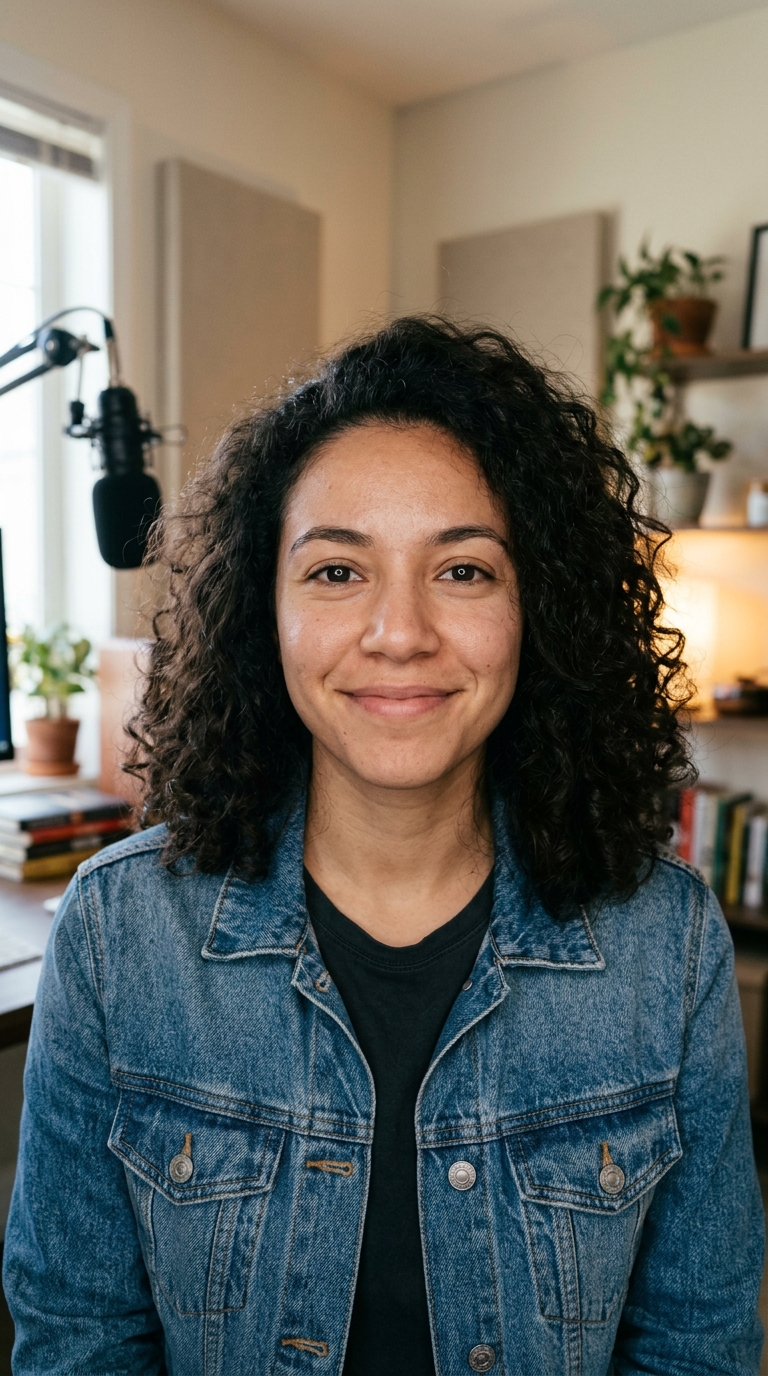
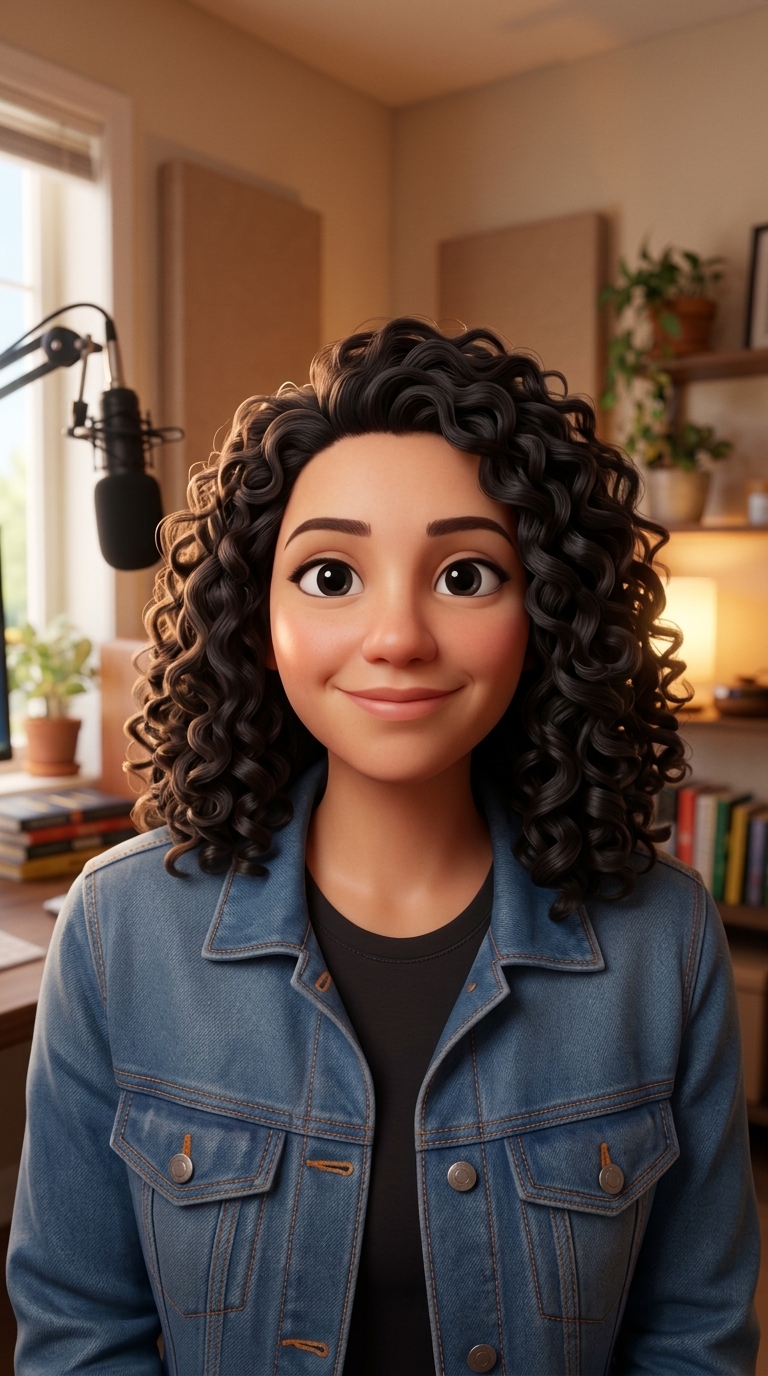
Upload a photo and the AI rebuilds it as a still from a 3D animated family movie: stylised characters, soft skin, rounded shapes and warm cinematic light, with the same faces and pose.

  • Style3D animated movie
  • InputOne JPG, PNG or WEBP, up to 15 MB
  • OutputA JPG image
  • Price30 Standard · 57 Pro

Set it up

Style
Quality
Estimated30 credits
Ways to pay less
  • Standard is 30 credits and Pro is 57 credits per photo; start with Standard to check the photo suits the style.
  • The price doesn't depend on the photo's size or how many people are in it.

Need something else? More Photo & Image tools or all 43 tools

What is a Pixar AI generator?

A Pixar AI generator is a tool that turns a real photo into a 3D cartoon version of it, in the polished look of big-studio animated family movies. Here you upload one photo, the "3D animated movie" style is preset, and the AI redraws the people with slightly larger heads and eyes, smooth rounded shapes, soft skin and warm lighting, keeping their faces, pose and clothing colours. The look is inspired by the style; Trendai.video is not affiliated with any studio.

Before
After
A photo redrawn as a 3D animated movie character.3D animated movie
A photo redrawn as a 3D animated movie character.

How to use AI Photo Style in 3 steps

  1. Upload the photo you want as a 3D cartoon

    Sign in and add a JPG, PNG or WEBP up to 15 MB. A clear portrait, a couple shot or a pet photo all work.

  2. Keep "3D animated movie" and pick Standard or Pro

    The Pixar-style look is already selected. Standard costs 30 credits, Pro 57 credits for finer detail.

  3. Create your Pixar AI picture

    Press Restyle photo. The image is saved in My Videos, so you can leave the page and download it later.

What AI Photo Style does

A 3D animated movie still

The preset asks for stylised characters with slightly larger heads and eyes, soft subsurface skin, smooth rounded shapes, warm cinematic lighting and a polished render.

Same person, cartoon proportions

Face shape, hairstyle, skin tone, age and expression are kept so friends can tell who it is. The proportions change; the identity should not.

Your scene, rebuilt in 3D

The background layout and framing stay as they were, so a kitchen stays a kitchen and a beach stays a beach, only rendered like an animated set.

Pro for sharper renders

Pro runs a high-detail editor at a higher resolution. It's worth it for close-up portraits, glasses, freckles and patterned clothes.

Ready to animate

The 3D look pairs well with Photo to Video. Restyle the photo first, then animate the result into a short clip.

Comparison

Why use AI Photo Style instead of commissioning a drawn portrait?

A hand-drawn portrait takes an artist days. For a quick avatar, card or post, the AI redraws your photo in the style you pick.

FeatureAI Photo StyleCommissioning a drawn portrait
InputOne photo and a style from the menuReference photos and a written brief to an artist
StylesEight looks, from anime film to pixel artWhatever the artist you hire draws
Trying optionsRun the same photo in another style for 30 creditsEach extra version is a new request and a new fee
TurnaroundA JPG in My Videos, usually within minutesDays to weeks
LikenessKeeps face, pose and framing from the photoDepends on the artist and rounds of feedback
Price30 credits on Standard, 57 on ProAn artist's rate per portrait

What you can make with it

Yourself as an animated movie hero

A selfie becomes a 3D character portrait for an avatar, a channel icon or a fun post.

  • Use a sharp, front-facing selfie in daylight: soft light gives the smooth render this style is known for.
  • A big smile or a raised eyebrow comes through well, since expression is kept.
  • Pick Pro for close-ups where eyes and hair fill the frame.
  • Post the original and the 3D version side by side for a before-and-after.

A couple or family movie poster look

An anniversary or holiday photo becomes a frame that looks like it came from an animated film.

  • Choose a photo where everyone faces the camera and no face is hidden.
  • Fewer people work better: two to four faces keep more likeness than a crowd.
  • Use only photos of people who are happy to be included.
  • Add a title afterwards with the add-text tool if you want a poster.

Your dog or cat as a 3D sidekick

Pets suit the rounded, big-eyed look and keep their real fur colours and markings.

  • Get down to the pet's level for a straight-on face.
  • Pick a moment when the pet is still, to avoid blurred fur.
  • A clean floor or lawn behind them gives a tidy animated set.
  • Animate the result with Photo to Video to make the sidekick move.

Who it's for

Anyone who wants a cartoon avatar

A 3D version of your face for gaming, messaging or social profiles that still looks like you.

Gift makers

Turn a couple, family or friends photo into a 3D cartoon print for a birthday card, a mug or a frame.

Pet owners

Give your pet a character portrait with big expressive eyes and its real markings.

Social creators

Make 3D-cartoon versions of your own photos for reveal posts and trend videos on your channel.

Tips for the best result

  • Avoid heavy filters or beauty modes on the original. The AI keeps what it sees, including odd colours.
  • Faces turned more than slightly away from the camera lose likeness. A near-front angle is best.
  • Sunglasses and hats hide features the AI uses to keep the person recognisable.
  • Use only photos you took or have permission to use, and not photos of celebrities or public figures.
  • If the first result looks too far from the person, try another photo with more even light rather than running the same one again.

Frequently asked questions

Is this made by Pixar?

No. Trendai.video is not affiliated with Pixar or any other studio. The "3D animated movie" style is inspired by the look of animated family films.

How do I turn myself into a 3D cartoon?

Upload a clear photo of yourself, keep the "3D animated movie" style and press Restyle photo. The AI gives you cartoon proportions while keeping your face, hair and expression.

How much does it cost?

30 credits per photo in Standard and 57 credits in Pro. One photo per job.

Does the Pixar AI generator work on group photos?

Yes. It works best with a few clear, front-facing faces; Pro keeps more detail when several people are in the shot.

Can I use a photo of a celebrity?

No. Use photos of yourself or of people who have agreed, and not photos of public figures.

Can it make a 3D cartoon video?

Yes, in two steps. Make the 3D picture here, then animate it with Photo to Video into a 5 or 10 second clip.

What's the difference between Standard and Pro?

Pro uses a high-detail editor at a higher resolution, which keeps more fine detail like hair, glasses and fabric. Standard costs about half as much.

What file do I get?

A JPG image, saved in My Videos.

Do I need an account?

Yes. Sign in with Google or email; each job costs credits from your balance, and the result is saved in My Videos.

What if a job fails?

If a job can't finish, the credits it used go back to your balance automatically.

More AI Video Tools

All 43 tools →

Ready to try AI Photo Style?

Turn a photo into an anime film still, a 3D cartoon, a comic or a painting. from 30 credits, and the result is saved in My Videos.

Restyle photo