AI tool · from 30 credits · Refunded if it fails

Photo to Anime with Your Face, Pose and Scene

Upload a photo and the AI redraws it as a modern TV anime key frame: crisp cel shading, bold clean outlines, vivid colour, glossy hair and bright eyes. You stay recognisable.

  • StyleModern anime
  • InputOne JPG, PNG or WEBP, up to 15 MB
  • OutputA JPG image
  • QualityStandard or Pro

Set it up

Style
Quality
Estimated30 credits
Ways to pay less
  • Each photo is 30 credits in Standard or 57 in Pro; check a photo in Standard before running Pro.
  • One flat price per photo, whatever its resolution up to 15 MB.

Need something else? More Photo & Image tools or all 43 tools

How do I turn a photo into anime?

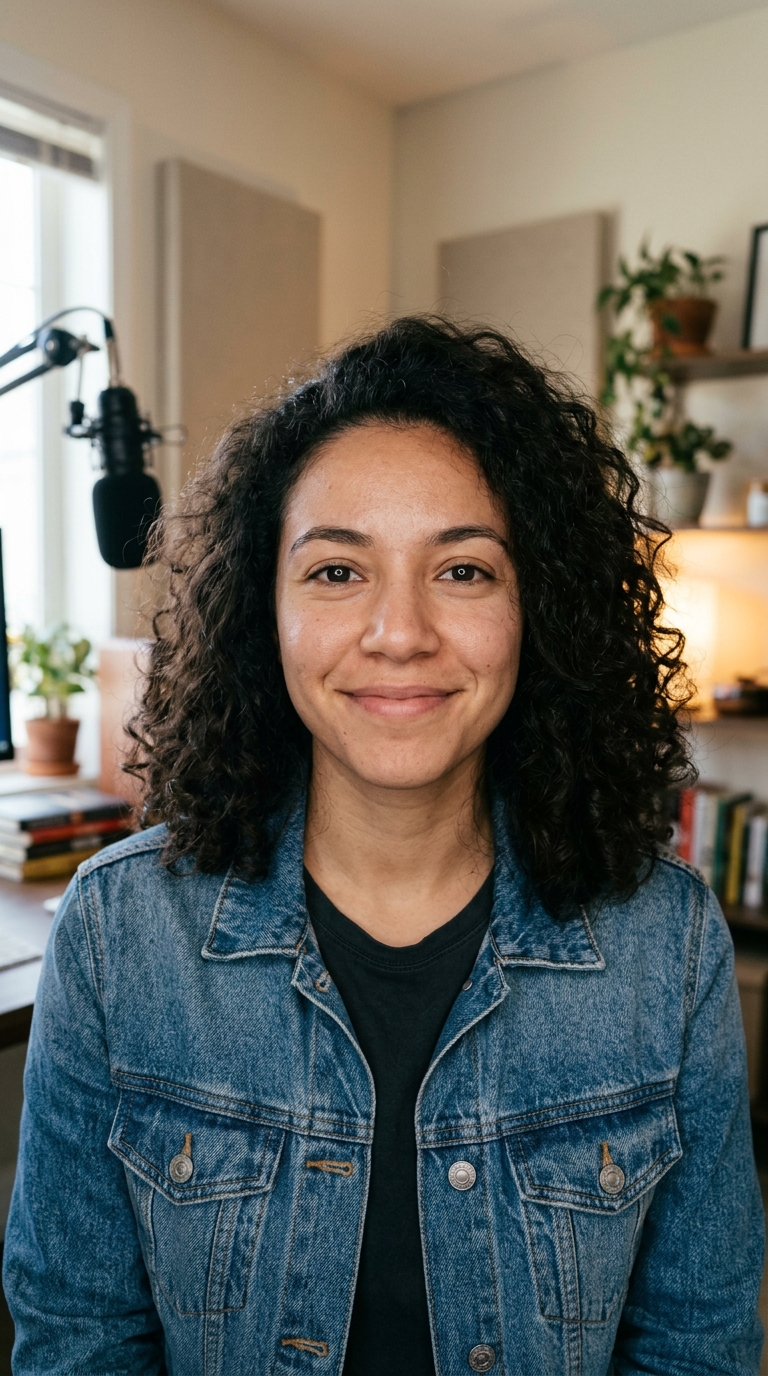
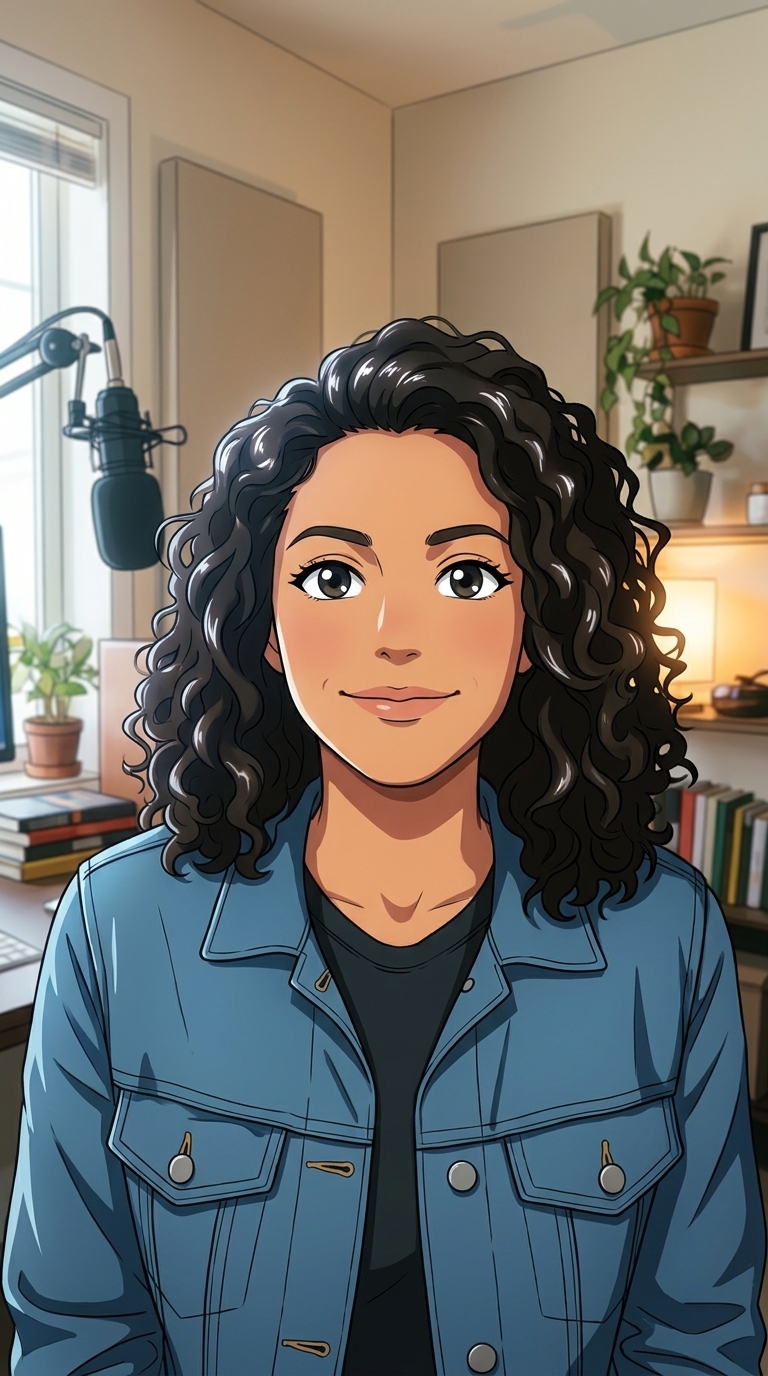
Photo to Anime is a tool that turns a real photo into a modern anime-style drawing in one step. Upload a picture, keep the "Modern anime" style that this page preselects, and press Restyle photo. The AI redraws it with cel shading, bold outlines, vivid colours, detailed hair and expressive eyes, while keeping each person's face shape, hairstyle, skin tone, age, expression and pose, and the layout of the scene. You get a JPG in My Videos.

Before
After
A photo redrawn as a modern anime key frame.Modern anime
A photo redrawn as a modern anime key frame.

How to use AI Photo Style in 3 steps

  1. Upload the photo to turn into anime

    Sign in and add one JPG, PNG or WEBP up to 15 MB: a selfie, a friends photo, a pet or a street.

  2. Keep "Modern anime" and choose a quality

    Standard is 30 credits. Pro is 57 credits and keeps more fine detail.

  3. Restyle and download

    Press Restyle photo. The anime picture is saved in My Videos, where you can download it.

What AI Photo Style does

Modern TV anime, not a filter

The photo is redrawn from scratch as an anime key frame, so lines, shading and colour are drawn, not traced over the original pixels.

Likeness kept on purpose

Face shape, hairstyle, skin tone, age and expression are part of the instructions, so the anime version still reads as the same person.

Clothes and setting carried over

Clothing colours, the pose and the background layout stay, so your red jacket on a train platform becomes a red jacket on an anime train platform.

Pro for fine linework

Pro uses a high-detail editor at a higher resolution, which keeps sharp outlines on hair strands, jewellery and patterned clothes.

More anime-adjacent looks

In the same form you can switch to a softer hand-painted anime film look, a comic book panel or pixel art for the same photo.

Comparison

Why use AI Photo Style instead of commissioning a drawn portrait?

A hand-drawn portrait takes an artist days. For a quick avatar, card or post, the AI redraws your photo in the style you pick.

FeatureAI Photo StyleCommissioning a drawn portrait
InputOne photo and a style from the menuReference photos and a written brief to an artist
StylesEight looks, from anime film to pixel artWhatever the artist you hire draws
Trying optionsRun the same photo in another style for 30 creditsEach extra version is a new request and a new fee
TurnaroundA JPG in My Videos, usually within minutesDays to weeks
LikenessKeeps face, pose and framing from the photoDepends on the artist and rounds of feedback
Price30 credits on Standard, 57 on ProAn artist's rate per portrait

What you can make with it

Selfie to anime for your profile

Get an anime version of yourself for a Discord, gaming or social profile that people still recognise.

  • Pick a photo with even light on both sides of the face.
  • Strong expressions, like a wide grin, translate well into anime faces.
  • Hair colour is kept, so dyed or bright hair stands out nicely.
  • Crop the result to a circle or square for the profile slot.

An anime scene from a city photo

A rainy crossing, a night market or a train window view becomes a background that looks drawn for a series.

  • Night photos with neon or street lights keep their glow in vivid anime colour.
  • Choose a wide, level shot: tilted horizons stay tilted.
  • Busy streets benefit from Pro, which keeps signs and shapes cleaner.
  • The prompt avoids text and logos, so shop signs are simplified rather than copied.

Anime versions of friends for a group chat

Turn a group photo from a trip or a party into an anime frame everyone can save.

  • Ask the people in it before you restyle and share the photo.
  • Keep the group small and facing the camera for the best likeness.
  • Use Pro when there are three or more faces.
  • Animate the frame with Photo to Video for a short moving version.

Who it's for

Anime fans

See yourself, your friends or your room drawn in the style of the shows you watch.

Streamers and gamers

Make an anime avatar or channel picture from a real photo, without commissioning a drawing.

Writers and roleplayers

Turn reference photos of places into anime-style scenes for character sheets or story boards.

Short-video creators

Post photo-to-anime transformations of your own pictures as reveal posts and trend content.

Tips for the best result

  • Sharp photos give clean outlines. A blurry or heavily compressed image produces messy lines.
  • Front-facing or three-quarter faces keep likeness best; full profiles are harder.
  • Remove phone beauty filters first, since smoothing hides features the AI uses.
  • Use photos you took or have permission to use, and not photos of public figures.
  • If you want softer, painterly colours instead of crisp cel shading, switch the style to "Hand-painted anime film".

Frequently asked questions

Can AI turn my photo into anime?

Yes. Upload a photo, keep the "Modern anime" style and press Restyle photo; the AI redraws it as an anime frame with your face, pose and background.

How much does photo to anime cost?

30 credits per photo in Standard and 57 credits in Pro.

Will the anime version look like me?

Mostly, yes. The AI keeps your face shape, hairstyle, skin tone, age and expression, though anime simplifies features, so small details like freckles may soften.

Does it work on pets and places?

Yes. Pets keep their colours and markings, and streets, rooms and landscapes are redrawn as anime backgrounds.

What's the difference between modern anime and the hand-painted style?

Modern anime uses crisp cel shading, bold outlines and vivid colour. The hand-painted anime film style is softer, with watercolour backgrounds and warm light.

Can I turn an anime picture into a video?

Yes. Download the result and upload it to Photo to Video to animate it for 5 or 10 seconds.

What file types can I upload?

JPG, PNG or WEBP up to 15 MB. The result is a JPG.

Can I put text or a logo on the anime image?

Not in this step: the AI is told to add no text, logos or watermarks. Add text afterwards in any image or video editor.

Do I need an account?

Yes. Sign in with Google or email; each job costs credits from your balance, and the result is saved in My Videos.

What if a job fails?

If a job can't finish, the credits it used go back to your balance automatically.

More AI Video Tools

All 43 tools →

Ready to try AI Photo Style?

Turn a photo into an anime film still, a 3D cartoon, a comic or a painting. from 30 credits, and the result is saved in My Videos.

Restyle photo