AI tool · from 30 credits · Refunded if it fails

Ghibli AI Generator for Your Own Photos

Upload a photo and the AI repaints it as a still from a hand-painted animated film: watercolour skies, warm light, clean lines and gentle faces. The people, the pose and the place stay the same.

  • StyleHand-painted anime film
  • InputOne JPG, PNG or WEBP, up to 15 MB
  • OutputA JPG image
  • QualityStandard or Pro

Set it up

Style
Quality
Estimated30 credits
Ways to pay less
  • Standard is 30 credits per photo and Pro is 57, so test a photo in Standard before paying for Pro.
  • One price per photo whatever its size, up to 15 MB.

Need something else? More Photo & Image tools or all 43 tools

What is a Ghibli AI generator?

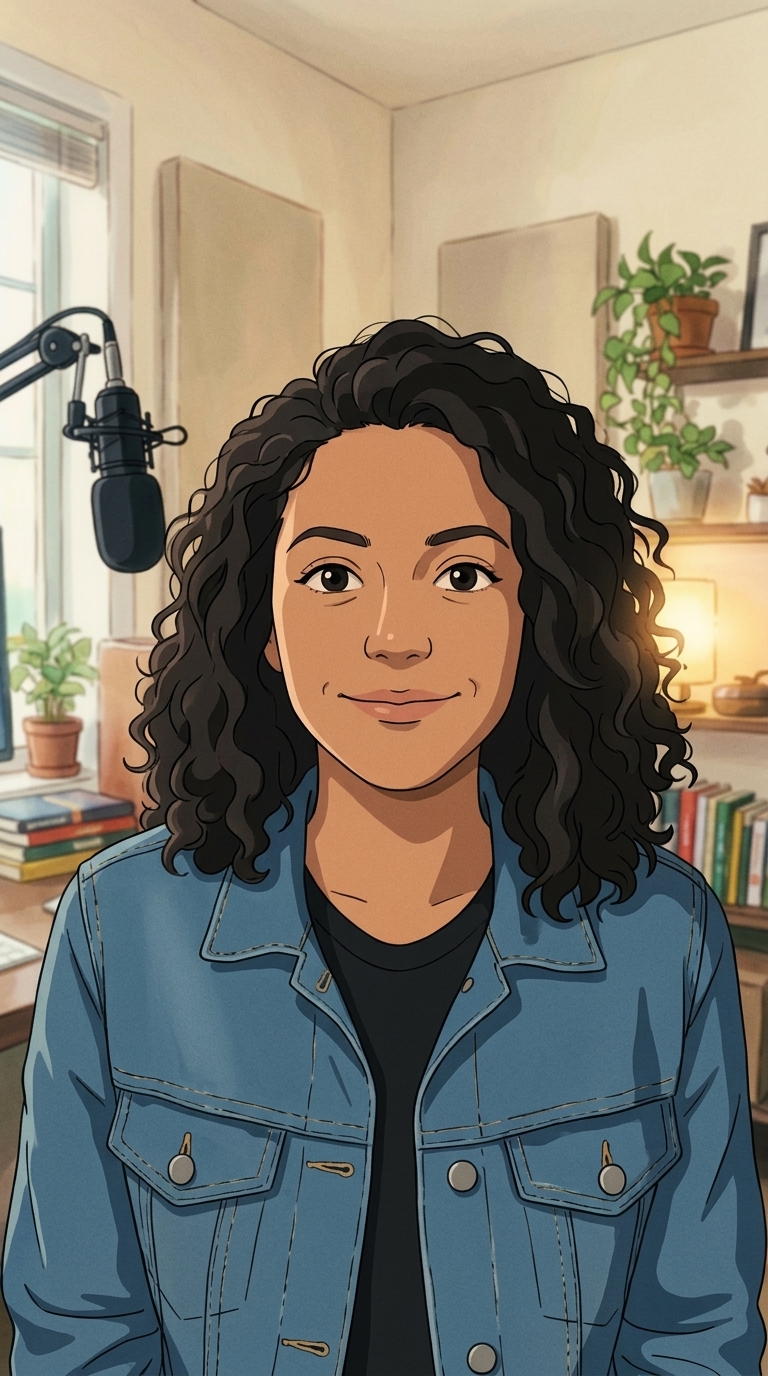
A Ghibli AI generator is a tool that redraws a real photo in the soft, hand-painted look people associate with classic Japanese animated films. On Trendai.video you upload one photo, the "Hand-painted anime film" style is already picked, and the AI repaints it with watercolour backgrounds, warm light, clean line art and rounded, expressive faces while keeping the same people, pose and framing. The look is inspired by the style; we are not affiliated with any animation studio.

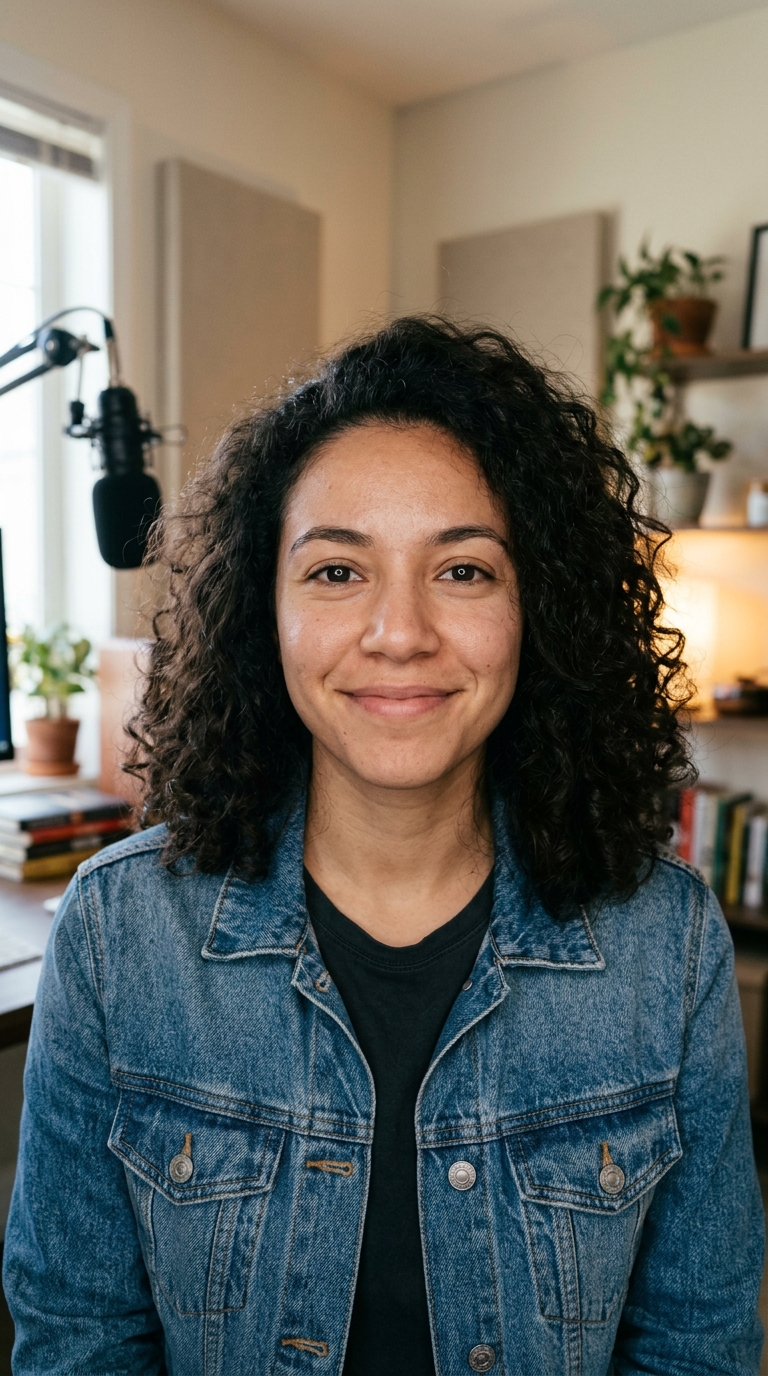
Before
After
A photo redrawn in a soft, hand-painted anime film look.Hand-painted anime film
A photo redrawn in a soft, hand-painted anime film look.

How to use AI Photo Style in 3 steps

  1. Upload a clear photo

    Sign in and add one JPG, PNG or WEBP up to 15 MB. Faces that are well lit and not too small give the most faithful result.

  2. Keep the hand-painted style and pick a quality

    The Ghibli-style look is set for you. Choose Standard for 30 credits or Pro for 57 credits if you want finer detail.

  3. Generate your Ghibli AI art

    Press Restyle photo. You can leave the page while it works: the finished image is saved in My Videos, ready to download.

What AI Photo Style does

The hand-painted look, already selected

This page opens the photo style tool with "Hand-painted anime film" picked: soft watercolour backgrounds, warm gentle light, clean line art, rounded friendly faces and a calm, nostalgic mood.

Still recognisably you

The AI is told to keep each person's face shape, hairstyle, skin tone, age and expression, plus the pose, clothing colours and the layout of the background. Only the art style changes.

Places and pets work too

A garden path, a rainy street, a kitchen window or a sleeping cat all suit this look. Scenes with sky, greenery and soft light come out especially well.

Clean images, nothing added

The prompt asks for no text, logos or watermarks, so you get a picture you can crop, frame or post as it is.

Standard or Pro detail

Standard is the quick version. Pro uses a high-detail editor at a higher resolution, which helps with group photos, fine hair and busy backgrounds.

Comparison

Why use AI Photo Style instead of commissioning a drawn portrait?

A hand-drawn portrait takes an artist days. For a quick avatar, card or post, the AI redraws your photo in the style you pick.

FeatureAI Photo StyleCommissioning a drawn portrait
InputOne photo and a style from the menuReference photos and a written brief to an artist
StylesEight looks, from anime film to pixel artWhatever the artist you hire draws
Trying optionsRun the same photo in another style for 30 creditsEach extra version is a new request and a new fee
TurnaroundA JPG in My Videos, usually within minutesDays to weeks
LikenessKeeps face, pose and framing from the photoDepends on the artist and rounds of feedback
Price30 credits on Standard, 57 on ProAn artist's rate per portrait

What you can make with it

A Ghibli-style profile picture

Turn a selfie into an avatar that still looks like you, for a chat app, a game profile or a social account.

  • Use a front-facing photo with your face filling at least a third of the frame.
  • A plain or outdoor background reads better in this style than a cluttered room.
  • Pick Pro if your hair has lots of fine strands or curls.
  • Crop the result to a square in any photo app before uploading it as an avatar.

A painted print of a favourite place

A holiday view, your street in autumn or a cabin by a lake becomes something you would frame on a wall.

  • Choose a photo with a clear sky and some greenery: it suits the watercolour look.
  • Golden-hour photos keep their warm light in the painted version.
  • Use Pro for prints, since it renders at a higher resolution.
  • Upscale the finished image afterwards if you want a large print.

Your pet as an animated film character

Dogs and cats get the soft, round, expressive treatment while keeping their markings and colours.

  • Shoot at the pet's eye level so the face is clear.
  • Avoid motion blur: a still, sharp photo keeps the markings right.
  • A pet in a garden or on a windowsill gives a calm, cosy scene.
  • Animate the painted image afterwards with Photo to Video for a short clip.

Who it's for

People updating their avatar

Get a hand-painted version of your selfie that friends still recognise, for any profile picture.

Couples and families

Turn a shared photo of the two of you, or a family day out, into a painted keepsake for a card or a frame.

Pet owners

Give your dog or cat a gentle animated-film portrait that keeps its real colours and markings.

Creators posting the trend

Make before-and-after posts of your own photos in the Ghibli-style look for your feed or stories.

Tips for the best result

  • Good light matters most. A face in soft daylight comes out warmer and more faithful than one lit by a phone flash.
  • Keep faces reasonably large. In a wide shot with tiny faces, the AI has little to work with and features may drift.
  • Simple scenes suit the style: a field, a beach, a quiet street or a window seat.
  • Use only photos you took or have permission to use, and not photos of public figures.
  • Try the same photo in Standard first; switch to Pro only if you need more detail.

Frequently asked questions

Is this the official Studio Ghibli AI?

No. Trendai.video is not affiliated with Studio Ghibli or any animation studio. The style is inspired by the soft, hand-painted look of classic animated films.

How do I make a Ghibli-style picture of myself?

Upload a clear, well-lit photo of yourself, keep the "Hand-painted anime film" style and press Restyle photo. The AI repaints it while keeping your face shape, hair and expression.

How much does the Ghibli AI generator cost?

30 credits per photo in Standard and 57 credits in Pro. The price is shown on the button before you start.

Will I still look like me?

Usually, yes. The AI is told to keep your face shape, hairstyle, skin tone, age and expression, but a stylised drawing always simplifies features, so small details can change.

Can I turn a group photo into Ghibli-style art?

Yes. Group photos work best when every face is clear and not too small; Pro keeps more detail across several faces.

Can I make a Ghibli-style video?

Yes, in two steps. Restyle the photo here, then upload the result to Photo to Video to animate it into a 5 or 10 second clip.

What format is the result?

A JPG image, saved in My Videos where you can download it.

Can I try other styles on the same photo?

Yes. The same form offers 3D animated movie, modern anime, comic book, claymation, watercolour, oil painting and pixel art; each run is a separate job.

Do I need an account?

Yes. Sign in with Google or email; each job costs credits from your balance, and the result is saved in My Videos.

What if a job fails?

If a job can't finish, the credits it used go back to your balance automatically.

More AI Video Tools

All 43 tools →

Ready to try AI Photo Style?

Turn a photo into an anime film still, a 3D cartoon, a comic or a painting. from 30 credits, and the result is saved in My Videos.

Restyle photo