
Video tool · 20 credits · Refunded if it fails

Audio Waveform Video Generator

Turn any recording into a square video with a sound wave that moves as it plays. Good for podcast audiograms, voice notes and quotes in the feed, where a still image would be scrolled past.

  • Default1:1 square · 1080×1080
  • WaveAnimated, 30 fps
  • BackgroundYour image or dark
  • AudioUp to 10 min · 50 MB

Set it up

Format
Style
Estimated20 credits
Ways to pay less
  • A flat 20 credits per video for any audio up to 10 minutes, so a 9-minute recording costs the same as a 20-second clip.
  • Each format is its own job: make the square version first and only add a 9:16 if you'll post it to Stories or Reels too.

Need something else? More Music tools or all 43 tools

How do I make a waveform video from audio?

An audio waveform generator is a tool that draws the sound of a recording as a moving line and saves it as a video. Here you upload an MP3, WAV, M4A or OGG up to 10 minutes. The tool draws a waveform band across the middle of the frame that moves with the audio at 30 frames per second, over your image or a dark background. This page starts on a 1:1 square, 1080×1080, the shape that fits feeds on Instagram, Facebook and LinkedIn.

Before
After
Waveform9:16
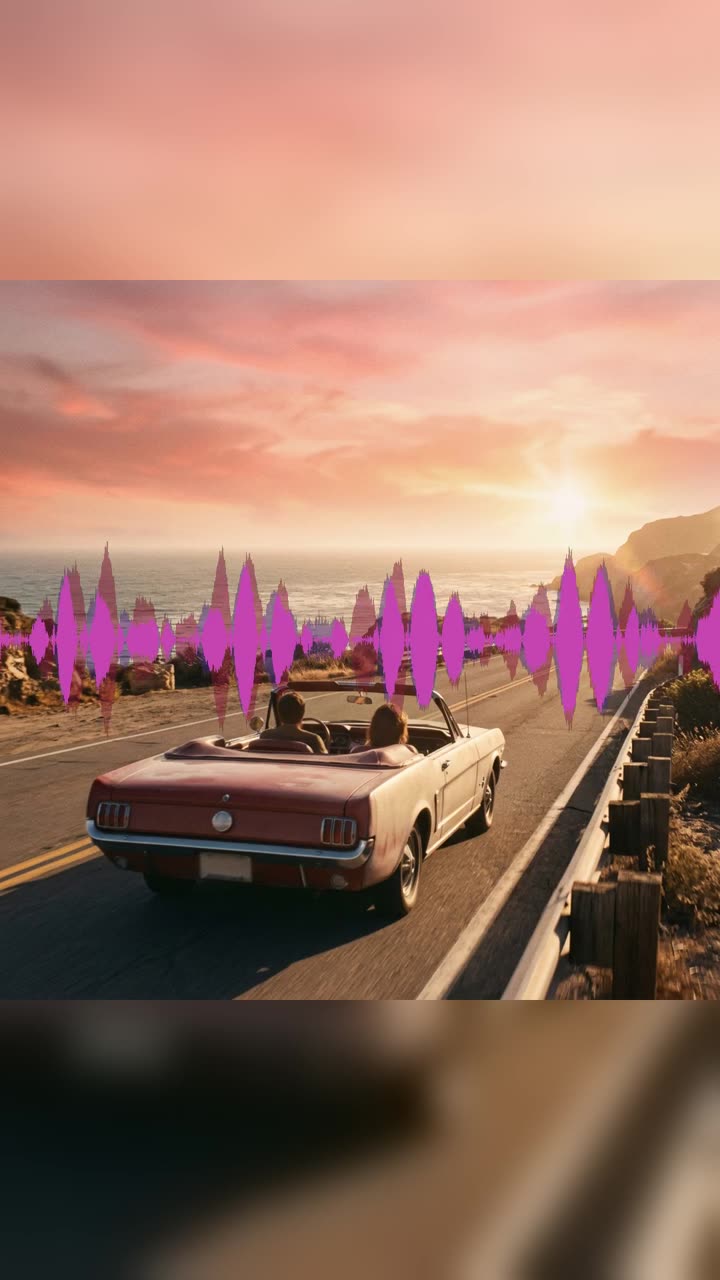
An MP3 and a cover image turned into a vertical video with an animated waveform.

How to use MP3 to MP4 in 3 steps

  1. Upload your audio

    Sign in and upload the recording: MP3, WAV, M4A or OGG, up to 50 MB and 10 minutes. Add an image if you want one behind the waveform.

  2. Check the format

    The audio waveform generator starts on 1:1 square with Animated waveform. Keep it for feed posts, or pick another format.

  3. Generate the waveform video

    Press Make video. The MP4 lasts exactly as long as your audio and is saved in My Videos.

What MP3 to MP4 does

A waveform that follows every word

The line is drawn from the audio itself. Speech shows as quick ripples with gaps between sentences; music shows its beat. Viewers can see straight away that there's sound to turn on.

Square by default

A 1:1 video takes the same space in a feed as a photo post, and it isn't cropped in grid previews. Change the format to 9:16, 16:9 or 4:5 in the form if you need a different shape.

Sized and placed for you

The wave band is a quarter of the frame's height, centered top to bottom and running edge to edge, drawn in a pink-to-purple gradient. There's nothing to position or adjust.

Your image behind it

Add a JPG, PNG or WEBP, such as a show logo, a headshot or a quote card. It's shown sharp in the middle with a blurred copy filling the frame, and the wave runs across it.

Plain and clean without an image

Skip the image and the waveform plays on a near-black background, a simple look for voice notes and recordings that don't need branding.

Comparison

Why use MP3 to MP4 instead of building a video in an editor?

Most platforms won't take a plain audio file. Turn it into a video without building one yourself.

FeatureMP3 to MP4Building a video in an editor
InputMP3, WAV, M4A or OGG, plus an optional coverImport audio and an image into a video project
VisualsAn animated waveform or your cover artAdd a waveform plugin or animate it yourself
Formats9:16, 1:1, 16:9 or 4:5 at 1080 pixelsSet up a sequence for each format
LengthEnds exactly when the audio doesTrim the still image to match by hand
PriceOne flat 20 credits for audio up to 10 minutesAn editor install or subscription

What you can make with it

A podcast audiogram for the feed

A 90-second answer from your latest episode, posted as a square video with your show's logo behind the wave.

  • Cut the moment from the episode and export it as MP3.
  • Use your square show artwork as the image.
  • Keep 1:1 for the Instagram and LinkedIn feed.
  • Add word captions afterwards with the AI Caption Generator; a 90-second clip is 30 credits there.

A voice note anyone can play

A spoken update, a reading or a short message recorded on your phone, shared in a group or on a page that only takes video.

  • Upload the M4A straight from the phone's recorder.
  • Leave the image out for the dark background look.
  • Trim the silence at the start, since the wave stays flat until there's sound.

A spoken quote with a quote card

One line from a talk or a lesson, with the words written on an image and the speaker's voice playing over it.

  • Make a square image with the quote in large text near the top or bottom, away from the middle where the wave runs.
  • Upload the 15 to 30 seconds of audio with that line.
  • Post it as a feed video; the moving wave makes it stand out from still quote posts.

Who it's for

Podcasters

Hosts and producers making audiograms from each episode for feeds that favour video.

Speakers and coaches

People sharing short spoken ideas with a quote card or their photo behind the wave.

Community and church media teams

Volunteers posting parts of talks, sermons and announcements as videos.

Voice actors and narrators

People posting a sample read where only video uploads are allowed.

Tips for the best result

  • The wave runs through the middle of the frame, so keep faces, logos and text in your image near the top or bottom.
  • Raise the level of quiet recordings in your audio app before uploading; a soft voice draws a thin line. For a noisy room, clean the voice first with the AI Audio Enhancer.
  • Use a square image of at least 1080 × 1080 pixels for a sharp center in the 1:1 format.
  • For long recordings, post a 30 to 90 second part as the audiogram and link to the full version.
  • Cover image only removes the wave entirely; keep Animated waveform for an audiogram.

Frequently asked questions

How do I make an audiogram?

Upload the audio clip and an optional image, keep 1:1 and Animated waveform, and press Make video. You get a square MP4 with a moving waveform.

How much does a waveform video cost?

20 credits per video, whatever the length, up to 10 minutes of audio.

Can I change the waveform color, size or position?

No. The waveform is a fixed pink-to-purple band, a quarter of the frame tall, across the middle.

Can I add captions to the waveform video?

Not in this tool. Run the finished MP4 through the AI Caption Generator to add word-by-word captions for speech.

What resolution is the square video?

1080×1080 at 30 frames per second. Other formats are also 1080 pixels on the short side.

Does it work with music as well as speech?

Yes. Any audio works; music with strong drums moves the wave the most.

Can I make a vertical waveform video?

Yes. Change the format to 9:16 before you press Make video.

Will the video be as long as my audio?

Yes. It ends exactly when the audio ends, up to 10 minutes.

Do I need an account?

Yes. Sign in with Google or email; each job costs credits from your balance, and the result is saved in My Videos.

What if a job fails?

If a job can't finish, the credits it used go back to your balance automatically.

More AI Video Tools

All 43 tools →

Ready to try MP3 to MP4?

Turn audio into a video with a waveform or cover art, ready to post. 20 credits, and the result is saved in My Videos.

Make video