How to Make a Thanksgiving Bend Dance AI Video
How to make a Thanksgiving Bend Dance AI video from one photo, choose a face that holds through the bend, and check sound before posting.
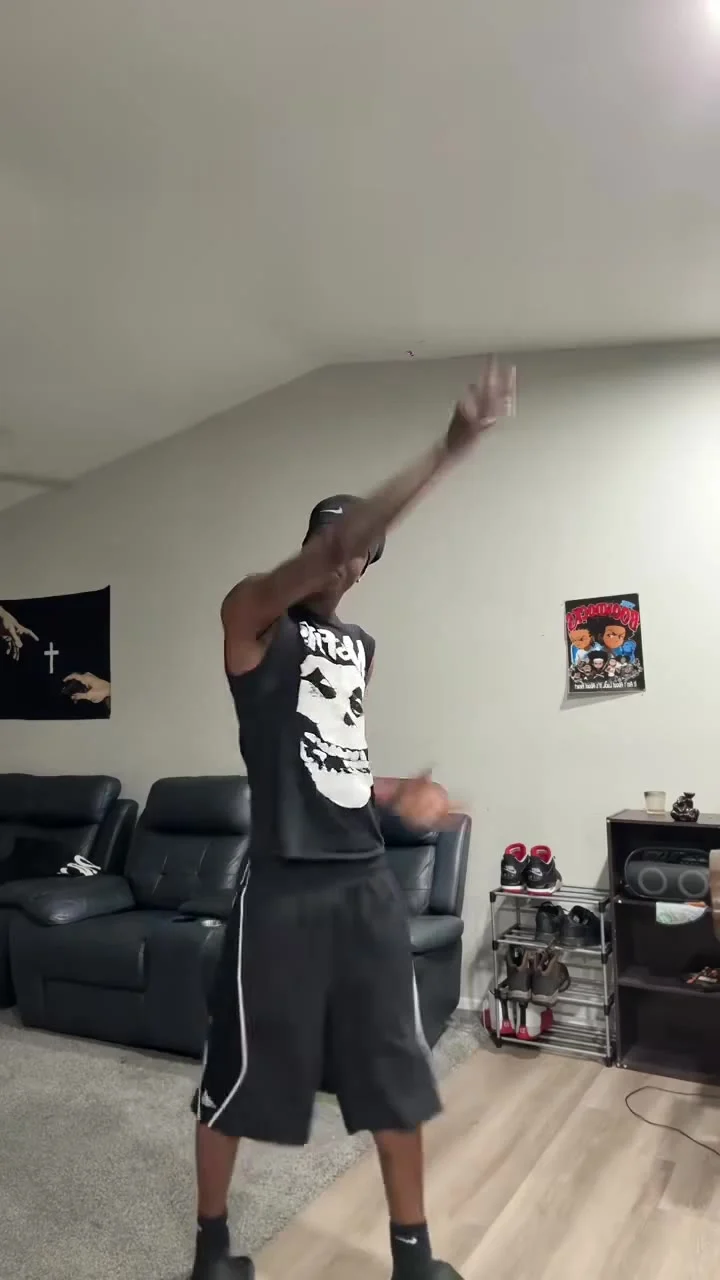
To make a Thanksgiving Bend Dance AI video, upload one clear photo of yourself as the dancer on Trendai’s Thanksgiving Bend Dance template. The reference scene is a living-room dance with low bends, bounces and a move toward the camera. Review the generated clip before posting, especially the face during the bend and the sound on export.
The bend is the whole joke
The template’s live form describes a 14-second vertical 9:16 video. Its source preview shows one dancer in a living room moving to a “beans greens potatoes tomatoes” remix. The rhythm feels like a holiday dinner roll call, but the image works even when someone watches muted: an ordinary room becomes a tiny dance floor.
Don’t mistake the source preview for a test of your own face. It’s reference footage, not a personalized result. The poster is another still from that reference scene: a dancer in a black graphic top and black shorts, with a dark couch behind them. It tells you what kind of framing the scene needs. It cannot tell you how a fresh upload will survive a moving arm crossing the face.
This isn’t the November 1st Christmas Lights guide, where the seasonal punchline is a lighting change. Here, the payoff is bodily timing: a recognizable person appears to hit the bend right on the holiday-food beat. Keep the caption about that contrast, not a claim that you actually performed the dance.
Pick a face that survives the movement
The upload field says “Your photo: the dancer” and marks it required. That’s the only photo role shown. Upload a well-lit image of one adult with a clear face; the app isn’t asking for a second dancer, a room photo or a separate outfit shot. If you’re casting a friend, get their clear permission first.
Front-facing beats dramatic here. A shadow across one eye might look great in a portrait and still make the face hard to recognize once the dancer dips and swings an arm. Pick a frame with the full face visible, without sunglasses or a phone hiding the jaw. Leave some space around the head. A tightly cropped selfie gives the edit less visual context when the source switches between a raised arm and a low bend.
You don’t need to stage yourself in a living room. The source supplies that room and choreography. Nor does a full-body reference photo guarantee a better face transfer; the form specifically asks for one person whose face is clear and well lit. Start with the best portrait you have, then judge the moving result rather than the still upload thumbnail.
The poster’s shirt has a large white graphic, while the form’s scene description calls the dancer’s top black and sleeveless. Don’t use either as a promise that your own clothing or a printed logo will reproduce exactly. If the outfit matters to your joke, check the export frame by frame before attaching a caption about it.
Make one clip, then watch the difficult frames
- Open the Thanksgiving Bend Dance creation page and put your permitted portrait into “Your photo: the dancer.” Read the consent checkbox before you submit; this should be a fictional AI portrayal, not an impersonation passed off as real footage.
- Check the visible settings. The form lists 14 seconds, 9:16, “source audio” and a resolution choice between 480p and 720p. Review the credit amount shown in your own session before generating. A higher setting is worth considering if facial detail matters, but it won’t rescue a face hidden by the original photo.
- Generate, then replay the result from the opening pose through the low bend and the step toward camera. Pause where the forearm passes the face. Check that the person’s eyes and mouth remain plausible, the limbs don’t merge into the shorts, and the movement still reads without sound.
Listen to the downloaded file separately. The form labels its reference “source audio,” and the page describes a remix in the source clip; neither observation proves what your new export will contain or what music you may legally use on a platform. If the file is silent or the sound isn’t cleared for your post, choose licensed audio inside the posting editor and align the bend to a beat there. Don’t promise followers the original remix before you’ve checked.
The video is already a vertical format in the live form. Avoid forcing it into a widescreen crop that loses the dancer’s legs just when the knees drop. In a phone preview, make sure caption text doesn’t cover the face or the lower-body move. Both are part of the gag.
Post the dinner-table contrast, not a fake receipt
A simple caption works better than a long setup: “Me when somebody says the sides are ready” tells viewers why the dance is happening without suggesting there was a real camera in your living room. Another angle is a group-chat joke about who starts celebrating before the food arrives. Use your own wording and let the bend land before any extra text takes over the screen.
Label it as an AI-made edit when you publish, and use the platform’s synthetic-media disclosure control if it applies. Don’t tag the original dancer as though they endorsed your version, and don’t claim rights to the reference footage or soundtrack. This is a fictional transformation using a template, not proof that the uploaded person danced there.
If your friend is the face, show them the final clip before it goes up. Consent to share a photo isn’t automatically consent to a dancing holiday post, especially one that could travel beyond the family chat. A quick review also catches the one awkward frame you stopped noticing after replaying the clip ten times.