How to Make a November 1st Christmas Lights AI Video
Make a November 1st Christmas Lights AI video with the right fridge and runner photos, then check the hallway reveal before posting your holiday edit.
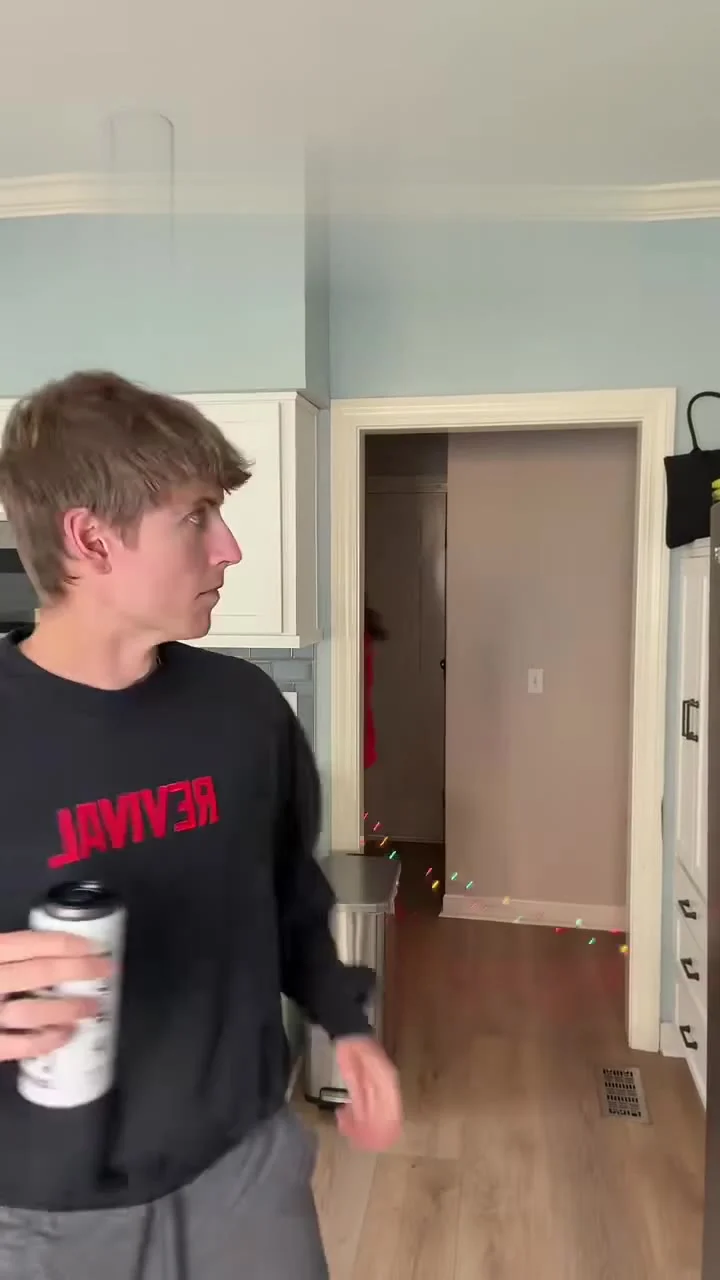
The November 1st Christmas Lights AI video turns a kitchen drink break into a holiday ambush: one person stands by the fridge while another races through the hallway with lights. To make it on Trendai, upload the fridge person’s photo first; a second photo for the runner is optional. Check the background dash before you post, because the joke depends on seeing the lights, not just recognizing a face.
The joke happens behind the person holding the drink
The November 1st Christmas Lights template uses an eight-second source reference in a vertical 9:16 frame. Its setup is wonderfully petty: one housemate is still in ordinary kitchen mode, and the other has apparently decided Halloween ended five minutes ago. The red pajamas and string of lights make that decision visible from across the room.
Watch the source preview before choosing photos. The kitchen person has time to register what’s happening; the runner passes through a doorway farther back. That depth makes the joke. Keep the doorway visible. If you crop to the foreground person’s face for a reaction shot, you lose the evidence. The poster catches a person with a can looking toward the hallway, with a narrow glimpse of red and colored lights behind. It’s a still from the source material, not a promise that your finished edit will match every detail.
This isn’t the same beat as the Don’t You Dare Christmas guide. That post is about its own Christmas setup; this one hangs on the split-second background sprint and the contrast between a calm foreground reaction and somebody already hauling out the decorations. Don’t try to make the runner the star in the first frame. The reveal needs room. Keep it hidden.
Cast the fridge first, then decide on the runner
The live form has two photo inputs in this order. “Your photo: the one at the fridge” is required: one person with a clear, well-lit face, assigned to grab the drink. “Your photo: the Christmas runner” is optional: one person who races behind them, small in frame. Leaving that second slot empty is allowed. It doesn’t mean you should put a two-person group shot in slot one to cover both parts.
Use a solo portrait for the fridge role. A face turned slightly toward the camera gives the edit a better chance to keep recognizable features when the person turns toward the hallway, while a clean hairline and unblocked eyes make it easier to judge the result. Avoid a photo taken in the dark with a phone flash straight into the eyes. Glare hides the eyes. More pixels won’t restore a face that is hidden by glare.
For the runner, choose a separate solo photo with the whole face visible even though the final role is farther from the camera. The runner is small. Their identity may be subtle at phone size; don’t promise a perfect close-up of your friend. Their motion, the red clothing in the source setup and the lights do most of the storytelling. A photo of someone already dressed for Christmas can be funny, but the form assigns a person, not a wardrobe instruction. Check the actual generated outfit before making it part of your caption.
If the photo belongs to your roommate or partner, ask them first. The form also asks you to confirm you own or have permission for the material you upload. A surprise about the decorations is funny; a surprise use of someone’s face is not.
Make it, then watch the doorway twice
- Open the exact Christmas Lights creation page and upload the fridge person’s image to the required first slot. Add a runner’s photo only if you have a consenting person you want in that background role.
- Review the displayed output settings. The form specifies 8 seconds at 9:16 and labels the clip “source audio”; it offers 480p and 720p resolution choices. Read the credit amount shown in your session before generating, since the chosen setting affects the displayed cost.
- Generate, then play the export once at full screen and once at the size of a phone feed. Freeze just before the runner crosses the doorway. Can you tell that the person is carrying lights? Then play through the turn: does the foreground face stay recognizable, and does the runner keep a plausible shape as they move?
The template page describes the reference as the source for movement, timing and camera. That describes an intended edit, not a quality test of your specific upload. Look for lights that merge into the doorframe, an extra hand holding the strand, or a face that changes as the fridge person turns. These are reasons to try a clearer photo or rethink the post, not reasons to claim the weirdness happened in your kitchen.
Check the export’s sound separately. Mute it once, too. The live form says “source audio,” but the preview’s audio and the site’s written claims don’t prove what your personal file contains or what you’re licensed to reuse on each platform. Listen to the downloaded result, then check the platform’s music and disclosure tools before publishing. Don’t write a caption promising a specific song until you’ve checked the file and your posting rights.
Give the viewer one second to get the joke
A short on-screen line such as “Me on November 1” can set up the quiet kitchen moment, while “my roommate” can point the viewer toward the hallway without covering the runner. Put text above or below the doorway, not over the lights. If the platform UI blocks the edge of the frame, move the text rather than cutting off the background action. The vertical frame does the work. Protect that background doorway.
Try a caption about a real difference in your household, like who puts the decorations away and who pulls them back out. Keep that part true even though the sprint is invented. If you didn’t actually film your roommate running through the house, don’t sell the edit as surveillance footage. Say it’s an AI-made holiday joke and use any AI-content disclosure the platform requires. For a friend featured in both slots, tag them only with permission; a tag isn’t retroactive consent.
November 1 is the punchline, not a rule for posting. If you’re publishing later in the season, frame it as the person who started early rather than pretending today’s date is different. Before you hit publish, replay the clip with the volume off: if a stranger can’t spot the lights crossing the doorway, the caption needs to point there or the source gag won’t land.