How to Make a French Protest Dancer AI Video
Make a French Protest Dancer AI video from one photo. Choose an outfit that reads on camera, review the 12-second edit and post it as fiction.
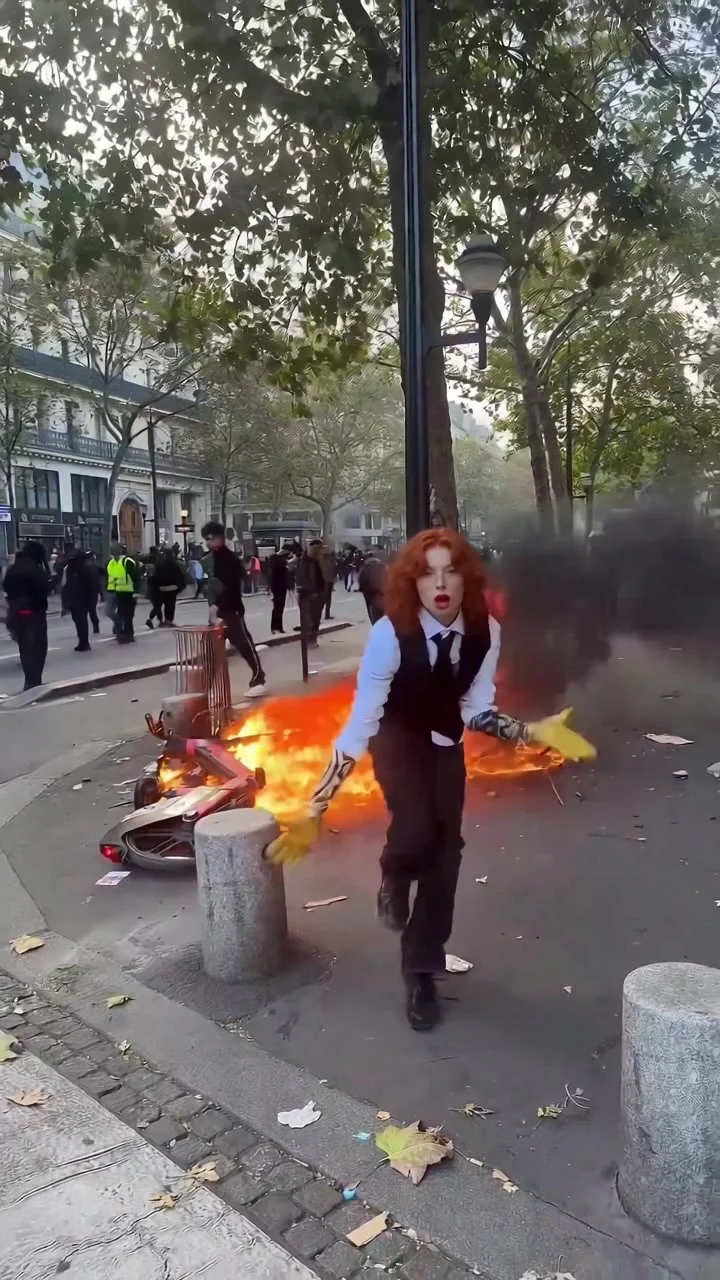
To make a French Protest Dancer AI video, upload one clear photo of yourself to the French Protest Dancer template. The template casts you as the dancer in a twelve-second vertical Paris street scene. Pick a full-body photo if you want the outfit to read clearly, then check the exported dance and audio before posting it as an AI-made edit.
The street is part of the scene, not your photo
The template page describes a crowded Paris street, a handheld camera and a theatrical solo dance. The source clip’s atmosphere is chaotic: while the camera follows the solo dancer moving toward the lens, people remain behind them on the Paris street, smoke hangs over the pavement and the burning objects in the poster make the scene easy to mistake for eyewitness footage if you leave the AI edit unlabeled. The page’s poster shows a red-haired person in a dark vest and yellow gloves near flames. That’s a sample image for this template, not what your own result has already generated.
Your upload changes the person in the middle. No extra cast. You don’t need a second photo of a crowd or a protest scene, and you don’t need to film yourself dancing. The setting and choreography are supplied by the template. The kitchen stays out of frame. A selfie taken there supplies a face and some appearance cues for the street dancer, but not the background.
Treat the scene as fiction. The original footage is associated with a real protest, but your generated version isn’t documentation of you attending one. Don’t caption it as eyewitness footage. Don’t suggest that a recognizable stranger took part or use it to imply support for violence or damage. The dance is the joke; the fire isn’t a challenge to recreate.
Pick a photo that gives the dancer room
The live form has one required photo slot, labeled “Your photo.” It asks for a single person whose face is clear and well lit. A full-body photo works best because the person dances head to toe and, according to the template, wears the outfit shown in the upload. This is a wardrobe decision as much as an identity upload. Pick clothes you actually want to see in the clip.
Stand far enough from the camera for shoes and hands to fit, but don’t disappear into a busy group shot. Keep the face lit. A portrait can be used, though the template says it may complete unseen trousers and shoes with matching pieces. If the shoes are the punch line, show them. A headshot can’t specify footwear. Don’t expect the poster’s vest or yellow gloves unless your own photo gives the generator a reason to use them.
This is similar to the Jean Phil Dance guide in one useful way: one photo casts a solo dancer rather than every person visible in source footage. Different scene. Jean Phil’s version takes place in a bare room with a fixed camera; this one moves down a busy street with a handheld feel.
Only use a photo you own or have permission to use, and get the subject’s consent. The template’s rules exclude children and public figures. Skip the “surprise my friend with a protest video” idea if they haven’t agreed to it.
Make the twelve-second vertical edit
- Open the French Protest Dancer template and upload your single-person photo. Check that the crop contains the face, outfit and enough of the legs for a full-body dance.
- Choose the available resolution. The form shows 480p or 720p, with a fixed 12-second, 9:16 video format. Use 720p if the outfit has fine details that need to survive a phone screen. Check the credit amount displayed for your choice before generating; it can change.
- Generate, then review the result in your Library. The page says this template runs in two steps, so a wait after the first stage doesn’t mean you need to upload a second image. Watch the entire clip, not only its thumbnail.
The original dancer’s gestures and camera movement are reference material for this template. The product page says it restores source sound, but a source preview can’t guarantee the audio in your particular downloaded file. Play the export with sound on. Don’t assume that means usage rights. If you add music in TikTok or Reels, check the track’s permitted use rather than assuming the source song is licensed for your post.
Post the dance without passing it off as protest footage
For a quick reveal, hold the caption until after the first movement so the dance lands before the explanation. Something like “My outfit apparently has an urgent appointment in Paris” keeps the joke on the subject, not the people behind them. Avoid identifying the crowd, making up a location or date for your generated version, or presenting smoke and fire as something you filmed.
Review the face while the dancer comes toward the lens. Do the hands stay attached through the arm motions? Does the outfit remain recognizable from your photo? Check for a sudden change in shoes or a second face appearing where the crowd overlaps. The poster doesn’t answer any of those questions for your result.
Keep room for platform overlays at the bottom of the vertical frame. Feet first. If a caption covers the footwork, move it higher or delay it. Add an AI-made disclosure when the platform requires one and don’t imply this independent edit is an official recording of the event. If the sound is usable but you don’t have clear posting rights for it, mute it and choose audio you are allowed to publish.