How to Make a Bakar Lonyo! Dance Crew AI Video
Make a Bakar Lonyo! Dance Crew AI video with the right lead and optional crew photos, then check the court formation, crop and audio before posting.
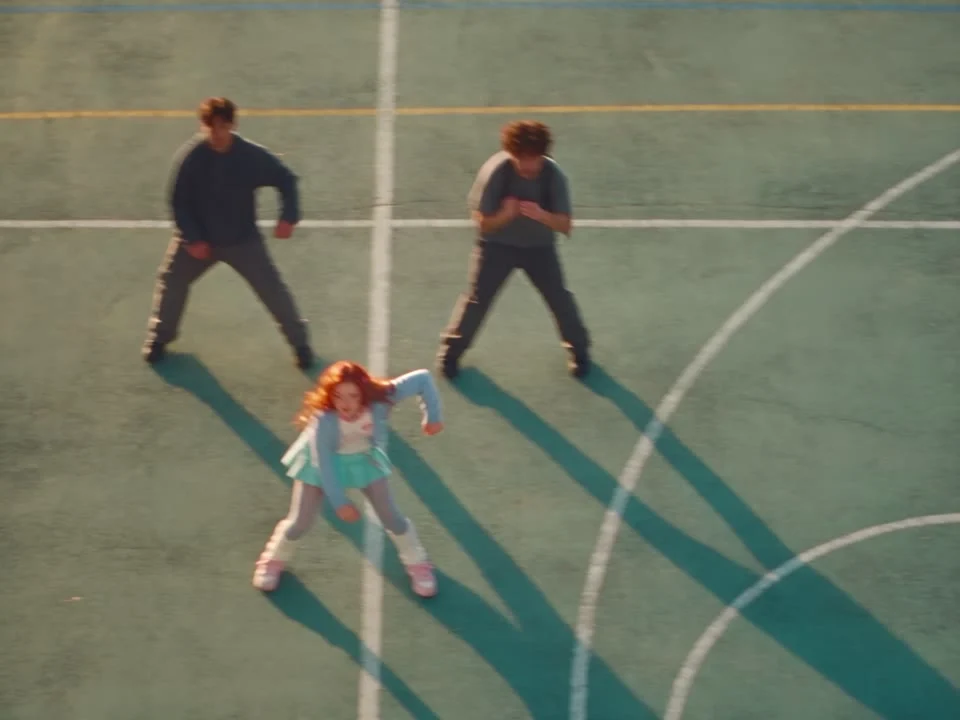
To make a Bakar Lonyo! Dance Crew AI video, upload a clear photo of one adult to cast the lead dancer on a sunlit court. An optional second photo changes the supporting crew, not the lead. The template follows a 25-second, 4:3 reference routine; check the generated clip before you crop it or add music for a post.
The court routine has one lead
The Bakar Lonyo! Dance Crew template starts with a specific bit of staging: a dancer in front, a crew behind, painted court lines and a camera that swings between overhead formations and closer views. This is not a prompt where you choreograph a fresh solo. The reference sets the motion and the editing. Your job is to cast a lead who still reads as the same person when the camera pulls way back.
That distance matters. A face that looks perfect in a tight selfie may disappear in the wider court shots. The shoes matter too. Outfit shape does real work at that distance. If you want the clip to feel like your own performance, choose the clothes you would actually wear to dance rather than a portrait with the bottom half cut off.
The page labels a sample output separately from the reference routine. Neither that sample nor the court poster is proof that your export will preserve every facial detail. Treat them as a map of the scene, then inspect your own result.
Cast the lead first, then decide on a crew
The live upload form requires a photo of one adult with a clearly visible face and body. That first image supplies the front dancer’s face and hair as well as outfit details down to the shoes. Pick a photo with one adult and enough space around the body to see the silhouette; a head-to-toe shot is useful because the routine includes wide views. Keep the eyes visible. Avoid a friend leaning into the frame, even if you plan to use that friend for the crew later.
The second input is labeled “Optional: your supporting dance crew.” It is not another lead slot. You can leave it alone and use the included gray crew, or replace it with a group photo of consenting adults whose looks you want on the background dancers. The product page says the second photo guides their faces and hair as well as clothing details down to the shoes; it does not transfer that photo’s pose or location. A shot of your friends standing together can therefore work even though nobody is dancing in it.
Don’t make the optional crew image a mystery crowd. If one friend has a bright red jacket and another has a black cap, those readable cues give you something concrete to check in the wide shot. A dim group selfie with half the faces hidden makes it much harder to tell whether the crew has been cast as intended. The crew may also be filled out beyond the people visible in the uploaded photo, so don’t promise each friend an exact one-to-one cameo.
This is a different casting problem from the Three Friends Night Selfie guide, where separate photos map to specific positions and solo moments. Lonyo! keeps one person out front while an optional image restyles the surrounding dancers. Ask your friends before using their faces, and use adults only. Consent still matters when they are small in frame.
Make the clip without losing the formation
- Open the Lonyo! template and upload your lead photo in the required first slot. Check that no other person is close enough to be mistaken for your subject.
- Leave the included crew in place for a clean lead-versus-group look, or replace the optional second slot with your consented group photo. Don’t upload a different photo of yourself there expecting a second view of the lead.
- Choose between the form’s 480p and 720p options and review the credit amount shown in your session before generating. The form identifies the video as 25 seconds in a 4:3 frame with source audio; that is the template setting, not a guarantee about the sound in your own downloaded file.
- Watch your actual export from opening formation to final shot. Check that the lead appears once at a time, retains recognizable hair and clothing across cuts, and does not blend into a supporting dancer during the overhead moves.
Pause on the widest shot. Can you still find yourself? If the answer is no, try a lead photo with stronger contrast between the outfit and the gray court, or keep the built-in crew so the subject stands apart. Also look at feet and hands during the fast movement. A clean close-up can hide awkward limbs that become obvious once the camera rises.
The source reference is associated with Bakar’s “Lonyo!” and the form says “source audio.” Still, listen to the delivered file. Do not assume a particular song or audio license carries through to every publishing platform, and do not treat the reference clip as a music-rights grant. If the export is silent or a platform restricts its soundtrack, add music through that platform’s licensed editor only when your use is permitted.
Post the dance as a fictional performance
A 4:3 court scene has more horizontal room for the crew than a narrow vertical crop. For a vertical feed, test the full clip inside a tall canvas before trimming the sides. Cropping tight to the lead could erase the people whose synchronized movement makes the routine funny and satisfying. Keep the painted court lines visible when possible; they help the overhead choreography read as one formation rather than scattered bodies.
I would open the post with the widest moment that still lets viewers spot the lead, then use a caption that invites them to find you in the crew. It gives the audience a small task without claiming you filmed a real dance event. If you used friends for the background, tell them where they appear before posting, especially if a quick cut changes their look more than they expected.
Call it an AI-made, independent dance edit. It is not an official Bakar video or a recording of a real group performance. Use the platform’s synthetic-media disclosure where required, and check both your right to use the uploaded photos and the soundtrack rules for the account posting it. Your caption can be playful; the disclosure should not be a guessing game.