How to Make a Tactical Operator Selfie AI Video
Make a Tactical Operator Selfie AI video from one photo: choose a recognizable subject, check the close-up and flash, and frame the result as fiction.
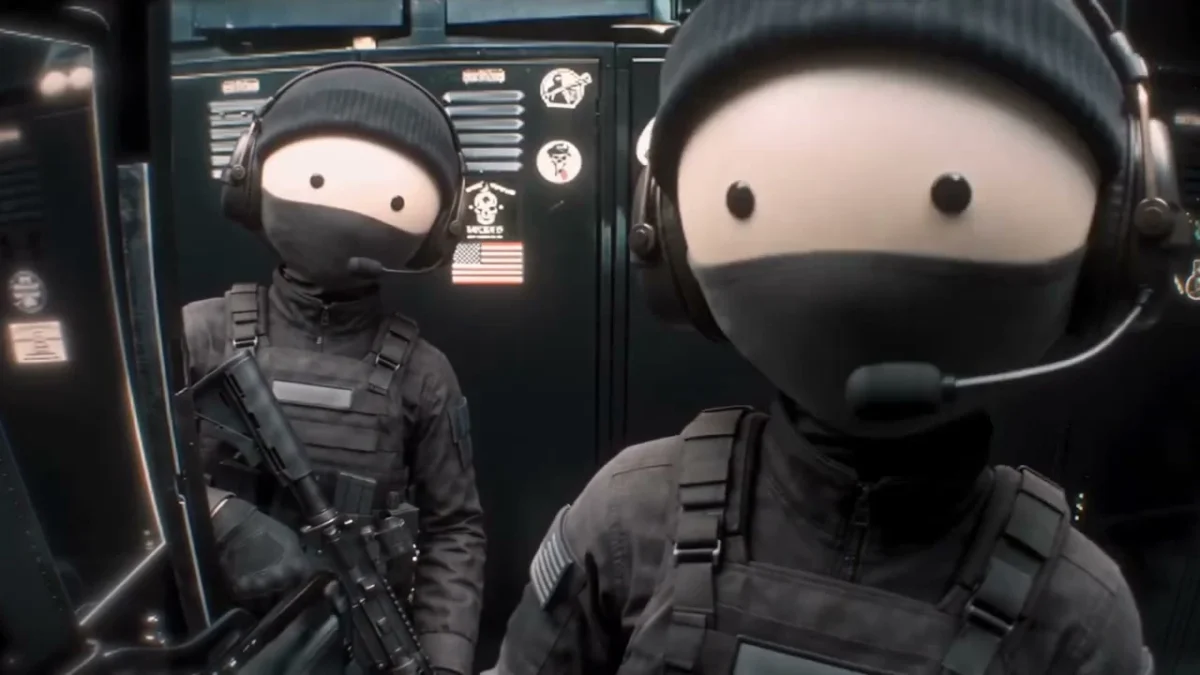
The Tactical Operator Selfie template turns one photo into the foreground character in a fictional aircraft-cabin action clip. To make it, upload a clear image of one person, pet or character, then check whether their features survive the close-up and bright flash. The background teammate is part of the reference scene, not a second upload.
Read the scene before picking a photo
The joke here is how seriously the camera treats a tiny, round-faced operator. A masked figure crowds the lens in a dark cabin; another hangs back. The Tactical Operator Selfie template follows a reference in which the front character checks on that teammate, lifts a piece of gear for a flash, then shows more of the kit. It’s a staged, game-style bit, not evidence of an actual operation.
That foreground close-up is the whole edit. Recognition has to happen fast. If your subject isn’t recognizable when the framing tightens, the reveal falls flat. A pet with unmistakable ears or a person with a distinct hairstyle gives viewers something to spot even in a low-light setting. Don’t try to invent a whole squad in the upload; the rear character isn’t yours to cast through this form.
The page labels its moving clip a source preview, not a personalized result. Its poster is a still of two masked, headset-wearing figures against dark equipment, with the closer figure filling the right side. Neither asset shows how your own upload will render. Look at the reference for shot order, then judge your finished video on its own merits.
Pick the face the camera can keep
The live form’s single required field says “Upload one person, pet or character.” That photo replaces only the foreground operator. The aircraft interior and background teammate come from the fixed reference, so a group shot is the wrong starting image. Crop out bystanders before uploading, especially if you don’t have their permission.
Start with a front-facing or slight three-quarter view where the eyes, hairline or markings are visible. Use even light. Skip dramatic face shadows. The cabin gets dark, but your source image doesn’t need to be dark too; a shadow across both eyes makes the later close-up harder to read. For pets, show the face and a bit of the body rather than an extreme nose-to-camera shot. If you’re using an illustrated character, choose a clean image with an outline that won’t disappear into black clothing.
Keep costume expectations modest. One uploaded face does not let you specify a new teammate, aircraft or uniform patch. If you want the subject’s real outfit to be the punch line, use a photo where it is visible, but don’t assume every clothing detail will persist through the reference gear. A selfie with heavy sunglasses may look cool in your camera roll and still be a poor identity source here. The eyes do work. Small details matter here.
Use your own photo, your own pet or a character you have rights to use. For another adult, get their permission before upload and before posting the result. Don’t cast a real service member or public figure without permission, and don’t caption this fictional cabin as footage from a real mission.
Generate the wide cut, then inspect the flash
The form currently lists an 11-second, 16:9 video with “source audio” and a resolution selector showing 480p and 720p. Those are form details, not a claim that we’ve tested a personalized export. Check the resolution and the credits displayed in your session before you press Generate Video; the amount can change with the setting.
- Upload one clear subject to the foreground field. There’s no second-photo slot for the teammate.
- Select the resolution you want, review the permission checkbox, and generate. The wide frame is part of this template’s composition.
- Watch the result all the way through before you write the caption. Pause at the first close-up, the turn toward the teammate, the bright flash and the final gesture.
The flash is where a muddy likeness can briefly become impossible to identify. Check that the face doesn’t jump between looks, that the headset or mask doesn’t swallow defining features, and that the gear stays coherent during the hand motion. If a pet becomes a different animal midway through, a better-lit source photo is a more sensible next attempt than adding another pet to the frame.
Listen too. Sound deserves its own check. The page calls the reference “source audio,” but the source’s soundtrack is not proof of what your generated file retained, or of your right to post that audio. Play the actual export with sound on. If it needs a replacement track, add one you can use in the posting editor and check the platform’s music rules. Don’t promise viewers live dialogue or a voice recording from your subject.
Post it as a fictional character reveal
This is a wide shot with a visual relationship between the foreground operator and the teammate behind them. Cropping straight down the middle for a vertical feed can erase that second character and make the look-back meaningless. If you need a tall post, preview a vertical canvas with the entire wide clip visible, or reframe carefully across the action. Check the flash again after the crop.
A stronger caption gives the viewer a reason to wait for the turn: “My cat got assigned to the world’s least serious tactical unit” works as a fictional setup, while “leaked mission footage” misrepresents the clip. Say that it’s an AI-made edit when the platform calls for disclosure. Keep the humor on the character, not on a real conflict, real unit or identifiable person’s service.
If what you actually want is one person moving through a moody building rather than a close-up beside a fixed teammate, the Night Elevator Walk guide covers a different scene. For this cabin clip, the best hook is recognition: put a normal photo of your consenting subject before the generated shot, then let viewers catch the same face under the headset. If the match doesn’t read without a caption, change the source photo before changing the joke.