How to Make a Night Elevator Walk AI Video
Make a Night Elevator Walk AI video from one full-body photo, then check the door reveal, outfit, face and audio before posting your fictional entrance.
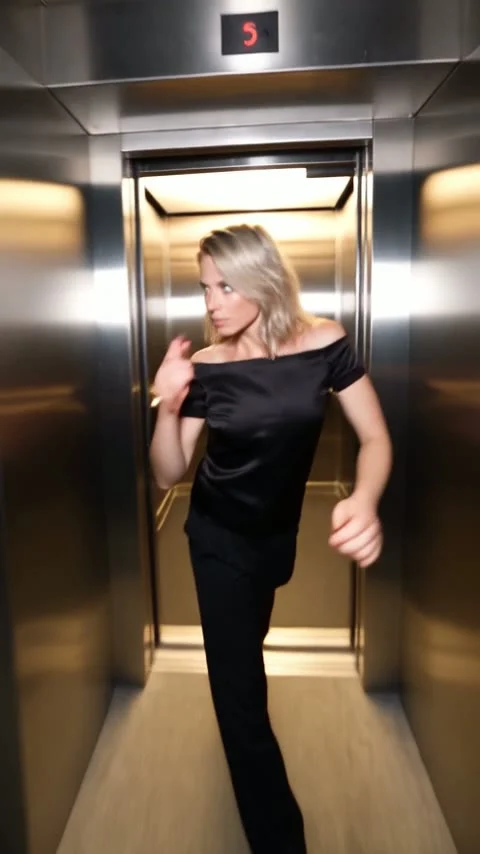
The Night Elevator Walk AI video turns one full-body photo into a flash-lit exit from an elevator and a confident walk past concrete pillars. Use a clear picture showing your face and complete outfit; the live template supplies the doors and night walk. Check the face when the doors open before you post.
Make the door reveal count
Wait for the doors. That pause matters. The viewer waits for a reveal, then gets a moving outfit shot instead of another mirror selfie. The Night Elevator Walk form describes a camera backing away as the subject comes forward, with flash lighting against city lights. This is no static elevator portrait.
Keep the story simple. Try an outfit-transition post: show a quick, ordinary shot of the clothes on a hanger, cut to the closed elevator doors, then let the walk reveal the look. Keep the setup shot short enough that the doors feel like the payoff. If you’re posting a personal-style series, the same opening caption can become a running joke across different outfits. The doors are the hook. Let them open.
It can also play as a fictional after-hours arrival. But don’t claim the AI clip documents a real night out or a venue you visited. The elevator and walkway belong to the reference scene, not to your camera roll.
Pick the photo for the walk, not the selfie
The live form has one required upload, labeled “Your full-body photo.” It asks for one person facing the camera, well lit, with shoes visible. No second person is needed. Your face and clothing are drawn from that photo; the elevator and moving camera, plus the stride and lighting come from the source clip. The form accepts JPG, PNG and WEBP, and its upload label says a maximum of 50 MB. A later how-to paragraph says 10 MB instead, so use the form’s current limit rather than relying on that older copy.
Show your feet in frame. Standing works best. A headshot makes the generator guess your pants and shoes just when the clip needs both. Give your elbows breathing room. If your arms are pressed against a dark jacket, the side of your body can become hard to read during the walk.
Avoid a heavily shadowed face even though the finished scene is dark. The source switches to bright, direct light; an evenly lit upload gives the moving face a better starting point. Pick the outfit you actually want revealed, not a photo with a great expression and the wrong clothes. A plain wall is fine. Your background won’t become the elevator.
Use your own photo or get clear permission from the adult pictured. Get that permission first. Don’t put somebody else’s face in a staged arrival and then caption it as if they really walked through those doors.
Generate and inspect the right moments
- Open the Night Elevator Walk template and upload the single full-body photo. Check that your shoes haven’t been clipped off by the file you selected.
- Review the resolution and credit amount shown in your session. The visible form offers 480p and 720p; the reference is about 12 seconds in a vertical 480×854 frame. Higher output resolution cannot put missing shoe detail back into a cropped source photo.
- Generate the video, then watch it once without skipping and once paused at the transition from closed doors to the first step. Check the face and hands. Check shoe-to-floor contact and whether clothing stays consistent as the camera moves away.
The source preview on the template page is reference footage, not an example made from your upload. Its poster is only a still from that scene. Dark frames can still fail. If the door opening gives you a strange face or a melted hand, don’t use that frame as a thumbnail just because the outfit looks good later.
The form labels the clip “source audio,” and the page says the reference includes sound. That’s information about the source, not a test of your export. Play the downloaded result with sound on before choosing music in your editor, and check your rights to any audio you keep. A platform’s licensed track library is a better place to select posting music than assuming the reference soundtrack is yours to reuse.
Post it as a reveal, not a location receipt
This clip is strongest when the audience can see the entire doorway before the subject appears. Don’t start halfway through the walk. You’d lose the reveal that makes this template different. For a vertical feed, keep the head away from the top interface and make sure any caption doesn’t cover the shoes. A caption such as “the outfit made me leave the house” sets up the joke without pretending the scene is documentary footage.
There’s a similarly named Haunted Elevator Halloween photo guide, but that’s a still, lantern-lit horror portrait built around a doorway. Night Elevator Walk is a moving, flash-lit fashion entrance from one full-body shot. Choose the still for eerie atmosphere; choose this clip when the stride and outfit reveal are the point.
If you add a real-life opening shot, cut at the closed doors rather than trying to match the camera movement exactly. The sliding door makes the cut. Label the moving sequence as an AI-made scene when that distinction could be missed, especially if your caption names a real place. And before uploading, watch the version you’ll actually post: an editor’s crop or text overlay can hide the very shoes you selected that full-body photo to show.