How to Make a Fancy Café First Time AI Video
Make a Fancy Café First Time AI video from one photo, keep the wrong-seat gag legible, check the cup and sound, and post the fictional scene honestly.
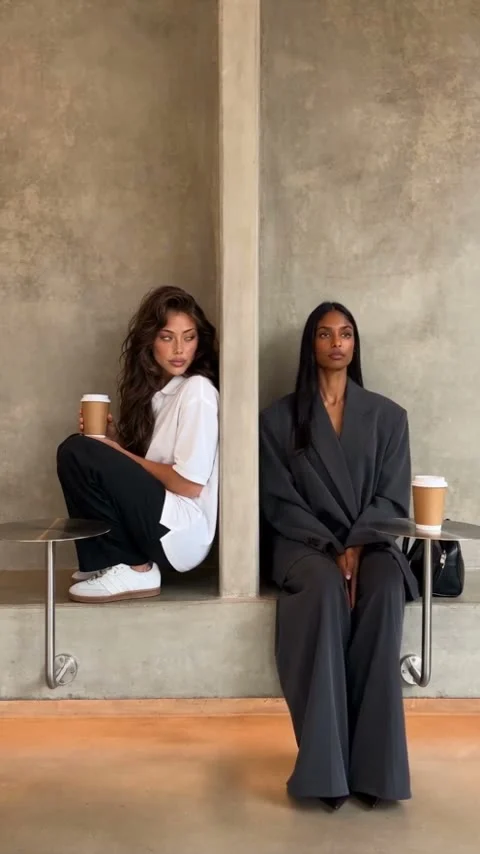
The Fancy Café First Time AI video makes you the person who sits on the café’s tiny metal table, then realizes the mistake when another guest uses it for her coffee. Upload one clear photo of yourself to cast that role. The laugh depends on the seat change reading clearly, so check the cup and final seating position before you post.
The table is the punch line
The Fancy Café First Time template stages a very specific bit of social embarrassment. In a concrete café, the main character perches on a small wall-mounted platform and drinks coffee as if everything is normal. Another guest takes the long ledge, puts her cup on the small platform and looks over. Only then does the first person figure out they’ve been sitting on the table.
It’s a sight gag, not a face-swap reveal. The first few seconds need to sell the wrong seat as a confident choice; the sideways glance needs to let us figure it out before the character moves. That glance is the hinge. If you add a caption that says “I sat on the table” over the opening shot, you’ve given away the only joke before the second cup arrives.
The page’s sample output and its poster are examples made with someone else’s input, not proof that your face or cup will track perfectly. In the poster, two women occupy separate concrete recesses with coffee cups beside them. That still catches a moment, not the whole setup and correction. Watch the clip in motion.
One photo casts the person who gets it wrong
The live form has one required upload labeled “Your photo.” It asks for a single, front-facing, well-lit person, ideally shown full body. Your likeness is meant for the person who starts on the wrong perch and switches seats; the other guest and café are built into the scene. Don’t upload a pair of friends in one image and expect both roles to be cast.
The scene changes your clothes to an off-white polo and black trousers, with white sneakers. Your current outfit isn’t the product here. A clean half-body shot can give the model a usable face, but a full-body photo offers more information about your proportions when the character stands and sits. Keep your face unobstructed. A mirror shot with a phone covering one cheek makes the deadpan glance harder to recognize, and a tight selfie leaves the body to guess at.
Pick an adult photo you own or have permission to use. The form’s consent checkbox is there for a reason. Skip public figures and children, which the page says are declined; don’t turn a coworker’s image into an embarrassing café story without asking them. If it’s you, the awkwardness is yours to play with.
Make the scene, then inspect the mistake
- Open the template and upload one clear photo to “Your photo.” Make sure there’s only one person in the frame, with enough of the body visible to support a seated shot.
- Read the live button and credit amount before you generate. The form currently labels the result as 22 seconds, vertical 9:16, with sound; it doesn’t offer a second-person upload or an outfit selector.
- Play the finished export from the start through the final seat change. Pause when the second guest sets down her cup, and check whether the small platform still reads as a table instead of a second chair.
Check the cup edges. Hands and props are tiny, and a bent cup or a hand melting into the platform is exactly the kind of glitch viewers will replay for the wrong reason. At the switch, make sure the character appears to move to the long ledge rather than simply changing places between cuts. The ending needs a beat of shared discomfort; if the position change is muddy, the whole story loses its payoff.
Listen, too. The page describes soft café ambience and no music, but that describes its example and stated setup, not a sound check of your personalized export. Don’t promise viewers a particular track or spoken line. If the generated audio is missing or distracting, choose music you have rights to use in the posting editor and make sure it doesn’t drown out the quiet pause.
Post the awkward pause, not a fake review
I’d keep the opening text small: “first time at a fancy café” gives context without explaining the furniture. Let the second guest’s cup do the explaining. A reaction caption such as “why is she looking at me?” belongs near the side-eye, not in the first frame. Watch it muted once before publishing; if the joke only works with an explanatory caption, the platform-to-ledge move may need another export.
This isn’t a café ad. The drinks and stylish stranger are part of a fictional scene. So is the concrete café. Don’t tag a real business or write as if you were actually filmed there. Label the clip as AI-generated when the platform calls for disclosure, and say plainly that it’s a made-up first-visit gag if someone asks. The Convertible Coffee Drive guide also uses a cup, but that one builds a relaxed driver portrait; this one needs a second person’s glance and a visible seating correction.
For a post, try a freeze-frame thumbnail just before the character notices the cup on the platform. The geometry matters: keep the small metal surface and the long ledge in view, even if a tighter face crop looks more flattering. Don’t crop it out. You want viewers to notice the furniture a half-second before the character does. Browse the trend gallery if you’re comparing scene formats, but for this joke, don’t cut away from the embarrassing pause just to make the edit feel faster.