Storm Dance: Black AI Video From One Portrait
Make a Storm Dance: Black AI video from one portrait by keeping your subject readable against the crowd and choosing a clear posting hook.
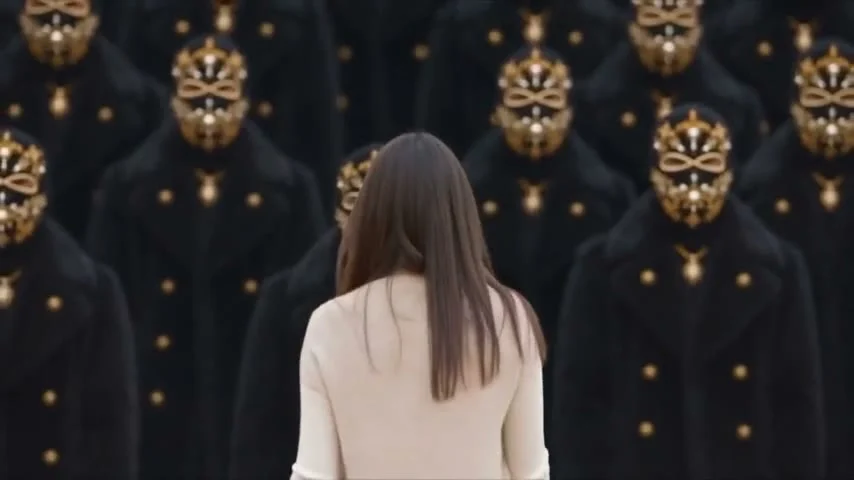
Storm Dance: Black turns one portrait into a crowd scene with the subject held in the center while the surrounding figures move together. For a version that reads on a phone, choose a portrait with a clear silhouette, keep the subject away from busy edges, and let the dark crowd frame the person instead of covering them. The stillness is the hook. Hold that contrast.
A crowd scene needs one clear lead
The Storm Dance: Black template describes a single-photo input and a centered subject with synchronized crowd motion. Its sample cover shows a person seen from behind in a light top, facing rows of dark-clothed figures with ornate gold masks. That contrast explains the look faster than any caption could. Your eye lands on the light shape in the middle, then notices the crowd. In that order.
This is where the edit differs from a standard group dance. You’re not trying to make every face equally interesting. You’re giving the viewer one person to track while the repeated figures provide movement and pressure around them. If you pick a portrait where the subject blends into a black background, the frame loses its lead. If you pick a neon outfit, the whole image can stop feeling like the Black look.
My pick: a plain light or midtone top with an uncluttered outline. The point is contrast, not a costume contest. Keep it simple. Dark clothing can work too if your face and shoulders are separated from the background. Avoid a photo with another person leaning into the frame. The template asks for one photo; make it obvious who that photo is about.
If you prefer a one-person blue-stage reveal over a moving crowd, try the Frozen Dance guide.
Prepare the photo for a centered composition
Don’t mistake “clear portrait” for “passport photo.” An expression is useful. A side glance, a half-turn or someone looking past the camera gives the crowd something to feel like it’s responding to. The sample image uses a back-facing figure, but you don’t have to copy that pose. What matters is that your outline survives a small preview. Test it small.
- Choose one person, with permission, and find a photo where their head and upper body are not cut by the frame. Leave some space on both sides.
- Check the thumbnail on your phone. Can you still find the person before you zoom? If not, try a cleaner background or a different crop.
- Remove accidental distractions from the source photo where you can: a second face at the edge, a bright sign behind the head, or a hand crossing the jaw. Fix the input rather than writing a caption to explain it.
- Upload that photo to Storm Dance: Black. The template page says it takes a clear portrait or product image and runs one generation step. Review the result for whether the subject stays identifiable across the moving crowd.
A product image is allowed by the form, but the sample’s human-versus-crowd tension is a different story from a product showcase. If your shot is for a brand, decide which one you’re making before you upload. A shoe in the middle of masked dancers could look deliberate. A tiny bottle lost between jackets probably won’t.
Write a hook that doesn’t explain the entire effect
Try a caption that gives the centered person a reason to stand there: “me entering the group chat after missing one message.” Or “when everyone knows the choreography except me.” The joke is about social pressure, not the generation process. One line is enough. Really. Put it where it doesn’t sit on your subject’s face.
Watch the first seconds at the size someone will see in a feed. The dark figures should feel like a pattern before they become individuals. If you add a title card that hides the center, you’ve blocked the best part. Keep any on-screen words high or low enough that the person and crowd still occupy the same visual space.
The cover is a separate decision. Pause on a frame where the center is easy to spot and several surrounding figures are visible. Avoid selecting a transition frame where a dancer crosses in front of the subject. That split second can make the post look like a nearly black rectangle in a grid. Not exactly an invitation to tap. Choose another frame.
Post the synthetic crowd honestly
The crowd in this format is a generated scene. If you’re depicting a real person, don’t frame the clip as footage from a real performance or gathering. A casual caption like “made a Storm Dance version of my photo” tells viewers what they’re looking at without flattening the mood.
YouTube’s AI disclosure rules require creators to disclose realistic AI content that makes a real person appear to do something they didn’t do or creates a realistic scene that never occurred. Use the AI-use field when the platform asks for it. That is especially relevant if the person in the center is recognizable and the video could pass for an actual event.
If you cross-post to Shorts, YouTube’s three-minute Shorts guidance says eligible square or vertical uploads up to three minutes are categorized as Shorts under its stated date rules. You don’t need a long video to sell this image, though. Rewatch the opening and stop when the crowd’s repetition has made its point. If the subject becomes hard to see later, a shorter cut can preserve the tension.
For a brand account, make a second sound pass before publishing. TikTok’s Commercial Music Library policy says businesses should use its cleared library for commercial TikTok activity, including organic posts and branded content. It also advises getting proper rights for other original or licensed sounds. Pick a track your account can use, then check whether the group movement still feels synchronized to its pulse. If it doesn’t, choose a different cut rather than disguising the mismatch with louder music. Listen twice.