Frozen Dance AI Video: The Song and the Post
Frozen Dance AI video posting guide: frame the ice-stage reveal, handle the included song across apps and decide when to label the clip as AI.
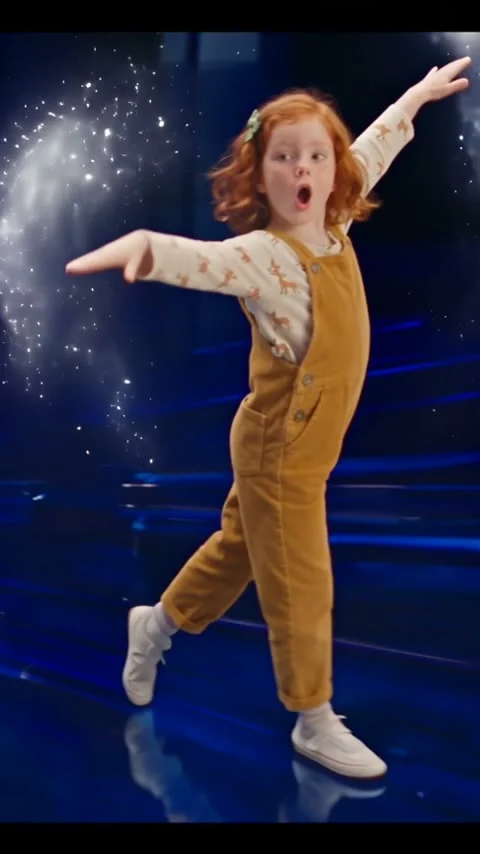
A Frozen Dance AI video works as a two-beat reveal: start close enough to recognize the person, then let the blue-stage dance take over. The Frozen Dance template makes that clip from one photo. The part you still have to plan is the post, especially the song if you share it beyond one app.
Lead with a face, not an explanation
The template opens on a lip-synced close-up and cuts to a full-body dance with ice effects. That close-up is the hook. No buildup needed. If a friend has to read a caption to figure out whose face they’re seeing, your reveal has already lost its best second.
Choose a picture where the subject’s eyes and mouth are visible, with light across the face rather than behind the head. Don’t use a photo where a hand covers the chin, even if the outfit looks perfect. The full-body dance matters. But the opening face has the harder job: it makes the change of scene mean something. A hat that hides the hair can also make the cut feel less like the same person.
This is why a costume photo isn’t automatically the strongest choice. A normal outfit can make the switch from a kitchen selfie to an ice-lit stage funnier. Skip the costume test. You don’t need to dress as a movie character to make the transition land. The sample poster itself shows a child in brown overalls on a blue stage, rather than a princess dress.
If the subject is a child, get permission from their parent or guardian before using the image or posting the result. Don’t turn somebody else’s kid into your surprise reveal. A little less magic, a lot more sense.
For more opening-frame ideas before the dance starts, read the photo-reveal hooks guide.
Write around the cut
The clip is about ten seconds and already contains its own change of scale. Keep the caption short enough that the person watching doesn’t miss that move while reading. Name the person if they’ve agreed to it, or describe the situation: “She asked for snow. She got a stage.” That’s an example of a caption you can write, not a claim about a real creator’s post.
Avoid stamping large text over the face in the first shot. If you add on-screen text, put it somewhere it won’t compete with the eyes or the arms when the dance starts. Preview on a phone with the app controls showing, since the bottom of a vertical clip is where captions and buttons can crowd the frame.
The generator supplies the performance and the music. You don’t need to bolt another transition onto the middle. If you want a different opening, use your caption or a separate cover frame for the post rather than cutting away before the face-to-stage switch. Play it twice. Watch the downloaded clip once with the sound on and once muted. Does the face still read? Can you still understand the reveal without relying on a lyric?
The included song needs a platform check
The music arriving with a generated file doesn’t mean the same audio is cleared for every upload, account type or ad. A file is not a license. Treat the sound as part of the creative, not as a portable license. This matters especially if you move the file from TikTok to Shorts or publish it on a brand account.
YouTube’s Shorts music guidance tells creators that using music from the Shorts Audio Library can help avoid copyright claims; it also says royalty-free tracks from the YouTube Audio Library won’t receive a Content ID claim. Those are choices made inside YouTube’s own tools, not blanket permission for a track baked into a separate export. Don’t assume that a song which plays on one app will pass on another.
If you want to share the same dance on several platforms, check the audio options on each one before you post. Where necessary, export or edit a version without the included track and choose a permitted sound inside the destination app. If you can’t separate the audio cleanly, avoid claiming the sound is yours or using the clip in a paid placement without checking rights. A dance can survive a different backing track; a muted upload with a copyright notice is a worse reveal.
For a promotional post, also check the rules attached to your business account and the music you select. Different use, different permission. An organic upload and an ad don’t automatically have the same permissions. Browse other trend formats if this song is the whole reason you’re hesitating; the shot idea should still work without borrowed music.
Say what is synthetic when it matters
A photorealistic person appearing to sing or dance in a scene they never entered can be mistaken for real footage, particularly after it leaves your account and loses its original caption. A plain note such as “AI dance made from a photo” gives viewers the context without flattening the joke.
YouTube’s AI disclosure guidance says creators must disclose meaningful AI alterations that make a real person appear to say or do something they didn’t do, or that create a realistic scene that didn’t happen. It also distinguishes clearly fantastical content from realistic edits. The exact setting on the upload screen depends on how your clip reads, so look at the finished video rather than assuming that sparkles make every frame obviously fictional.
Ask the person in the photo before sharing a synthetic performance under their name. Permission to use a portrait isn’t automatically permission to make that portrait lip-sync. For your own photo, check the exported frame where the face fills the screen: if you’d pause and wonder whether that performance was filmed, disclose it.
Finally, choose a cover frame that tells the truth about the clip. The ice-stage wide shot promises a dance; the close-up promises a reveal. Pick the one your caption supports, then leave the face unobstructed by text or stickers. Leave one thing to discover. The first thumbnail somebody sees should make them want to watch the cut, not explain the entire trick.