How to Make a Toz Pembe Dance Video With Your Cat
Make a Toz Pembe Dance video from one cat photo. Cast the front-left dancer, keep the other cats in frame and check markings before posting.
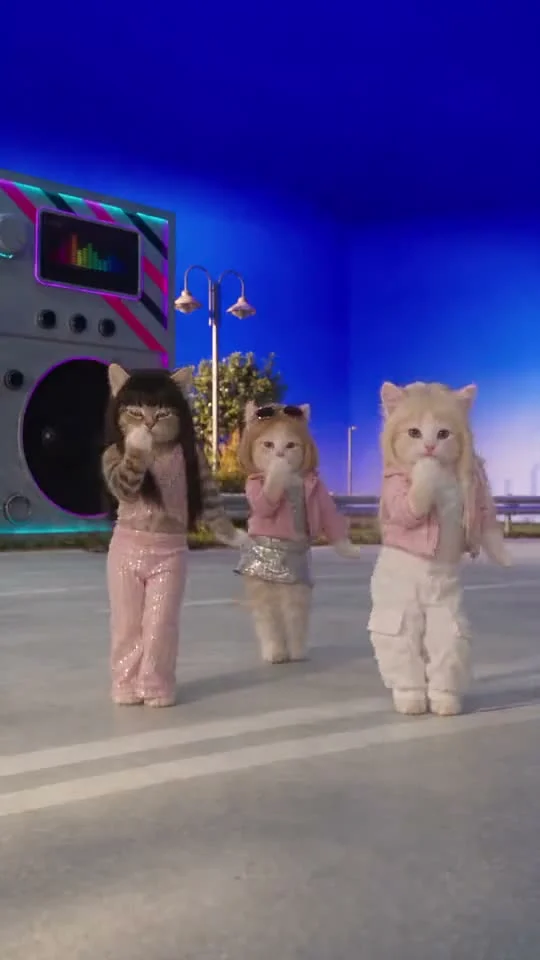
To make a Toz Pembe Dance video, upload a clear photo of one cat to Trendai’s pet template and let the reference performance provide the moves. Your cat takes the front-left spot in a three-cat dance; the two other performers are already in the scene. A photo of a person isn’t the intended input for this template.
One pet joins an existing crew
The Toz Pembe Dance template starts with a playful, surreal setup: three upright cats in pink outfits dance on a paved stage beneath a saturated blue sky. There’s a huge boombox on the left. The owned source poster places the darker cat on the viewer’s left, a smaller cat farther back in the middle, and a cream-colored cat on the right. It’s a source still, not a personalized output made from anybody’s pet photo.
What the poster cannot tell you is which cat your upload replaces. The live form can. Its only required slot is labeled Your cat, and it assigns your photo to the front-left cat in the pink sequin outfit. The other two stay in the reference scene. You aren’t uploading three pet photos to build a new band. That’s a different casting problem from the Dancing Pets three-dog guide, where optional uploads cast additional animals.
The Toz Pembe form lists a vertical 9:16 video of about 15 seconds. It offers 480p or 720p. It labels the preview as the original three-cat clip. This isn’t a live video of your cat learning choreography, so don’t introduce the post as a real pet stunt. Let the pink pants do the absurd work.
Choose the cat photo for markings, not motion
The subject is one cat. A calm, well-lit photo where the ears and muzzle are sharp will do more for recognition than a blurry action shot taken mid-jump. Try to include the entire body if you have a clean image, but don’t make the cat so tiny that its face becomes a few pixels. A sitting pet with visible paws can be easier to identify than a distant standing silhouette. Stay close.
Look for a clear fur pattern: the stripe above an eye, an unusual patch on the nose, or a white chest that friends recognize immediately. The form says your pet photo supplies the face and fur markings while the pink sequin outfit follows the reference character. Review the result rather than assuming every stripe will survive the fast moves. AI can smear a paw or drift a marking from one frame to the next.
Do not upload a photo with two cats pressed together and hope the model picks your favorite. It can’t read minds. Crop to one animal first. A human selfie is also the wrong input here: the live page identifies this as a cat template, not a human dance swap. For the cat itself, use a photo you’re entitled to share. If it’s your roommate’s pet, ask before turning that recognizable face into a public joke.
Make the dance and watch all three positions
- Visit the Toz Pembe dance page and upload one cat picture in Your cat. The front-left role is assigned by the form, not by where the cat stands in your photo.
- Select the displayed resolution and check the price in credits before generation. Both choices follow the same approximate 15-second reference and vertical format; sharper output isn’t a promise that every whisker or paw stays perfect.
- Generate and replay the exported video twice. On the first pass, see whether the new cat clearly occupies the left foreground. On the second, inspect fur color, ears, paws, and the seam where its pink outfit meets its body.
- Listen to the downloaded result separately from the source preview. The template page labels source audio, but only your export tells you what actually arrived. If you’re adding music through a social platform, choose a sound you have permission to use.
The background performers have a job: they make the scene read as a crew instead of a lonely dressed-up cat. Avoid placing a giant sticker over the middle of the frame; it could hide the smaller center dancer completely. Keep added text near a clear area of sky after checking where the boombox and ears travel through the shot.
Give the pet a recognizable hook
A simple caption about your own cat taking the left spot is more specific than “AI pets are taking over.” Show the original photo for a second before the generated dance if your audience already knows the pet’s face. Then cut into the same recognizable marking in the pink outfit. A before-and-after needs a visual match, not a long explanation of the software.
You can send viewers to the trends gallery for other animal formats, but this particular template’s trick is fixed: one pet enters an existing trio. It isn’t a three-photo casting app. If you’re doing several cats in one series, label the pet whose face you supplied for each individual video, not the background cats from the source preview.
The reference’s music may have its own rights holder. Don’t claim rights to that recording just because you could preview the clip on the page; check what your export contains and what the posting platform lets you use. Your last check before sharing is visual: pause as the front-left cat raises a paw. If your pet’s defining patch disappears right at that beat, use a cleaner photo before paying for another run.