How to Make a Jean Phil Dance AI Video
Make a Jean Phil Dance AI video from one photo. Learn why the original multi-dancer poster differs from the eleven-second, solo vertical result.
To make a Jean Phil Dance AI video, upload one clear photo of the person you want dancing and use the Jean Phil template. The generated scene follows one dancer’s hops and spins in a fixed vertical shot, rather than copying the multiple costumed people in the original poster. Check your face and outfit through the turn before posting.
The poster is not the video you’ll make
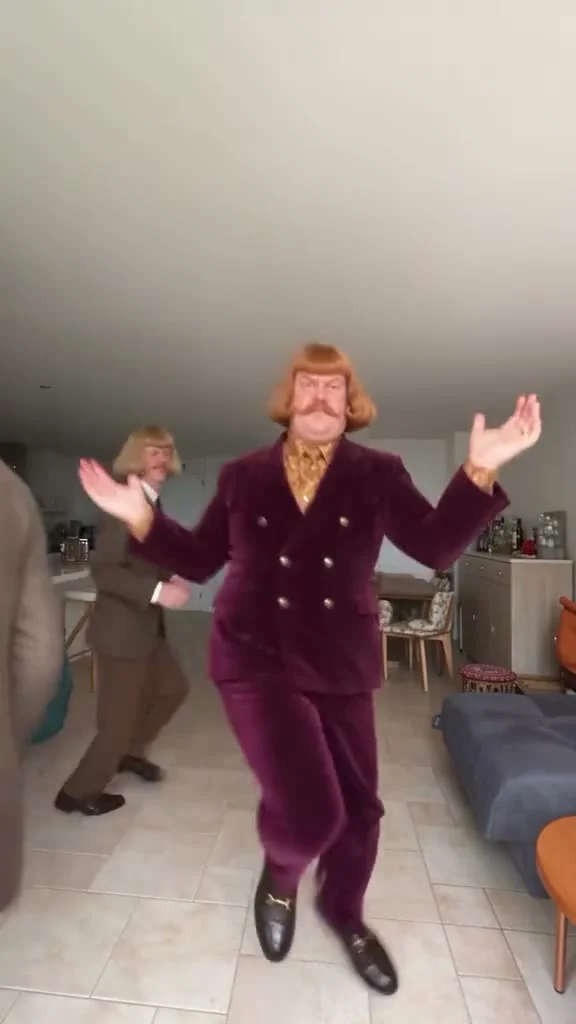
The source preview on the template page points to the original Jean Phil TikTok. Its poster shows a mustached dancer in a burgundy suit near the camera, arms raised, with another suited dancer farther back in a furnished room. That image isn’t a finished result made from a new upload. Don’t pick a photo expecting that wig, mustache or burgundy jacket to appear on you.
The live template describes a different output scene: one dancer in a bare white room, with a fixed camera. The person hops and kicks. After a spin, the dancer ends facing the lens with arms out. The upload supplies the person’s appearance, including their clothes. Different room. It’s the rhythm and full-body movement you’re borrowing, not the original clip’s cast or living-room decor.
That distinction changes how you plan the post. If the joke in your caption relies on two dancers taking turns, this single-person version won’t tell that story. Keep it solo. Make the one dancer the point. A simple “I tried the Jean Phil dance without learning the steps” gives the movement space to do its job.
Use a photo that can survive the kicks
The live upload form has one required photo slot. It asks for one person, ideally shown full-body with a clear, well-lit face. There’s no second role to cast and no optional angle to add. Pick a photo in which the subject is standing naturally and their arms and legs are visible, if you want the outfit and body shape to stay coherent through the kicks.
A close portrait can still give the model a recognizable face, but it leaves more of the outfit to be interpreted. The product page says your photo informs the hair and build as well as clothing; it also says the wig and tracksuit from the original don’t automatically carry over. Want that jacket? Show it in the upload. Don’t rely on the reference poster for wardrobe direction.
Avoid a group shot even if you’ve circled the right person. A cropped friend beside them can become a confusing extra limb as the dancer spins. A heavy face filter isn’t helpful either: the face needs to look consistent at several angles. Use your own photo, or get the subject’s permission before uploading theirs. The form includes an ownership-and-consent check for a reason.
Your strongest frame may not be the first one. In the fixed-camera view, both arms need room to move; the feet do too. Give them space. Choose a photo with a complete silhouette, then judge the result against the actual dance, not the original poster. Clean shoes matter more here than an elaborate background in your source photo.
Generate the vertical clip and inspect the turn
- Open the Jean Phil AI Dance template and add one well-lit photo of one consenting person. A full-body image helps define the outfit for this full-body dance.
- Select an available resolution and review the credits currently shown in the form before generating. The live page offers 480p and 720p; don’t base your decision on an old price screenshot.
- Generate the video, then watch the whole dance. Look at the face during the spin, the legs during the kicks and the hands in the arms-out final pose. Fast movement can expose warped fingers or a changed outfit that a still thumbnail hides.
- Download only after you’ve watched it with sound both on and off. If the export doesn’t contain usable audio, add a track you can legally use in your posting editor and align its beat to the first hop.
The form specifies 11 seconds in a 9:16 vertical frame. The page’s original TikTok source preview is labeled as a different, longer clip, so don’t time your caption to that preview’s last second. Wrong ending. Watch your generated eleven-second version instead. No extra crop is needed to fill a standard vertical canvas, though platform overlays can still cover the dancer’s shoes or raised hands. Preview your final upload with the caption UI visible.
The form labels the template as using source audio, while the page’s copy says the music follows the clip. Neither is proof that every new export will contain a particular licensed track or that a social platform will permit that recording in your post. Check the file you downloaded. If you replace the audio, sync to the actual hop and check your platform’s music library or your own license.
Give the dance its own hook
This works best when the person’s ordinary outfit is the reveal. The dance itself is theatrical; a face you recognize in everyday clothes is funnier than a costume copied from the poster. Try a straight-faced caption such as “me when the meeting finally gets canceled” and let the first kick carry the punch line. One sentence is plenty.
Don’t label the AI version as a new official Jean Phil video or pretend the source creator appears in your result. Frame it as an independently made AI edit inspired by a dance template, and follow the disclosure rules of the platform where you post. Permission from the person in your upload matters even if the finished clip looks silly.
If you’re deciding between dance formats, the Nicole Kidman Dance guide covers a different source performance and posting angle. Here, the check is very specific: pause your own Jean Phil render on the spin and again at the arms-out ending. If the face flips to somebody else or the jacket changes color halfway through, use a cleaner full-body photo and try again before you hit share.