How to Make a Closed on Sunday AI Video
Make a Closed on Sunday AI video with one person or pet standing still in the middle and your chosen choir singing around them in a wide 14-second shot.
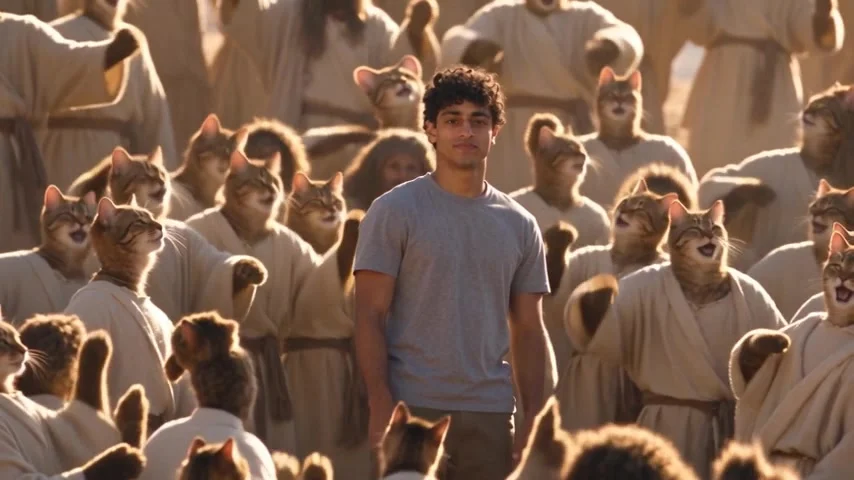
To make a Closed on Sunday AI video, upload one clear photo of the person or pet you want standing in the middle of the choir. On the Trendai template, pick the original singers or a themed choir such as cats, then generate the 14-second shot. The central figure stays calm and silent while the crowd moves around them.
The still person is the punch line
The source preview shows a choir on a sunlit desert hillside, dressed in pale robes. Arms rise; bodies sway. One figure in the middle faces the camera without joining in. No duet here. That contrast makes the edit work. If your caption tells people to watch the choir, they might miss the person who looks like they wandered into the wrong rehearsal.
There’s also a cat-choir sample on the page. Its poster shows a person in a gray T-shirt surrounded by robed cats on a warm hillside. The page labels that sample a result made with a fictional AI-generated face at 480p. It isn’t your personalized output, and the separate source preview is reference footage rather than a generated result. Use the cat sample to understand the joke, not to promise how a new face or every animal in the back row will render.
This isn’t a template where you upload a choir of friends. The crowd is chosen in the form. Just one upload. Your photo casts just the still center figure, which is why the expression in that one picture matters more than any dance pose.
One upload for the middle, one selector for the crowd
The live upload form marks Your photo, the one in the middle as required. It asks for one person or pet with a clearly visible, well-lit face. A waist-up picture in the clothes you want to see is a sensible start; a group selfie leaves the model guessing which face belongs in the middle. Keep the mouth visible too. The scene’s joke depends on that figure staying quiet while the choir appears to sing.
The Choir control is separate from the photo slot. It offers the original choir plus cats, dogs, skeletons, pumpkin heads, zombies, angels, penguins, frogs, teddy bears, aliens and grandmas. Pick one theme for the surrounding crowd. One click, not a casting call. You don’t need to gather animal portraits or cast every robe individually. The form defaults to the original choir, so check the selected option before you hit Generate if your caption promises a cat chorus.
Your chosen photo informs the center figure’s face and look. The desert setting and warm light belong to the clip; so does the slow camera movement. The people or creatures around the center are the choir choice, not the subject of your upload. If you’re using a pet, choose a photo with the eyes and muzzle easy to read. Look at the eyes. Don’t treat the sample’s robed cats as proof that every new pet will stand in an identical pose.
With a crowd this dense, some back-row faces may be hard to inspect. The product page itself cautions that changing the entire choir and preserving the center likeness are generation goals, not guarantees, particularly when the wide shot places a large moving crowd behind a much smaller central face. Check the actual file rather than judging success from its cover image. Watch the middle. One odd figure in the far distance might be less distracting than a changed face in the center; prioritize what your audience sees first.
Make the wide choir shot
- Open the Closed on Sunday video template and add one clear, consented photo to the center-figure slot. Use a single subject with the face unobstructed.
- Select the choir that fits your idea. Original singers make the still-person contrast feel solemn; cats turn it into a deadpan joke. Preview the selector’s label before generating so the result matches your caption.
- Choose the resolution offered by the live form and check the credits currently displayed. The page offers 480p and 720p, and says the choir choice doesn’t change the price. Don’t quote a screenshot as if it were a permanent price.
- Generate, then watch the finished clip. Check whether the middle person stays recognizable and still, whether the surrounding choir actually follows the selected theme, and whether the sides of the wide frame remain intact.
The form specifies 14 seconds in a fixed 16:9 horizontal frame. Don’t crop it to 9:16 by zooming straight into the center: that would erase the surrounding singers, and the contrast is the entire story. Too tight. To share it in a tall feed, place the wide clip inside a vertical canvas with room above or below for your caption. Keep both choir edges visible. Test that layout on a phone before posting.
The live form labels the audio source audio, and the page describes a song under the reference scene. That does not prove a particular song will survive in every new export or give you the rights to publish the recording on every platform. Listen to the actual downloaded video. If you need new audio, choose something you’re allowed to use in the posting app and avoid lip-sync claims about the silent center figure.
Keep the caption on the person who doesn’t sing
A useful caption gives the center figure a reason to stand there. “Me at the family sing-along when I only came for dinner” lands differently with the original choir than with cats. For the cat option, try “the cats formed a choir and nobody told me.” Make it clear this is a fictional AI edit, especially if the person in the center is a friend. Ask permission before uploading their photo and before sharing the result.
The scene references a music video, but your post is an independent edit. Don’t present it as an official version, a performance by the original artists or evidence someone stood on that hillside. Follow the AI-content labeling rules where you publish it. The sample output can inspire a caption, but it doesn’t certify your export or grant music rights.
If the point of your post is to make two people perform together, the Oouuh Kitchen Duet guide is a different setup with a different cast. Here the solo figure should do almost nothing. Watch the generated choir’s first arm raise, then look back at the center face. If that face changes as the crowd moves, try a sharper front-facing photo before you share the wide shot.