Pigeon Head Swap AI Video: Put Your Face on the Bird
Make a pigeon head swap AI video using one clear portrait. See which bird gets your face, how to check the moving result and where to crop.
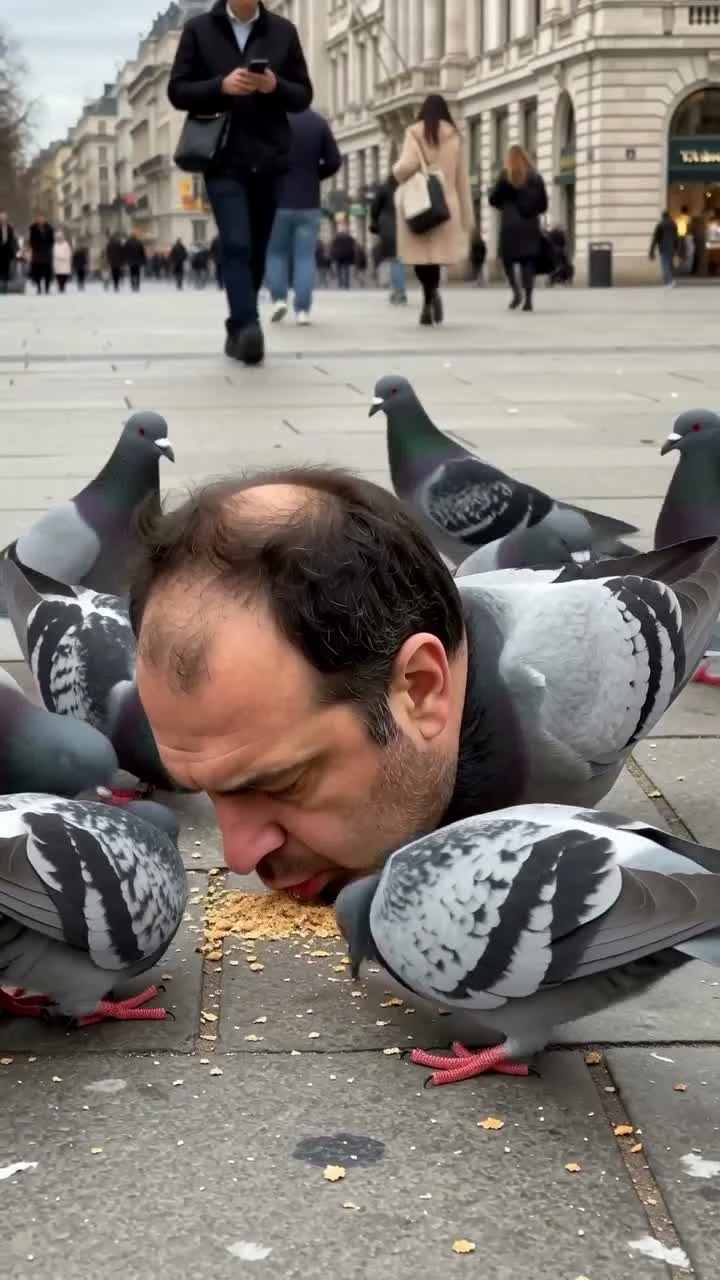
A flock of pigeons pecks at crumbs on a busy sidewalk. One bird has a man’s head where its own head should be. The pigeon head swap AI video replaces only that human head with your face, using one portrait. The pigeons, passing pedestrians and street action stay in the reference clip, which is why the joke looks oddly ordinary for a second.
The street makes the weird part work
Look at the pigeon head swap template before you upload. The poster puts the main bird low in the frame, surrounded by regular pigeons. Pedestrians keep walking in the background. The human-headed pigeon is the only thing anyone needs to notice. If you cover half the screen with a caption explaining the joke, you’ve made the pigeon do less work than it should.
The live form has one slot labeled "Your portrait." Its note says Image 1 replaces only the human head on the main pigeon. It doesn’t put your face on every bird, change the crowd or turn the clip into a talking-head video. The page lists a roughly 15.2-second vertical 9:16 output and offers 480p and 720p resolution choices. Motion and audio follow the source preview.
That narrow swap is what makes the effect funny. A city street is boring, pigeons eating crumbs are boring, and then one of them is unmistakably you. Give viewers room to spot it themselves. Let them look. It’s a tiny double take, not a trailer for a pigeon cinematic universe.
The airplane face swap guide has a much larger human face; the pigeon edit needs to read at sidewalk scale.
Choose a face that reads at bird size
The portrait matters more than your outfit. The upload form calls for a clear, well-lit face photo, and the generated head sits close to the pavement in a busy frame. If your face is hidden under a cap, or if the photo was taken from far away, the identity may disappear when someone watches on a phone. Use a closer crop of one person looking toward the camera.
Avoid a group picture even if you know which face you mean. The template only asks for one portrait, so give it one person. A clean image with visible eyes and an unobstructed mouth helps you recognize the head when it turns. You can use your own photo for the gag, or ask a friend who will actually enjoy being cast as the boldest bird on the block.
The cover shows a human head on one pigeon among several normal birds. It’s surreal, but it isn’t a photo of a real person crawling on a sidewalk. That difference is worth making clear when you share it. The stranger in the background did not meet your bird alter ego.
Make it and review the whole walk-by
- Open the pigeon head swap video page and play the original source preview. Find the main pigeon before you choose a photo.
- Upload one well-lit portrait to the "Your portrait" slot. Choose an image where a friend could recognize you from a small thumbnail.
- Pick 480p or 720p and check the price shown on the form before generating. If you’re testing the portrait, the lower-resolution choice lets you judge the swap before deciding whether to make a sharper version.
- Download and watch the result at normal speed. Check that the human head belongs on the main bird, not on a background pigeon, and that your features are still recognizable as it moves.
- If the face looks vague, change the source photo first. Try better light and a clearer front view instead of adding text that says whose face it’s meant to be.
Give it a watch without sound, too. People often see the first seconds of a clip before deciding to turn audio on. The face should make sense as the joke even when the soundtrack isn’t carrying it. Keep the crop wide enough to show both the strange bird and the normal pigeons around it.
A caption that lets people notice
Try a caption that plays the scene straight for a beat: "Just out for lunch" or "He runs this sidewalk." A paragraph explaining that you used AI only delays the visual reveal, though you should still make clear that the clip is an edit and label generated content through the platform’s controls where applicable. Don’t imply a real animal was altered or harmed to make it.
YouTube’s altered-content policy describes disclosure for realistic AI-generated scenes that didn’t happen. YouTube’s Shorts upload instructions accept square or vertical clips up to three minutes; this template’s 9:16, roughly 15-second output fits the stated format. If you use somebody else’s face, show them the export before posting. A pigeon body is a specific kind of joke, and they get to decide whether it’s theirs.
Leave a little street visible above the bird when you crop for another platform. The passersby and the ordinary pigeons are the setup. Cut them all away and you’ve just made an inexplicable head with feathers.