Airplane Face Swap AI Video: Make the Face Read
Make an airplane face swap AI video from one portrait. Pick a clear reference face, inspect the moving shot and label the impossible scene as AI.
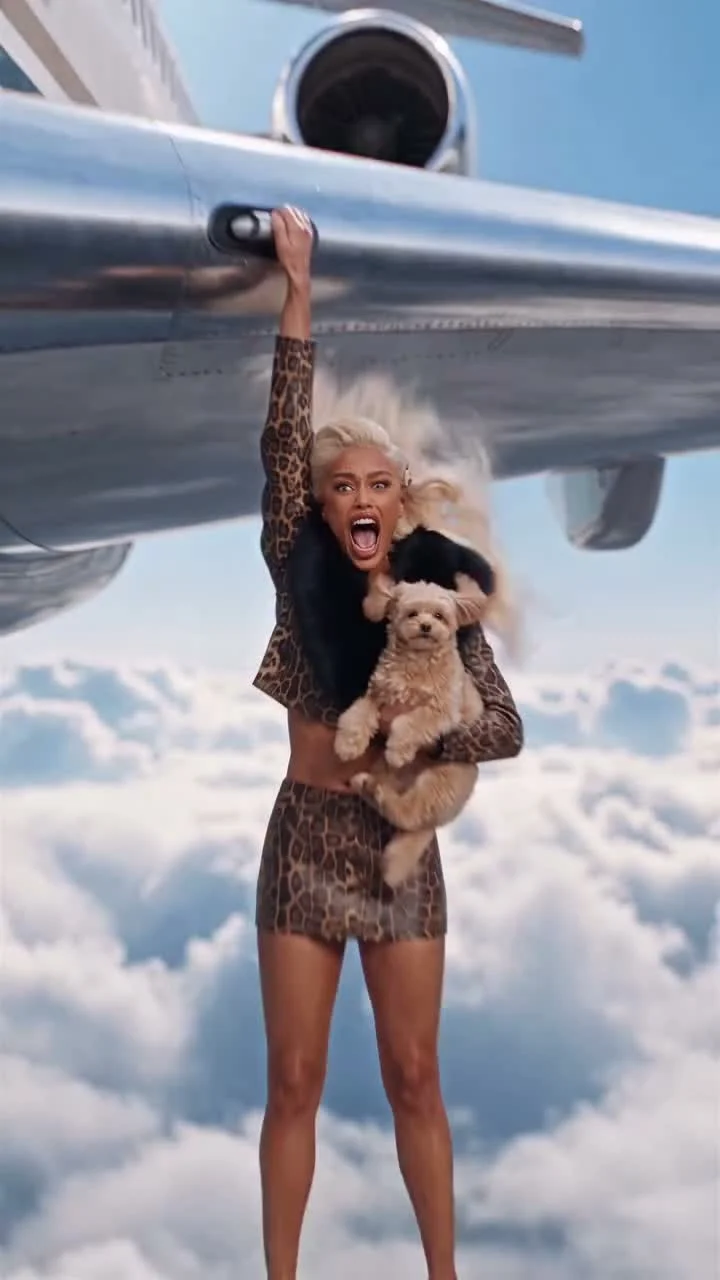
A woman clings to the outside of a plane above the clouds with a small dog in her other arm. The airplane face swap AI video puts a new facial identity into that impossible scene from one portrait. Upload a clear face photo, then check the finished shot closely: the face has to stay readable while everything around it is moving.
The airplane shot already does the heavy lifting
The airplane face swap template follows a short source clip with a plane against open sky and a character hanging onto the aircraft. In its poster, she has one hand overhead and the dog tucked against her body. That’s the visual hook. You don’t need to add another stunt or invent a second location; your job is to make the replacement face feel like it belongs in the frame. Watch her expression.
The live form asks for one reference face. The template describes Higgsfield Genjutsu Object Swap as the method and lists the output as about 7.94 seconds, vertical 9:16 at 720p. The movement and camera timing come from the original clip, as does the audio. The preview is that original reference, not a render made with your photo. Different face. Same scene. Don’t judge the face swap by how closely you resemble the person in the preview.
There’s one detail worth checking before you spend credits: the upload note says the supplied prompt describes a mature brunette woman and recommends a matching reference for that look. The poster’s hair color may not tell the whole story. Read that note. If your photo has a very different hairstyle or presentation, don’t promise yourself an exact match just because the preview looks fun. Try a portrait that suits the stated reference, or expect the styling to come from the source scene rather than your selfie.
For a second fictional airplane stunt that puts a portrait into the action, see the Wing Stunt edit guide.
A portrait that survives the moving frame
Pick one well-lit photo with a single face, visible from forehead to chin. Eyes looking toward the camera give the model more to work with than a side view hidden by hair. Avoid a sunglasses selfie: half the identity you’re trying to swap is covered. Give it a face. If the source image is a compressed screenshot of a face the size of a postage stamp, look for the original photo instead.
Expression matters too. The source shot is loud: open mouth and wind, plus a tiny dog having a deeply unreasonable day. A stiff passport picture can still give the model facial features, but a photo with an expressive face is a better reference for the mood. You don’t have to pose on a plane. Please don’t.
Get permission if the portrait belongs to someone else. This clip makes a real-looking person appear in an event they never experienced, and it should be their choice whether their face is used. A friend might love the joke; asking first takes less time than explaining it afterward.
Make the video and check the face
- Open the airplane face swap page and watch the source preview. Notice where the woman’s face is most visible, not just the first frame.
- Upload a clear, well-lit reference portrait in the single face slot. Check the form’s note about the mature brunette look before choosing your image.
- Review the displayed credit cost and generate. Unlike some other Trendai templates, this page lists one 720p output rather than a 480p-versus-720p choice.
- Watch the result on a phone at normal speed, then pause on a frame where her face turns or the hair crosses it. Is the new face still recognizable? Are the eyes and mouth aligned with the expression? If not, try a cleaner portrait before changing your caption.
Don’t cover the face with a giant text banner. The plane is already unusual enough to stop a scroll; the face is why someone will replay the clip. Make it visible. Put any on-screen line in open sky where it doesn’t fight the dog or the hand gripping the aircraft.
Say it’s an edit, not an aviation story
A caption can lean into the absurdity: "My carry-on got complicated" gives the shot a joke without claiming you actually hung outside a flying plane. Avoid captions that invite someone to copy the stunt. It’s a fictional AI scene, not travel footage or a safety tutorial.
YouTube’s altered-content guidance says realistic generated scenes and depictions of real people doing things they didn’t do require disclosure. YouTube’s Shorts upload instructions accept a vertical video of up to three minutes, so the short 9:16 export fits that format. Those are platform rules, not an excuse to skip the final watch. Check the local disclosure control wherever you post and give the person in the portrait a look at the finished version first.
Pause once on the frame with the overhead hand. If the face is clean there, check it again when the mouth opens. That second frame is where the swap earns the replay.