Most Wanted BMW Car Swap: Make Every Cut Match
Make the Most Wanted BMW car swap video with photos of your own car. Pick useful front, rear and side angles for a consistent 10-second night edit.
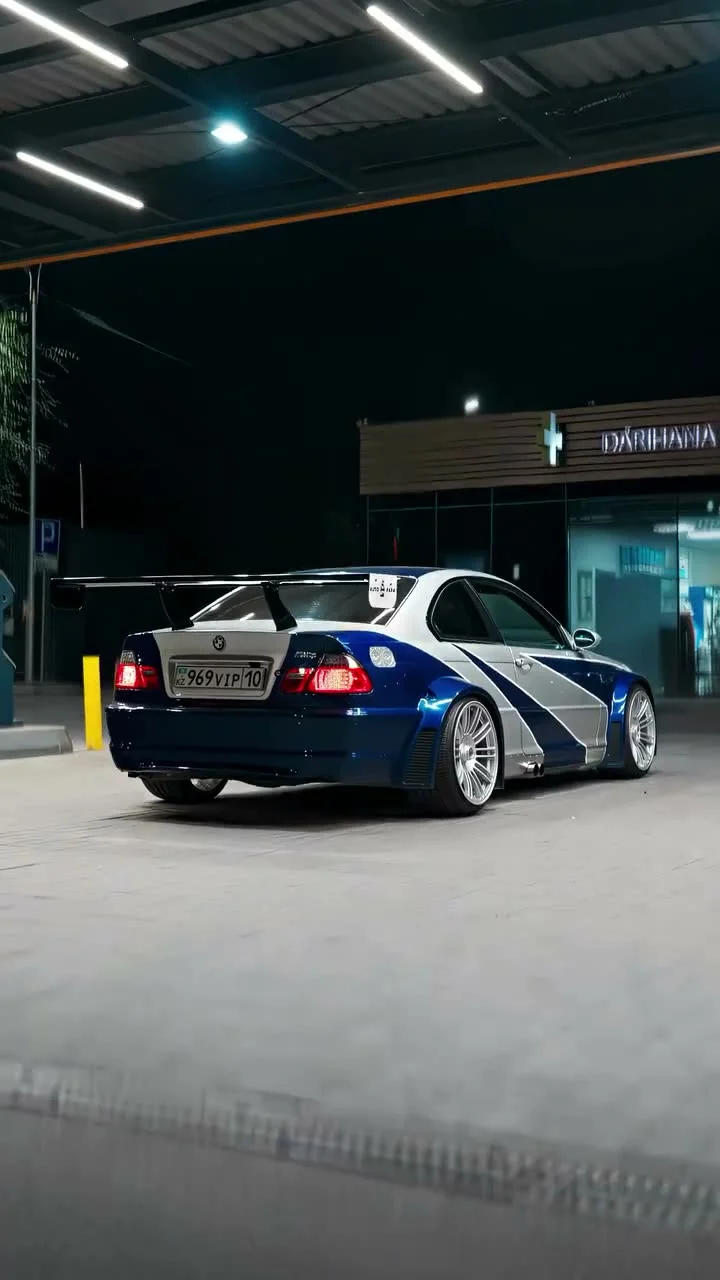
A blue-and-silver BMW rolls through a gas station at night, then the edit jumps from its headlights to the rear wing and wheels. The Most Wanted BMW car swap video lets you replace that car with your own, using one to four photos. The hard part isn’t the upload; it’s giving every camera angle a believable version of the same car.
One car has to survive every cut
The Most Wanted BMW car swap template uses a 10-second vertical reference clip. Its cuts, night setting, camera movement and sound stay in place while your car replaces the blue-and-silver BMW M3 GTR-style vehicle. You’re not being asked to record a fresh gas-station video. You’re providing the visual reference for a car that has to appear in several existing shots.
That distinction matters. A single beautiful rear-three-quarter photo can tell the edit what your tail lights and wing look like, but it has less to say about the front end. When the clip cuts to the headlights, the model has to make up details it couldn’t see. Give it more views and it has less guessing to do. Especially at night.
Before you upload, watch the source preview on the template page. Look for the tight wheel shot and the change from front to rear. Now look at your camera roll. Do your photos show those parts of your actual car, or just the angle you always use for your profile picture?
Build a useful set of car photos
Start with one full-car photo from a front or rear three-quarter angle. The page requires this first image and allows up to three extra images of the same vehicle. Good light helps here, even though the finished edit is set at night: the model needs to see the paint, the body lines and the wheels before it can place the car under the gas-station lights.
If you have four photos, give each a job:
- First image: a clean, whole-car three-quarter view with the bumper, roof and wheels visible.
- Second image: the front, including the headlights and grille.
- Third image: the rear, especially the tail lights, bumper and any wing.
- Fourth image: a side view that shows the proportions and wheel design.
Don’t mix photos from two cars that happen to share a color. And skip a heavily filtered shot if it turns silver paint blue or erases the wheel spokes. This edit moves quickly, but mismatched details still stick out when a close-up appears after a wide shot. The clip shouldn’t give your car a surprise second set of rims. Same car. Every angle.
If you only have one decent photo, use it. The template says one is enough. Just pick the view that shows the entire car rather than a close-up of the badge. You can add the extra angles later if the first result leaves a headlight or body panel looking wrong. When you choose between two similar shots, take the one that shows the full edge of the hood and both wheels clearly, even if the other has a moodier background that looks better on Instagram.
Make the swap without rebuilding the timeline
- Open the Most Wanted BMW car swap page and play the original source clip. It’s the reference, not an example of a completed swap with your vehicle.
- Upload the full-car photo in the required car slot. Make sure nobody is standing in front of the bumper or hiding a wheel.
- Add up to three supporting images, all of that same car. Use them to show the angles the first photo misses, not four near-identical parking-lot selfies.
- Choose a resolution and check the displayed credit cost before generating. The template offers 480p and 720p, with no prompt field to fill out.
- Download the MP4 when it’s ready. Watch it straight through, then pause on the headlight, side and rear shots. If one area changes shape between cuts, replace the least useful photo with a clearer view of that area.
I’d test with 480p before paying for a sharper version. A higher-resolution file won’t fix a wrong wheel design or a roofline that changes between shots. Sort out the references first. Pixels won’t fix it.
Give the post its own angle
This is a recognizable game-inspired car edit, but a caption that only says “AI BMW” hides the personal part. Call out the specific car you swapped in. A plain caption like “My hatchback got the Most Wanted night edit” gives viewers a reason to watch the cuts again, especially if your car looks nothing like the original.
Keep any added text away from the car’s front end and the wheel close-ups. Those are the frames people use to decide whether the swap looks like your actual vehicle. A caption that sits across the grille turns the best proof into a guessing game. Let the grille show. If you’d rather put yourself beside the vehicle, the pickup truck jump edit is a different setup: one portrait plus a separate car photo.
The output is 10 seconds in a 9:16 frame, which fits YouTube’s Short upload requirements for a vertical video under three minutes. If you post a realistic-looking AI swap, don’t imply you filmed your car in the source scene. YouTube’s altered-content guidance says creators must disclose realistic generated scenes that didn’t occur. Check the disclosure setting on each platform you use, and only upload vehicle photos you have the right to use.
One last export check: freeze the frame where the car changes from front to side. If the paint and wheels still read as yours, the quick cut is doing its job. If they don’t, swap in a better side photo before you post.