How to Make a Hotel Lobby AI Video Duet
Make a Hotel Lobby AI video duet with two Character Sheets, choose the correct performer slots and review the widescreen export before posting.
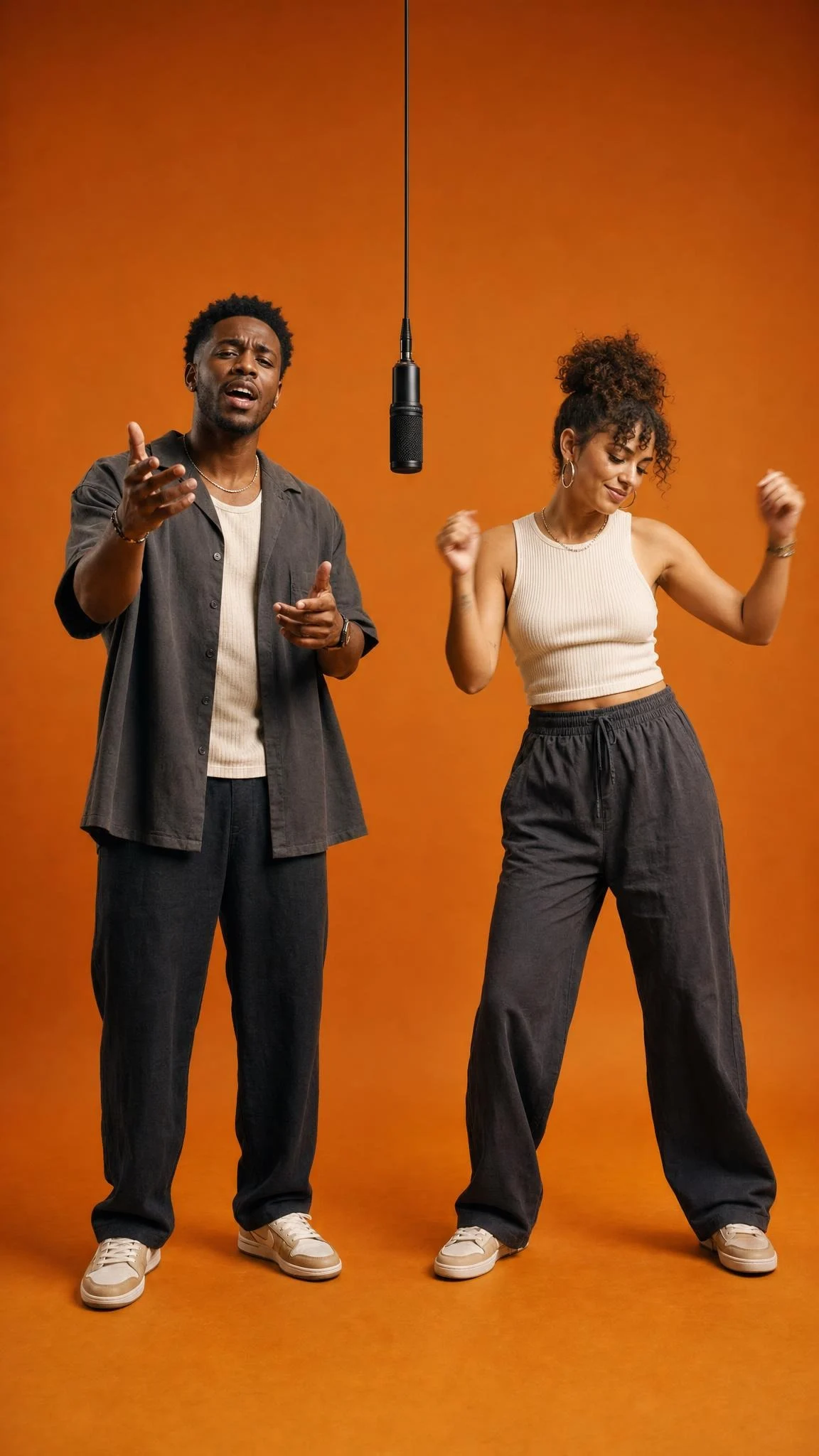
The Hotel Lobby AI video puts two people into an orange-studio performance built around a hanging microphone. To make one on Trendai, prepare a three-view Character Sheet for each person, put them in the form’s left and right performer slots, then review the finished clip for identity and framing, then check the audio before you post. It’s a fictional recast, not footage of you performing with Migos.
The scene has two jobs
The Hotel Lobby template is built around a duo performance: two people share a bright orange space while a microphone hangs between them. That center line matters. If the left performer is supposed to address the mic and the right performer is reacting, swapping your people without thinking about that exchange can turn an easy-to-read duet into a pair of strangers doing separate things.
The page describes the action as a recast of the Hotel Lobby (Migos) performance, with camera moves and choreography taken from its source clip. Treat that as a description of the reference, not proof that your generated version will reproduce every hand movement perfectly. Watch the source preview before you pick who goes where. Where does each person face? Who gets the more direct look toward camera? Casting comes before editing.
The poster shows two performers against orange, one on each side of a black hanging microphone. It’s a still, not evidence that your upload will land with the same pose. And it is tall, while the live form describes a widescreen output. Don’t use that poster as a crop plan for your finished video.
Make each Character Sheet readable
The live form has two required image uploads in a fixed order: Left performer, then Right performer. Each upload is a Character Sheet for one person, not a single face selfie. The first asks for a front portrait, front full-body view and back full-body view; the second asks for the same three views of a different person. The page accepts JPG or PNG. WEBP works too. Follow those field labels rather than deciding the slot order from a still image.
Build each sheet from photos that clearly show the same person. Keep the face uncovered in the portrait, and make the full-body frames show the shoes and the outline of the outfit. Shoes can give the model a useful shape cue. A baggy jacket can hide the person’s shape; if it appears in one view, keep it recognizable across the other views. Don’t splice together three wildly different hairstyles and expect the edit to pick the one you meant.
Light the sheets consistently. A bright, frontal portrait paired with a dim rear view gives the generator conflicting information about hair and clothing. You don’t need a studio. A plain wall and a little distance from it will do more for the silhouette than a heavy face filter. Check the back view for reflections that make it look like a second person. Reflections can confuse a character sheet.
If you’re casting a friend, ask before you use their images. The form itself requires clear permission and warns against impersonating real people or their voices. Keep each person’s sheet in their intended slot, especially if you remake the video with a different pair later. The left/right assignment is part of the gag.
Set the length, then check the render
The form currently shows 15 seconds as its duration default and offers 30 seconds as another choice. It also shows 480p by default, with 720p available. The product page describes the resulting video as 16:9 widescreen. Those are live form and page details, not a promise about how well every face or frame will render. Check the credit estimate displayed for your own selection before generating; it can vary with the settings.
Start with the shorter cut if your posting idea hinges on one exchange near the mic. That’s a creative choice, not a claim that one setting renders better. Once it finishes, play the whole export rather than judging the thumbnail. Look at the opening face, the change between close and wide shots, and any moment a hand crosses a face. Small identity slips are especially obvious in a two-person video because viewers can compare the performers within the same frame.
Listen to the actual file, too. The template page says its source performance includes music and describes source audio as retained, but that copy cannot establish what your personalized export contains. Verify whether the export has audio, whether it matches your intended cut, and whether you have rights to use it on your chosen platform. If you need licensed music, choose an available sound in the posting editor instead of assuming the source soundtrack is cleared for your account.
Keep both people visible when adapting for a vertical feed. A tight center crop that saves the microphone but cuts off the right performer ruins the duet. Try a tall canvas with the full widescreen frame inside it, or choose a crop that follows the interaction only if both performers stay readable. Test it on a phone screen before posting. Both faces need room.
Post the recast as your own fiction
A good caption gives the audience the premise before the first cut: "We finally got our orange-room performance" or "My friend took the right side of the mic." Name your friend if they want credit. Don’t caption it as a real Migos appearance or an official video; this is your independently made fictional edit, and the underlying song or performance footage is not automatically yours to reuse.
For another duo setup, the Alorse On Dance keyboard duet guide deals with a different arrangement around a keyboard. Here, the mic splits the frame and the main problem is keeping two performers legible across cuts. Label the AI portrayal where the platform asks for it, and don’t suggest either person actually performed in the source clip.
The last check is the first frame at feed size. Can someone tell there are two people and one mic without reading the caption? If not, choose a different frame for your post thumbnail rather than making a claim the video can’t carry.