Somebody That I Used to Know AI Video: Cast the Duo
Make a Somebody That I Used to Know AI video from two portraits. Cast the left and right roles, keep clothing readable and frame the painted wall.
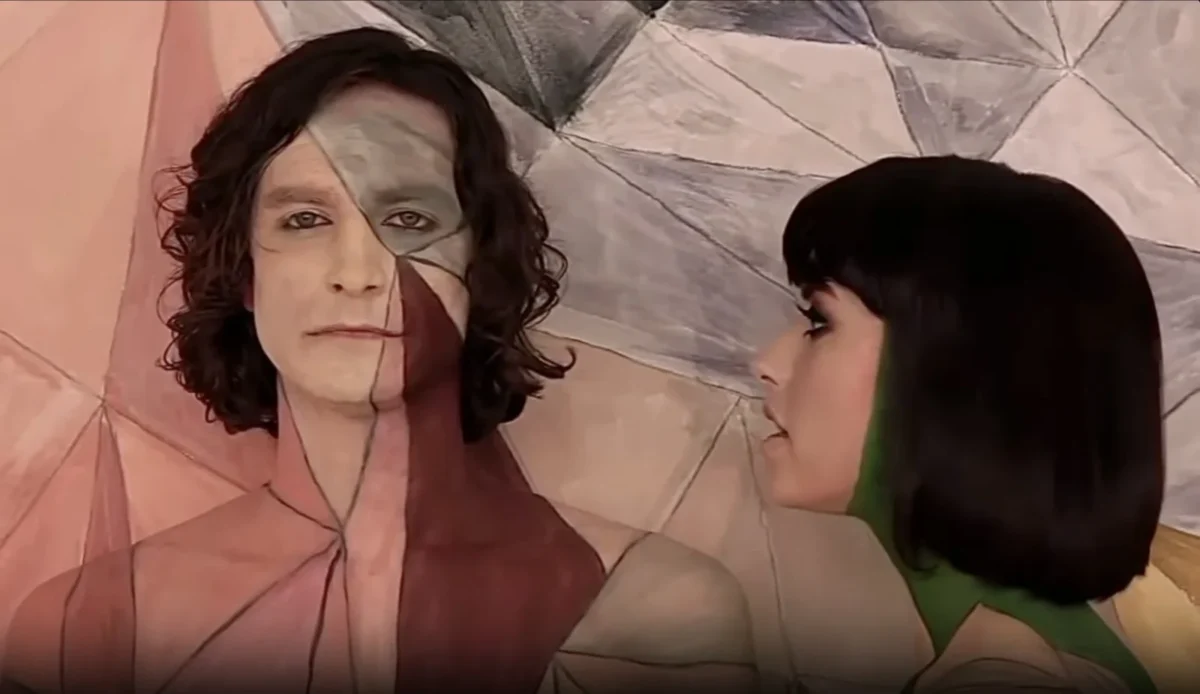
A Somebody That I Used to Know AI video turns two portraits into a short painted-wall duet. In Trendai’s template, Photo 1 becomes the camera-facing person on the left; Photo 2 becomes the right-side person looking left in profile. The geometric mural and paint belong to the scene, while your photos supply the people.
Cast for the camera-facing shot and the profile
This is a two-person scene, but the roles don’t carry the same visual weight. The left person faces us. The person on the right is shown in profile, looking toward the left. If one friend has a clean front-facing portrait and the other has a photo where their side view reads clearly even on a small phone screen, the casting is almost decided, because each person will have a different angle to carry. Don’t upload in the order you found the photos in your camera roll.
The live form makes both roles required and keeps their positions fixed: first upload left, second upload right. Unlike the Smalltown Boy scream dance, there is no reversal between upload number and first appearance. The edit also has a different beat. Instead of building from frantic close-ups to a wide dance, it sits with the painted-wall pairing. The tiny shift of attention between the two people is the point.
You can play the contrast straight, casting two people with a shared history and a quiet caption. Or lean into a harmless mismatch, such as you and the plant you forgot to water. For the latter, remember the actual form asks for one person’s photo in each slot; it is not a product or pet replacement template. Use two consenting human participants and let the caption carry the joke instead of trying to make the upload slots perform a different task.
For another two-photo duet with fixed left and right roles, compare the Alorse On Dance guide.
Clothing is part of the picture
The template description says the image-preparation step keeps each person’s face, hair and clothing, then places geometric matte paint on visible skin. It does not say the hair or clothes are painted. That’s a useful constraint for picking photos. Choose tops you want to see in a graphic scene, and don’t expect a busy logo to melt neatly into the mural.
Use a portrait where the face and hairstyle are visible. For the right role, avoid an image in which hair entirely hides the side of the face; for the left role, a straight-on or gentle three-quarter angle gives the camera-facing performance a clear identity. Clothing matters too. A tight crop that ends above the collar leaves little outfit reference, while a wide image with a thumbnail-size person makes it harder to judge the face. Check the eyes. Save the image with enough resolution to inspect them before uploading.
Look at the geometric blocks behind the performers in the source preview. They’re the visual hook, but a caption bar covering the lower part of the painted skin can make the illusion feel like random face paint. Keep the wall visible. Draft your text after checking where the two people sit in the actual output. There is no need to draw a fake wall or paint your source photos yourself. The template prepares a combined scene image before animating it, according to its workflow notes.
Build the short duet
- Open the Somebody That I Used to Know AI video template and watch the source reference. It is the original performance reference, not a generated sample of your own photos.
- Upload the left, camera-facing person in Photo 1. Upload the right, profile-facing person in Photo 2. Check each thumbnail for a single visible face and the clothing you want to keep.
- Choose the output resolution offered on the page and generate. The form describes image prep, video generation and final audio mux; stay on the page while it completes. For current credit requirements, check the form or Trendai pricing rather than a copied figure in an old post.
- Watch the result with sound. Check that the left person still looks like Photo 1, the profile still looks like Photo 2, and the paint sits on visible skin rather than taking over the hair or outfit. Replay it once without sound too: the painted-wall composition should still make sense.
The source preview runs about five seconds, carries original audio and is labeled 4:3 in the live form. A square-ish frame can look small inside a tall TikTok or Reel screen. Don’t blindly crop it to 9:16: you’ll risk cutting one participant or the edges of the mural. If you make a vertical post, consider fitting the full frame against a simple background and inspect it inside the posting app before publishing. The template’s workflow notes mention a 16:9 intermediate still; that’s an internal prep image, not permission to treat the delivered clip as widescreen.
Let the five seconds do one job
A longer story will not fit into a five-second performance. Keep it tight. Keep the caption on a single tension: “When the group chat goes quiet after that message” is enough to assign a relationship without naming either person as an ex. A more literal breakup angle can work, but don’t imply a real person’s past relationship without their okay. The faces and wall already provide a reveal, so avoid stacking multiple text cards over both performers.
The source song and recognizable video styling are references, not an endorsement from the original musicians. The template states it is independent of Gotye and Kimbra. Before posting, get permission from both people whose portraits you used and check music availability for your account and region. For brand use, TikTok explains its commercial-use music rules; a downloaded clip’s soundtrack is not a blanket license for every placement.
If the right person’s identity disappears in profile, first replace Photo 2 with a sharper image where the face edge and hairstyle are visible. If the wall paint overwhelms the left face, try a simpler portrait with less distracting shadow. Those are photo-selection fixes, not reasons to reverse the fixed left/right roles.