How to Make the Halloween Haunted Mom AI Video
Make the Halloween Haunted Mom AI video with two photos. Cast the haunted figure on the right and the kid on the left in a 23-second hallway scare.
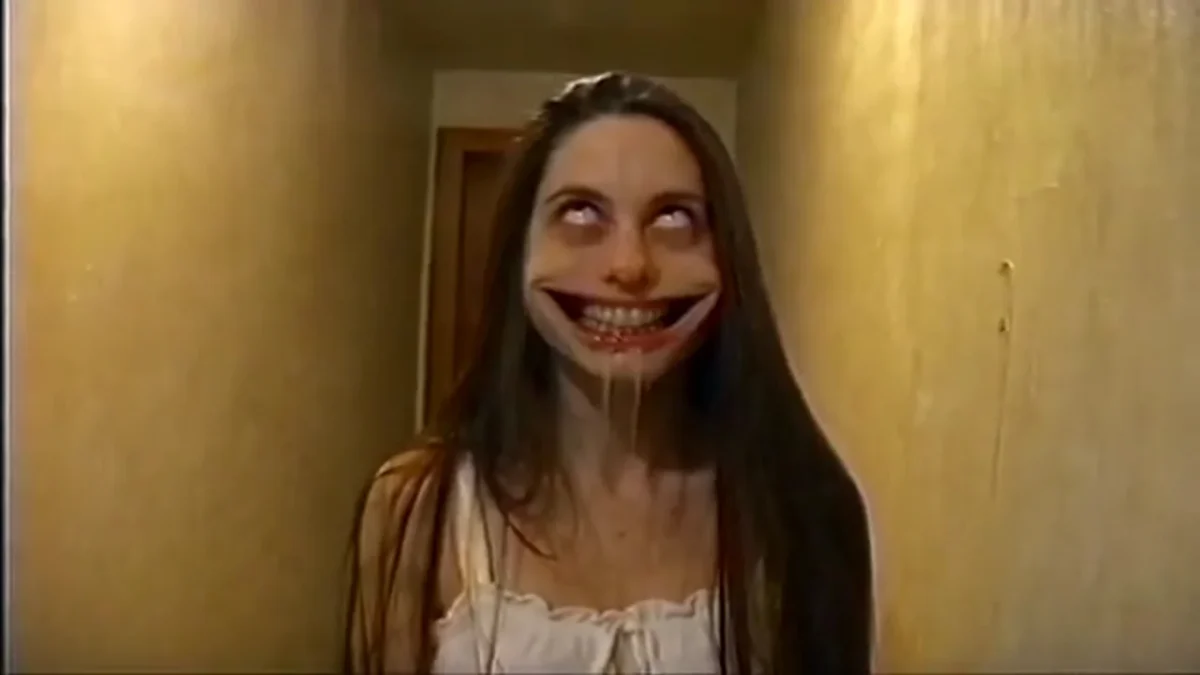
A person in a white nightgown turns at the end of a narrow hallway, walks toward the camera with rolled-back eyes and a stretched grin, then lunges. To make the Halloween Haunted Mom AI video, upload two photos: the first casts the haunted mom on the right, and the second casts the kid by the camera on the left. The result follows a 23-second horizontal 16:9 prank clip.
The order is easy to mix up. You aren’t uploading a “before” and “after” photo of the same person; you’re casting two separate roles. Decide who gets the scare and who reacts in the opening seconds before either of you reaches for a selfie.
Put the scare in the first photo slot
The live template form labels the first required upload “The haunted mom,” specifying the person on the right. This character starts facing the wall at the far end of the hall. The figure turns, approaches with a huge grin and white eyes, then jumps toward the lens as the picture glitches. Whoever is in photo one plays that role, regardless of their gender. The nightgown comes from the source scene; the face and hair come from the photo.
Choose a well-lit, face-forward image of just one person. You don’t need to arrive in costume. In fact, painting white eyes or a giant smile onto the upload gives the generator less clean facial detail to work from, and the template already supplies those effects. Let the source clip handle the scare. Use the photo to give the person a recognizable face.
The second required upload is “The kid,” the person on the left. That character stands near the camera early in the video, so a sharp photo matters even though the screen time is short. Don’t use a group shot and hope the model guesses which friend to pick. One person per slot.
If you cast friends or family, get their permission for this specific horror edit. A stretched grin placed on someone’s likeness can feel very different from an ordinary Halloween portrait. Keep the post clearly fictional rather than passing the footage off as a real family incident.
Keep the hallway prank readable
The source preview on Trendai is the reference video, not a personalized sample. Its progression does the work: someone waits by the camera, the figure down the hall turns, the face gets uncomfortably close and the recording breaks up at the lunge. That’s a small story. You don’t need to add a second monster or invent a different ending in your caption.
When reviewing a generation, look at the opening first. Is the kid near the camera the person from slot two? Then check the turn at the end of the hall and the approach. Slot one should remain recognizable as the haunted figure even as the eyes roll up and the smile stretches beyond a normal expression. Those last seconds can blur on purpose. A bad likeness isn’t always obvious if you only watch the jump scare once.
The template keeps the source’s handheld home-video movement and original sound. It doesn’t generate a new voice for either person. This is a fixed 23-second horizontal 16:9 clip, with 480p and 720p choices in the form. Don’t call it a vertical 9:16 effect just because you’re planning to post it on TikTok; a tight vertical crop may cut off the kid on the left or hide the distance down the hall that makes the scare work.
Make the video without swapping the two people
- Open Halloween Haunted Mom. Upload the person who plays the nightgown figure to the first slot, labeled for the haunted mom on the right.
- Upload a different, consenting person’s clear photo to the second slot for the kid on the left. Check both thumbnails before generating; the labels refer to screen roles, not your photo’s left or right side.
- Choose 480p or 720p after reading the current credit cost on the form. Generate the 23-second clip in its horizontal 16:9 format.
- Watch the result from the start with sound. Check that both roles match the right photos, then pause on the hallway turn, the grin and the lunge to look for a face that abruptly changes.
The source has a grainy home-video look. More resolution can help faces, but it can’t turn the reference into a spotless studio shot; don’t promise your collaborator a clean portrait from the last glitched frame. A steady face in the clearer middle of the approach is a fairer test.
Post the prank as a staged scare
A short caption can make the casting legible: “She said she had one more Halloween costume to show me.” If the first upload isn’t literally your mother, that’s fine; “mom” names a role in this template, not a relationship the AI verifies. Tell viewers it’s an AI Halloween edit and avoid framing it as proof that someone was actually attacked. The video is a staged jump scare, with an intense grin close to the lens; give sensitive viewers some warning if your platform offers one.
This is different from the Haunted Elevator Halloween AI Photo guide, which covers a still image framed around an elevator doorway. Haunted Mom is a two-person moving scene with a brief left-side role. Before posting a cropped version, replay the first seconds on your phone and make sure that kid is still in the picture.