Haunted Elevator Halloween AI Photo: Frame the Doorway
Make a Haunted Elevator Halloween AI photo from one selfie. Keep the lantern, doorway and your face readable in the final 3:4 portrait.
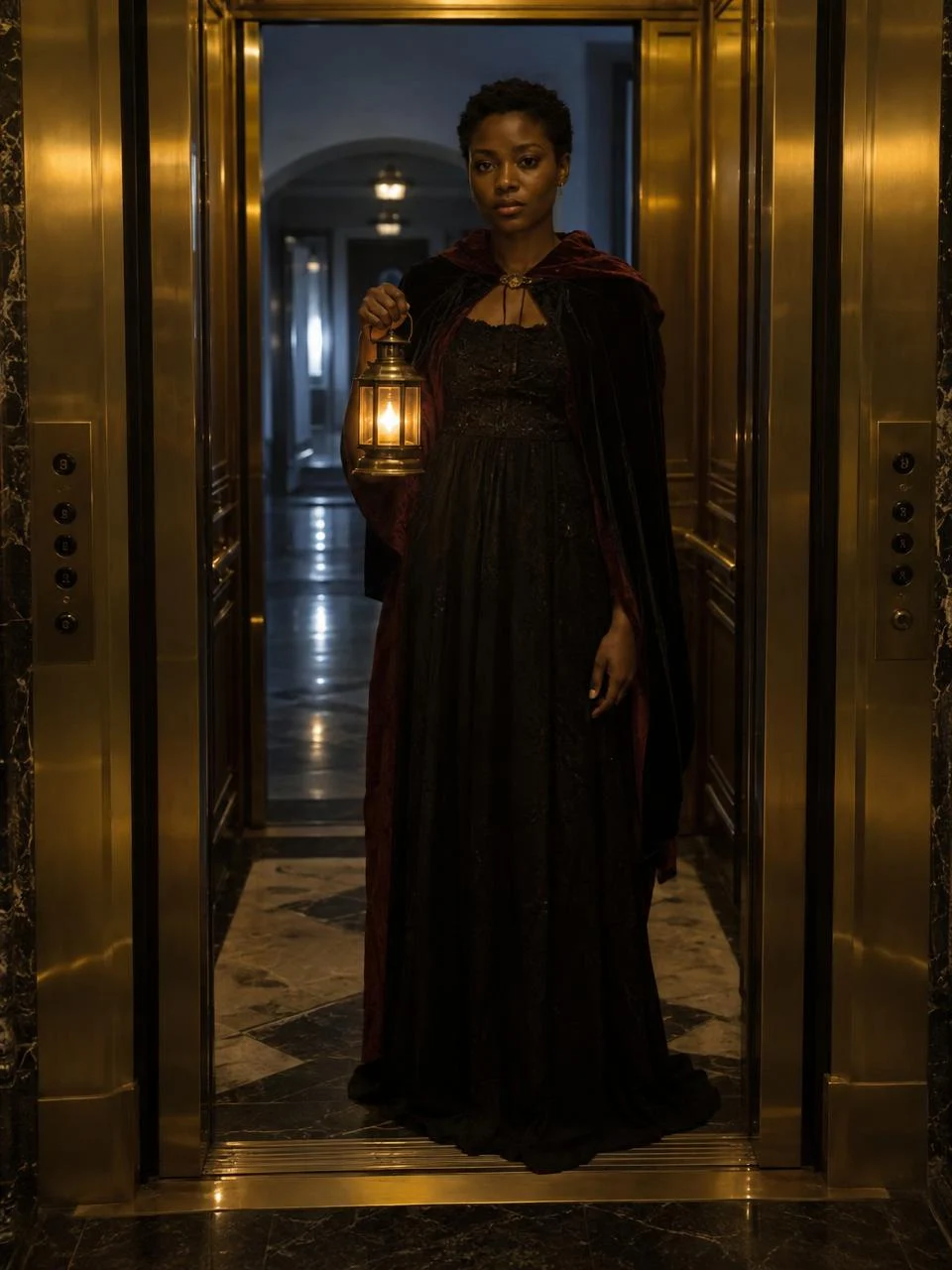
A lantern glows inside a brass elevator while the hallway behind it stays cold and empty. That is the Haunted Elevator Halloween AI photo: a staged portrait built from one clear selfie, not a video clip. Upload a photo with your face visible, choose this specific style, and inspect whether the generated doorway still frames you before you post it.
The doorway is the story
The Haunted Elevator style sets up a tiny horror scene without showing a monster. Warm light inside. A colder hallway beyond the doors suggests something might be waiting there, while the lantern keeps the subject easy to see. You don’t need a ghost in the caption. The corridor is enough.
The sample shows a person holding a lantern in a dark dress, standing between gold-toned elevator panels. It’s a preview. Your output isn’t promised to match it pixel for pixel, because your own face is the point of the upload and the elevator scene is generated around that reference.
Think about the crop before choosing your selfie. A profile-picture crop may cut away both door edges, leaving a nice portrait but no elevator story. Keep the doors. A vertical story can work too, provided you check what the app hides behind its username and reply bar.
I’d keep the first version as a still. A slow zoom or flickering light added later can be fun, but don’t turn the image into a fake security-camera clip and claim it records a real incident. Let the hallway lie. Don’t lie to the viewer.
Choose a selfie the lantern can work with
The live form asks for one person with a clearly visible, well-lit face. Use a sharp photo with the eyes uncovered. If your only source image is a tiny face at the back of a group selfie, crop to the subject first or pick another photo. The generator can’t infer a distinctive expression from a few blurred pixels.
Use even light. The style already has a warm lantern against a cool hall; a strong colored selfie may fight that contrast, especially when your face has to remain recognizable next to the bright lantern. Keep your usual hairline visible. A hand across the mouth can make the resulting face hard for friends to recognize, even if the outfit looks cinematic.
This isn’t a custom scene slot. The form offers one required photo and no separate field for a corridor, costume or lantern. You can pick a different selfie, but you aren’t directing the light with a text prompt on this page. Want another setting? Choose another style rather than describing one in a caption and hoping the picture agrees.
Using a friend’s face? Ask first. A realistic Halloween portrait of somebody else can travel farther than the private joke it started as. If the result could be mistaken for a real photo of them at a hotel, call it an AI Halloween edit in the post.
Generate and check the edges
- Open the Haunted Elevator photo generator. Confirm the Haunted Elevator style is selected, then upload one clear selfie of the person you want in the frame.
- Review the generation cost shown on the form before proceeding. The style page specifies one 2K portrait in a 3:4 format per generation. That is an image, not a timed scene with audio or motion.
- Open the result at full size. Check the face first, then the lantern hand and the vertical lines of the elevator doors. If the doorway bends or the fingers blend into the handle, a phone-size preview might hide it until after you’ve posted.
Look behind you. The hallway should recede behind the subject, not swallow half the face or turn a doorframe into a second arm. A faint odd detail can add to a fictional horror portrait; an extra hand attached to your shoulder is a different kind of surprise.
Face looks off? Change the input selfie before trying another generation. A cleaner face with less shadow gives the style a more dependable reference. If the face works but the framing doesn’t, don’t crop aggressively to disguise the doorway. That trades away the most recognizable part of this particular style.
Post it as a Halloween portrait
A line like “the elevator stopped on a floor that isn’t on the buttons” gives the still a story without inventing an actual event. Keep the caption short enough that viewers look back at the unlit corridor. If you add text on the image, put it in a margin rather than over the lantern or your face.
For a different Halloween mood, the Choice Zombie Love Story guide covers a two-person moving scene. Haunted Elevator is simpler: one photo, one invented location and one moment before anything happens. Export the full portrait first, then make a platform crop only after checking that the doors, lantern and hallway remain visible.