How to Make a Convertible Drive Recast AI Video
Make a Convertible Drive Recast AI video from one portrait: cast the driver, check the night-cruise cuts and post it as a fictional edit.
To make a Convertible Drive Recast GTA 6-style AI video, upload one clear photo of the person you want behind the wheel. The template replaces only the driver in a neon-night convertible scene, not the friends in back. Choose a visible face and upper body, then inspect the steering-hand shot and audio before sharing your fictional edit.
The back seat sells the scene
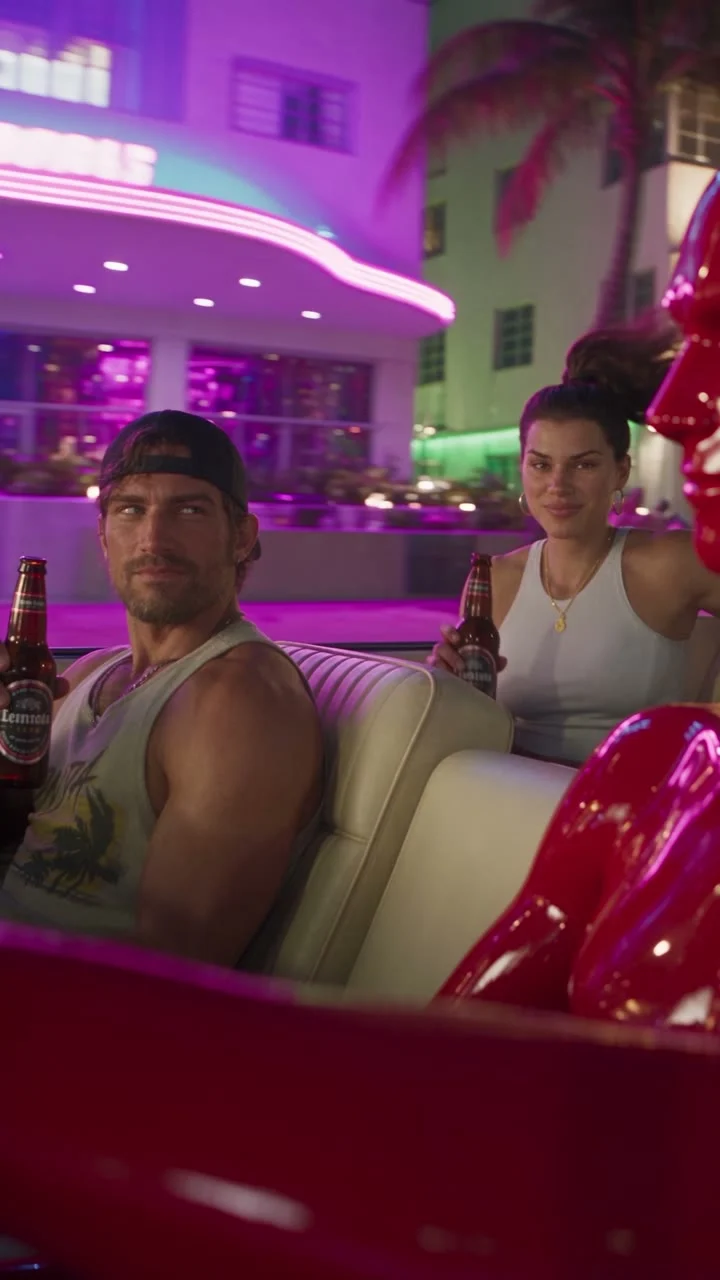
The Convertible Drive Recast template follows a source clip of a black convertible cruising past palm trees and lit hotels at night. The camera cuts from the wheel to the driver’s face, catches two friends in the back seat with bottles, then opens up to the car on the boulevard. Those passengers are the social proof inside the joke: your character looks like they already have a whole night planned.
Don’t pitch this as a chase. The car cruises. A caption like “me after saying I’d be home by ten” fits the relaxed back-seat energy better than a fake police pursuit, and it leaves the viewers a beat to notice who’s driving. The reference scene has its own people and timing; your result needs a separate watch before you can claim any detail survived the recast.
The poster is a source still, not a test of your upload. It shows the two seated passengers against pink-lit buildings, with glossy red material at the right edge. The person you upload belongs at the wheel, not in either of those visible passenger seats. The source preview is likewise reference footage rather than a personalized output.
This is a different job from the Speedboat Getaway Driver guide. That template puts the driver at a pier waiting for a running crew before the boat leaves; the convertible keeps the friends seated behind you during a leisurely night drive. Use the boat for an escape punch line. Use this one for an arrival or “we’re going out” mood. Both recast one driver, but their stories don’t land the same way.
One photo, one driver
The live form asks for one person in its only required “Your photo” upload. It asks for one clear face. The form says a well-lit upper body works best. It accepts JPG, PNG or WEBP. There is no passenger-photo field on this form, and no cast selector to swap the two friends. Keep any friend who wants to appear in the back seat out of your promise to them: that isn’t what this upload does.
Pick a waist-up picture in which your face isn’t swallowed by sunglasses or a phone. The shot has to read in the driver’s close-up, but it also has to survive the quick cut to the hand on the steering wheel. Give the model a visible shoulder line and a bit of clothing, since this template says it carries your outfit into the driver role. A cropped face-only selfie makes the wardrobe transition harder to judge.
You don’t need to stage yourself inside a car. A simple wall and even light make it easier to see your hairline and jaw when you’re choosing between photos. Avoid a second face in the background. If your favorite group photo is all you have, crop to one adult with enough room around their head and shoulders, and check that the crop isn’t blurry at full size.
The scene starts in the dark, but your upload shouldn’t. A dim, colored selfie may feel like a perfect match for the neon boulevard; it also hides the facial detail the driver close-up needs. Start with an evenly lit photo, then let the scene carry the color. This is casting, not color grading.
Make it, then watch every cut
- Open the template and upload your own photo, or a photo of an adult who clearly agreed to this fictional portrayal. Keep one person in frame. Don’t upload a celebrity, a stranger, a minor or someone whose permission you haven’t got.
- Check the form’s resolution choice and the credit amount shown in your session before you generate. The live form shows a 15-second vertical 9:16 video, with 480p selected and 720p offered. Don’t treat an old screenshot’s credit figure as today’s price.
- Watch the downloaded result at normal speed and again paused at the driver’s face and steering-wheel cut. If the face, hair or hand changes oddly, try a clearer upper-body photo instead of covering the mistake with a fast caption.
Check the back-seat cuts too. The two friends should remain the scene’s passengers; your photo is meant for the driver alone. Look for a stranger’s face turning into yours or an outfit appearing on the wrong person. Those are reasons to rework the source portrait or skip posting that export, not proof the reference clip was wrong.
The form labels the format “15s · 9:16 · source audio.” That describes the intended setting, while the source preview’s soundtrack only tells you what the reference contains. Play your actual export with sound before editing a post: confirm what came through. Check the rights for any audio you decide to add in the platform editor. No poster can answer that for you.
Give the cruise a reason to exist
A night-drive edit needs a small premise or it’s just another car video. Make the first on-screen line about a familiar social lie, like “just one drink,” and let the two passengers and the boulevard contradict it. If the driver looks serious, make that the joke: the person who said they weren’t going out is suddenly managing the whole evening. Don’t describe the clip as footage from a real night you filmed.
Keep the text high enough to clear the car and faces, then preview it in the posting app with its interface visible. The source is already vertical; a tighter crop may cut off one of the passengers and flatten the joke. Leave a clean beat before the caption appears so viewers can register the car. If you need to trim for a loop, preserve the wheel-to-face change and check the cut back to the start rather than assuming a smooth join.
Call it an independently made, GTA-inspired AI edit, not a trailer or an official Rockstar collaboration. Don’t borrow an original game soundtrack or unrelated creator footage just because the look reminds you of a franchise. A clear fictional label is especially useful if your own face is in the driver’s seat; it keeps a playful recast from reading like a claim that the cruise happened.
Before you publish, replay the file on your phone without headphones. Make sure the first caption is legible over the bright hotel lights and the final frame doesn’t freeze on a warped hand. If the source sound hasn’t carried into your export, decide on licensed audio in the posting editor only after you’ve checked the clip you actually received.