How to Make a Christmas Photo Strip AI Video
Make a Christmas Photo Strip AI video with the correct left and right photo slots, then check faces, source audio and framing before posting.
To make a Christmas Photo Strip AI video, start with a clear photo of yourself for the left side of the booth and, if you want a real duo, a consenting friend’s photo for the right. The template turns those two places into a moving black-and-white strip; your job is to choose faces that stay readable through its quick poses, then check the finished clip before posting.
The strip is a tiny story, not a holiday filter
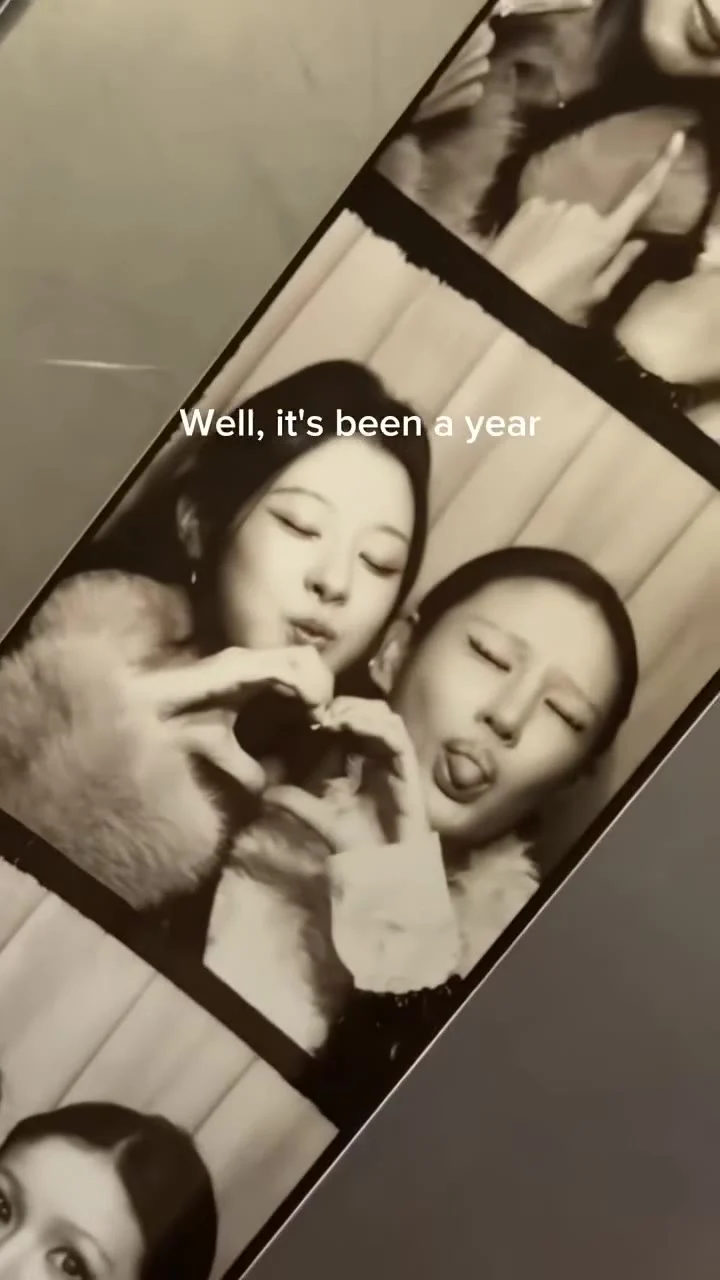
The Christmas Photo Strip template follows a photo booth strip as the camera moves past successive frames. The source scene shows two people making heart hands, peace signs and cheek-to-cheek poses. That sequence matters more than the Christmas label. Each frame should feel like another beat in a shared memory, not the same selfie copied into four boxes.
On the live template form, the output is listed as 17 seconds in a vertical 9:16 frame, with source audio. Its preview is labeled as a source reference clip, not a sample made from your uploads. A poster can show you the framing and the black-and-white look, but it cannot tell you how your own faces, hands or audio will render. Treat the reference like a shot list, not a receipt for your result.
The booth layout creates a specific trap: the strip moves, but the people are meant to be recognized across multiple little pictures. A face that looks great in one close-up can disappear when hands cross the cheeks or when the camera passes a narrow frame. Aim for familiarity over glamour. Small faces need clear features.
Put the right person in the right slot
The form labels the first upload “Your photo: the left one” and marks it required. It asks for one person with a clear, well-lit face. The second upload, “Friend’s photo: the right one,” is optional and is also a single-person photo. The form accepts JPG, PNG or WEBP for each photo. Left and right come from these labels, not from whichever person looks more prominent in the poster.
For your own slot, pick a head-and-shoulders image with your whole face visible. Don’t make the generator guess what sits behind sunglasses, hair or a hand on your cheek. An ordinary daylight portrait can be more useful than a heavily edited party shot because the booth scene already supplies the atmosphere. Avoid a group photo that forces a guess about which face is yours.
For the friend slot, get permission before uploading. Pick a similarly clear single-person photo, ideally with comparable head size and camera angle to yours. The faces need to read as a pair even after the scene changes both people’s poses. Different backgrounds are fine; mismatched visibility is the bigger problem. Both eyes should show. If your friend is half hidden by a phone, find another picture.
You can leave the second slot empty. The page says the unassigned person keeps their original look in that case. That can work for a deliberately one-sided edit, but don’t caption the clip as a photo booth memory with a specific friend whose face you never supplied. It’s a fictional AI portrayal either way, not footage of a visit you both made.
Make it and review the moving frames
- Open the Christmas Photo Strip creation form. Upload your solo portrait in the required left slot. Add your friend’s approved portrait to the optional right slot only if you want to personalize both people.
- Check the resolution choices and current credit estimate in the form before generating. The displayed choices include 480p and 720p. If facial detail is the point of the post, consider whether the sharper option fits your budget rather than treating a tiny preview as final quality.
- Generate and watch the full 17-second result before you post. Pause at every new booth frame: are the same two faces readable, do fingers cover an eye, and does a pose turn one person’s face into an odd blur? Look at the first and last frames too, since a cover crop may land on either one.
Check the output with sound on, then again muted. The form says “source audio,” and the reference shows lyric text, but I haven’t tested what a personalized export retains or what posting rights that audio carries. Listen to your own file. Silent autoplay can fool you. Check the lyric overlays for legibility and decide whether you have permission to use the audio on your destination platform; if not, use licensed audio available in the posting editor and make sure any baked-in source sound doesn’t clash. Don’t promise your friend a particular song until you’ve checked.
The strip is vertical already. Resist zooming in just to enlarge one face: a tight crop can cut off the other person’s pose or the black separators that tell viewers these are separate booth frames. Preview the upload in the app where you’ll publish, especially if it places captions or account buttons over the right edge.
Give the pair a reason to be in the booth
The best caption is a small, honest premise: “Our holiday card if we ever found a photo booth” or “A booth date we made up.” Those are posting ideas, not claims that the scene happened. If your friend is part of the joke, show them the export and get approval for the final portrayal, not just the original photo. Mark the result as AI-made where the platform asks you to disclose synthetic media.
This isn’t the same joke as a solo costume entrance. The Dance With Santa guide is about a moving dance partner and timing a performance; here the payoff is watching two faces return in a sequence of little still-like poses. Give viewers enough time to notice the second face. A caption that identifies the relationship, like roommates or long-distance friends, does more work than a generic “Christmas trend” tag.
If the hands form the heart cleanly but one face drifts between frames, don’t hide it under a frantic cut. Try a more frontal portrait for the weak slot before spending effort on captions. If the lyric text covers a face in the final frame, choose a different thumbnail frame rather than cropping away half the strip. The booth frame is the whole gag. Keep those black borders visible.