How to Make a Speedboat Getaway Driver AI Video
Make a Speedboat Getaway Driver AI video from one photo: cast the person at the wheel, check the 15-second chase and post a fictional edit.
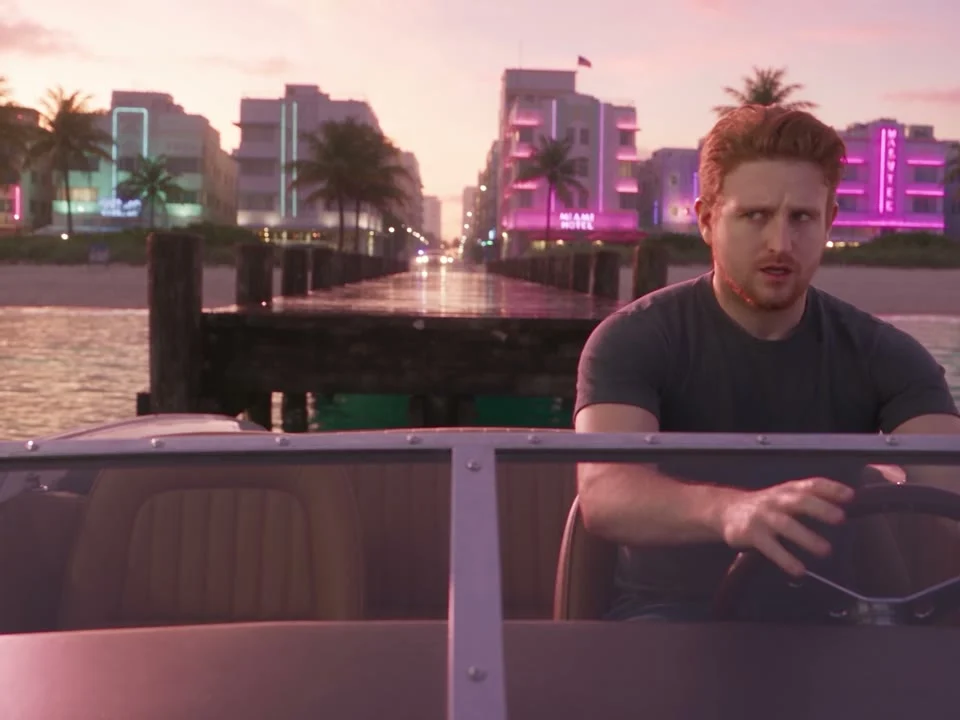
To make a Speedboat Getaway Driver GTA 6-style AI video, upload one clear image of the driver you want at the wheel. The template places that subject in a fictional pier getaway with a running crew and police behind them. Pick a photo that shows the face and upper body, then check the finished clip before posting it as an independent AI edit.
The driver is the whole joke
The Speedboat Getaway Driver template starts with someone waiting at a speedboat’s wheel while the rest of the crew races down a neon pier. A red car and police give the escape its urgency. The driver urges the others on, they board, and the boat pulls away. It’s a small role with a surprisingly big job: the face at the wheel has to sell both the anxious wait and the relieved exit.
Don’t cast the person carrying the bag. That isn’t the upload role. On the live form, the only required image field is labeled “Your photo, a character or your pet.” It replaces the driver, not the two people sprinting toward the boat. There aren’t separate crew uploads or a setting selector on this form. If you wanted a custom friend running down the pier, this isn’t the control that does it.
The page labels its reference footage as a source preview, not a generated result. The cover is another source still: it shows a man at the wheel with an empty boat seat beside him, a pier behind him and pink-lit buildings across the water. Neither asset tells you how your own face will render. Keep that distinction when deciding whether the edit is ready to share.
Give the wheel a face it can keep
Start with a photo of one adult who agreed to appear, an original character, or your own pet. The upload guidance on the live form asks for one subject with a clear face and accepts a photo, cartoon, anime image, 3D render or drawing. Don’t upload a group selfie and hope the driver turns out to be the person on the right. Crop first.
A waist-up shot gives the edit both a face and an outfit to work from, and a plain background makes the hair easier to separate when the driver’s head turns toward the pier. Keep the mouth visible. The scene includes the driver calling to the crew, so a hand across the lips makes any attempted dialogue harder to judge. Side-on photos may look cool in your camera roll but make those quick glances at the pier harder to read. Use a near-front view when you have one.
For a pet, choose a frame where the eyes and muzzle aren’t buried in a blanket or pressed against another animal. The boat-wheel premise is already absurd. Let that be the gag. Don’t add a fake claim that your dog really helped rob a bank, even as a joke caption that could be mistaken for actual footage.
If you cast yourself as the driver, your own photo also makes the caption more personal. The wait at the wheel becomes “me when my friends say they’re almost here,” with the fictional chase doing the exaggerating. That’s a different joke from posing as an actual game character. Keep the edit unofficial, and don’t use somebody else’s likeness without permission.
Make the 15 seconds work
- Open the exact Speedboat Getaway Driver page. Choose one image for the driver field. There is no second photo role to fill.
- Check the form before spending credits. It currently shows 15 seconds in a 4:3 frame, a 480p or 720p resolution choice and a source-audio label. The displayed credit amount depends on the selected setting; use the current amount shown in your session rather than an old screenshot.
- Generate the clip and watch the entire export, not just the thumbnail. Pause at the wheel, the crew’s arrival and the pullaway. Does the same driver’s face survive those changes? Are the hands plausible on the wheel? Can you still tell where the running crew is in the wide shots?
That 4:3 frame matters. A tight 9:16 crop can chop off the running crew while leaving only the person steering, which removes the setup for the escape. If you’re posting on a vertical feed, try fitting the full frame on a tall canvas rather than automatically filling the screen. Put any caption in unused space. Check your platform’s safe areas before publishing; a giant caption over the pier hides the reason anyone is hurrying.
The page describes source audio and dialogue in its reference clip, but a labeled reference is not proof that your particular export has clean speech, intact sound or believable mouth movement at the precise moment the crew boards. Listen to the file you downloaded. If the mouth, voice or timing feels off, don’t write a caption that depends on a perfectly delivered line. If you add music later, use audio you have rights to use in that posting context.
Give the escape a posting angle
The best hook here is a specific reason your driver is waiting. “When your group chat says five minutes” lets the crew’s late sprint carry the punch line. “I volunteered to drive once” makes the nervous look at the wheel the joke. Those are caption ideas, not claims about what the generation will show. Pick one that still makes sense if the export’s dialogue is imperfect.
For another GTA-inspired format, the GTA 6 loading-screen photo guide deals with a still image and its graphic treatment. This speedboat template has a timed chase and only one personalized role, so its success depends on the driver’s face remaining recognizable across the movement. Don’t copy a still-image caption strategy that needs viewers to read tiny on-screen details.
A fictional game-style heist isn’t documentary footage, and this template isn’t an official Rockstar Games promotion. Say it’s an AI-made GTA-inspired edit when posting; use the platform’s synthetic-media disclosure when required. Avoid official logos, copied game footage or unlicensed soundtrack in your added edit. Ask the person in the upload for permission before sharing, even if they agreed to the original photo. Their face is doing the getaway here.