How to Make a Cat Barista Duo AI Video
How to make a Cat Barista Duo AI video with the right pet in each upload slot, readable kitchen action and a checked vertical export.
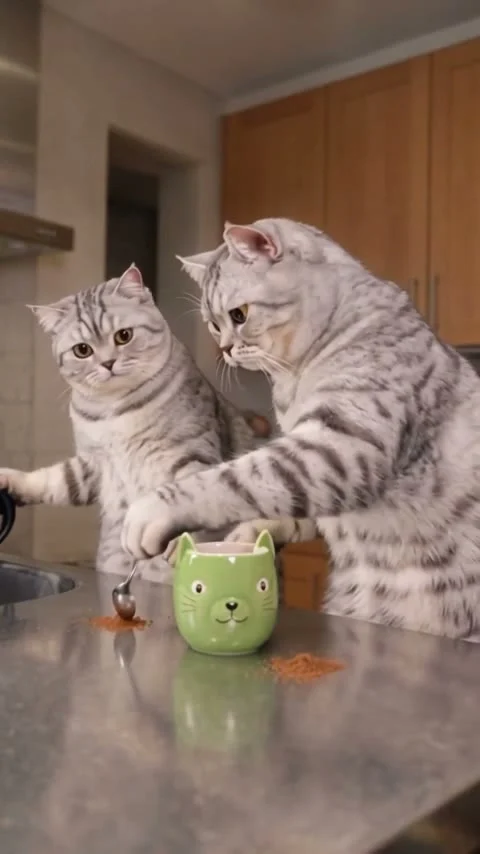
To make a Cat Barista Duo AI video, give the pourer and the helper their own pet photos in the Cat Barista Duo template. The reference scene puts two cats at a kitchen counter with a kettle, a green mug and a milk spill. Your real job is to make both animals recognizable through the busy handoff, then check the generated clip before you post it.
The kitchen gag has two leads
This isn’t a generic clip of cats dressed as baristas. The source preview on the template page shows one cat handling the kettle and milk while the other works by the mug. The counter goes from careful drink-making to a small mess. That change is the joke. Save the spill. If you start with a caption that gives away the spill, you flatten the payoff.
Watch the source reference before choosing photos. The poster is a single kitchen still, not a promise that your pets will appear in exactly the same pose in the finished video. In that still, two silver tabby cats stand behind a shiny counter, with a green cat-face mug and a spoon in front of them. The pour and the spill need a moving clip to make sense.
There’s a useful difference from the Pet Duo Dance guide: that scene depends on two animals reading as dance partners. Here, the eye has to follow a prop handoff. The mug carries the scene. Don’t cover it with text or a sticker when you edit the post.
Cast the pourer first, then the helper
The live form calls its first required upload Pet 1, the pourer. That pet replaces the smaller cat on the left that pours from the kettle and milk bottle. Its second required upload is Pet 2, the helper, replacing the larger cat on the right that stirs and helps. Those roles come from the form labels, not from guessing which animal seems closer to the mug in the poster.
For Pet 1, use a photo with the whole head and enough body to show its size and coat. A front or three-quarter view makes distinct facial markings easier to read when the scene cuts between actions. If the animal has a white blaze or one dark ear, keep that detail unobstructed. Keep the whiskers in frame. They matter here.
Give Pet 2 equally clear lighting, preferably from a similar direction. A helper shot taken in a dim hallway and a pourer shot in direct sun can make the pair feel like they came from different worlds. Match the photo color as closely as you can before upload; don’t paint over markings you actually want to keep. The form accepts JPG, PNG or WEBP, and its upload labels currently show a 50 MB limit per photo.
You can use two photos of the same pet if that’s the joke. But choose different angles only if you still want viewers to recognize the repeat casting; an extreme haircut, seasonal coat or filter can read like a different animal. Use photos you own or have permission to use. No stranger’s pet account is a photo library.
Make the clip, then inspect the handoff
- Open the Cat Barista Duo creation form, upload the pourer in slot one and the helper in slot two. Check both thumbnails before generation; swapping them changes the casting.
- Review the displayed resolution and credit amount in your session. The live form offers 480p and 720p, and labels the planned video 15 seconds, vertical 9:16, source audio. Pick the quality that fits your intended post rather than assuming the higher setting fixes a poor input photo.
- Generate the clip and inspect the result in your Library. The form says this template uses a three-step pipeline, so don’t interpret a longer wait as proof that something broke. Check the actual status instead.
Play your export once without captions. Can you tell which pet is pouring? Does the helper stay visually distinct beside the mug? The fast changes between the kettle, stirring and milk can hide a face for a beat; pause at each action, especially if both pets have similar tabby markings. If the identities drift, start with more distinctive source photos before trying another generation.
Then play it with sound on. The page labels the form’s audio as source audio and shows a reference clip, but that reference is not a test of your personalized export or a music license. Listen for the spill beat. Then check for a missing track or an odd cut in the audio. Check what your posting platform permits before adding a licensed song in its editor. Avoid promising viewers a specific original sound if you haven’t heard your finished file.
Keep the post about the pets, not a fake café
A short setup is enough: “I put our most responsible cat on the kettle. Mistake.” Let the helper’s response and the spill finish the joke. Place any on-screen text above the animals rather than over the mug, and use the first clean shot as your thumbnail if the messy frame makes the story impossible to read at a glance.
The template is vertical already. Keep both cats visible. Don’t crop tighter just because every other pet edit has a giant face in frame: the two cats and the mug need room at the same time. Check the preview in the actual app where you’ll publish, including any caption overlay or platform controls at the bottom. If one pet disappears behind them, move your caption instead of cutting a character out.
Label it as an AI pet edit rather than footage from a real kitchen. If you’re posting for a café or a pet brand, don’t imply the animals actually handled a hot kettle or that your product appears in the generated scene unless it really does. Keep the caption playful and let the visual joke do the work. Ask the pet owners before using their photos in a public or sponsored post.