How to Make a Pet Duo Dance AI Video
Make a Pet Duo Dance AI video with the right pet in each upload slot, better full-body photos, and a careful check of the vertical export.
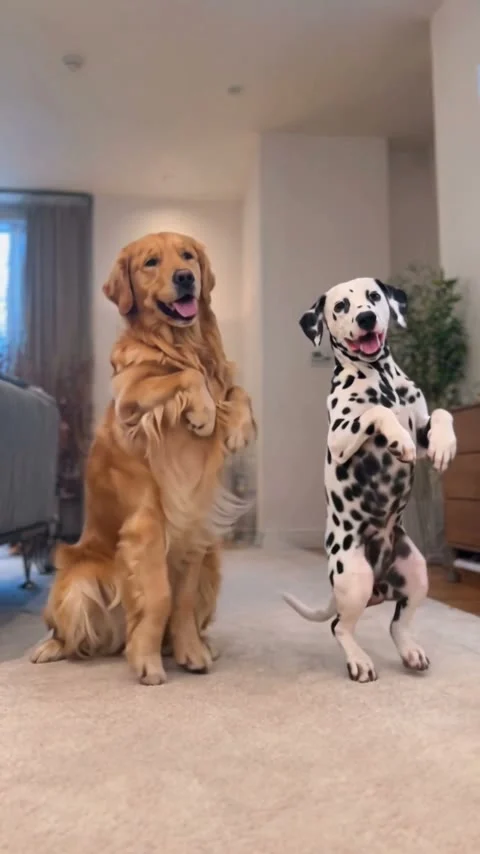
To make a Pet Duo Dance AI video, upload one clear photo of each pet to the Pet Duo Dance template: the first pet dances on the left, the second on the right. The form makes a 15-second vertical clip set in a living room. Check both animals’ markings and paws before posting; the sample isn’t your export.
Two pets, two actual roles
The scene is a living-room dance, not a pet portrait that happens to move. Two animals rise onto their back legs and wave their front paws beside each other. Both pets stay in view. That side-by-side setup is the whole joke: viewers can pick their favorite dancer without waiting for a cut. If you’re making it with pets who share a home, the natural hook is their relationship, not a claim that they really stood up and rehearsed.
The live Pet Duo Dance form labels both uploads as required. “Pet 1: dances on the left” takes a photo of one pet with its whole body visible. “Pet 2: dances on the right” takes a second photo with the same framing. These aren’t extra angles of one pet unless you deliberately want the same animal dancing with itself. The room comes with the template. There is no separate background upload on this form; the choreography belongs to the template.
The form lists 15 seconds, 9:16 vertical and music. It calls the page preview a sample output made with example inputs, while the cover is a frame of that sample. Neither is evidence that your two particular animals will keep every stripe or ear shape throughout a new render. The displayed generation cost can change; look at the button in your session before submitting.
Pick photos that can survive the paw wave
For the left slot, pick the pet whose face you want the viewer to recognize first. A dog with distinct ears or a bright collar is easier to follow when both animals move at once. Then choose a similarly legible image for the right slot. Keep the camera height similar. Match the lighting, too, so one pet doesn’t look like it belongs in an entirely different room.
Full bodies matter here. The template asks for the whole pet, because the action involves hind legs, front paws and a visible stance. A tight face crop may look adorable in a profile picture, but it gives the animation less information about limbs. Don’t cut off the feet. Leave a little space around tails, too, especially if one animal has a long or fluffy one.
Use one animal per file. If another pet appears behind your intended dancer, the subject can become ambiguous before the first paw wave. A seated photo is fine if the entire animal is easy to see; you don’t need to photograph a real dance pose. Keep hands out of frame. Try to avoid a hand holding the pet up. That hand could be carried into a shot where it has no reason to exist.
The page says the setup is made for dogs and that cats or other furry pets can also work, though it warns the motion may look less natural with them. Treat that as a casting choice, not a promise. A cat that looks unimpressed by its dance partner might be funnier than two polished canine performers, but check the motion before you decide the bit works.
Make the duo without mixing up left and right
- Open the Pet Duo Dance template and put your first pet’s full-body image in the required left-dancer slot.
- Put the other pet’s image in the required right-dancer slot. Recheck the names before generating, particularly if both animals have similar coats.
- Confirm the form’s current credit amount and submit only photos you own or have permission to use.
- Watch the resulting video in full before downloading or posting. Your export is the real test. The sample preview isn’t a substitute for this pass.
Start by watching the first second without sound. Can you tell which pet is which? Then look at the moment each pet lifts its paws: check for merged paws, legs that briefly disappear, a collar that changes sides or markings that drift between bodies. If one subject loses its defining feature, swap in a clearer photo before trying again. Spending another generation on essentially the same blurry crop is a rough way to learn the lesson.
Check the last frame as carefully as the first. Short clips often get looped in a feed, and a sudden pose jump can be more distracting than a slightly soft paw. The form specifies music, but the page’s description of its sample does not verify the audio on your personal download. Play your exported file, listen for the track and confirm that you have the rights to use any audio in the place you plan to post. Clear the rights before posting. Don’t assume the sample’s soundtrack is cleared for a brand campaign.
Give the pairing a reason to exist
The easiest caption is a real detail about the pets, followed by an honest fictional setup: “The one who steals the couch versus the one who reports it. AI dance edit.” You’re giving people a reason to watch both sides, without pretending your animals performed a human dance. If your page is about one pet, the twin version can work too: upload two different full-body photos of that same pet and frame it as a face-off with itself. Check both copies for recognizable markings.
This is distinct from the older Dancing Pets trio guide, which uses one required foreground pet and optional back-left and back-right pets in a different, longer source-clip setup. Don’t carry that guide’s optional-slot advice over here. The Pet Duo Dance form needs two uploads, and its left-right casting is the point.
Keep any on-screen caption away from the pets’ faces and raised paws. In a vertical post, those areas carry the gag; text across the center can turn the dance into an unreadable pile of legs. Preview the crop in the actual posting editor and check whether its buttons cover the right-hand dancer. If they do, move your caption upward rather than cropping one pet out of the duet.