How to Make a Broke Boyfriend Hug AI Video
Make a Broke Boyfriend Hug AI video with the right hugger and optional friend photos, then check the eight-second clip before posting it.
A Broke Boyfriend Hug AI video puts you in the role of the friend giving an over-the-top thank-you hug at a perfume counter. Upload one clear photo for the hugger, then add a second photo only if the friend who supposedly paid wants to appear too. The joke needs two readable reactions, not a convincing shopping receipt.
The perfume-counter joke
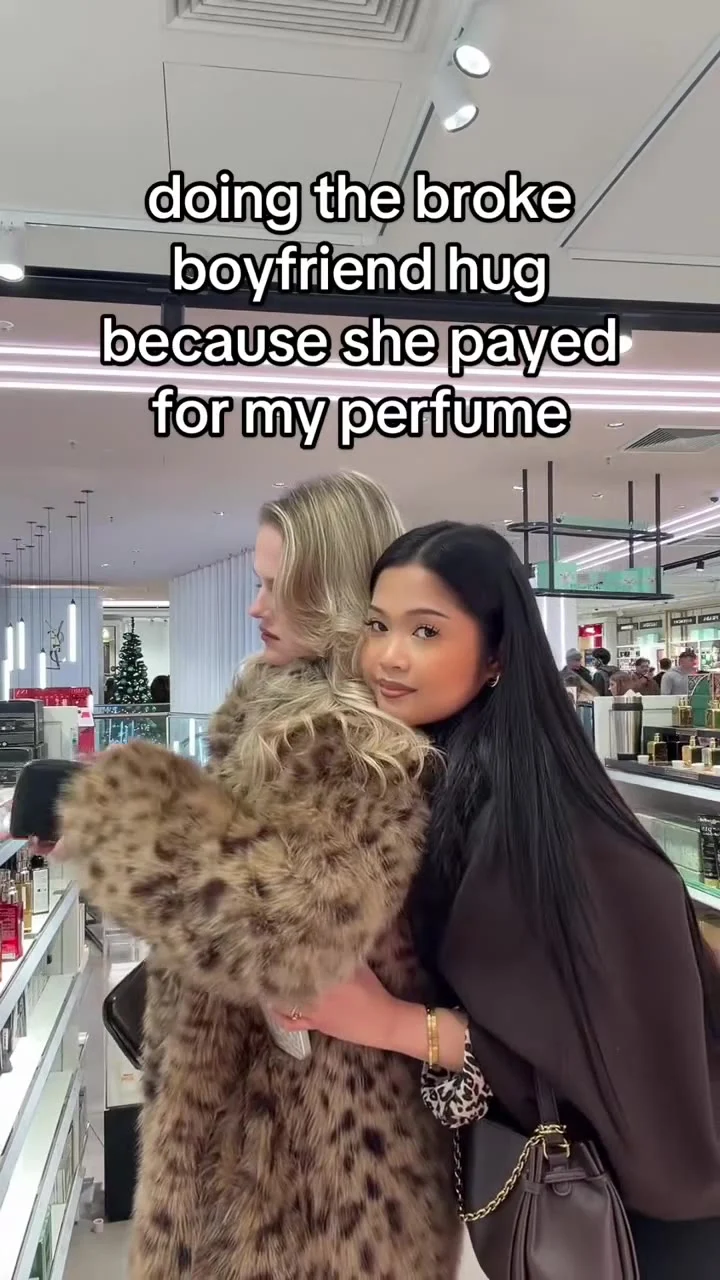
The source scene starts in a bright store. A woman in a brown coat leans around a friend wearing leopard faux fur, and the on-screen line says she is doing the “broke boyfriend hug” because that friend paid for her perfume. It’s a tiny act of gratitude played way too seriously. The reaction is the punchline. The friend being hugged barely has to move for the joke to land.
The Broke Boyfriend Hug template follows that perfume-counter embrace in an eight-second, vertical 9:16 video. Its poster shows two people standing close by a display counter, with large caption text across the upper half. That poster is a source still, not evidence of how a new face will look after generation.
Don’t make the caption do all the work. If your hugger’s face isn’t visible beside the other person’s shoulder, the viewer gets a store clip instead of a specific, ridiculous favor between friends. The setup has to be instant. The shot has to read without a long introduction. A separate post caption can explain which favor your friend did for you, even when it wasn’t actually perfume.
Cast the hugger first
The order matters here. There are two uploads, each with a different job. The live form labels the first slot “Your photo: the hugger” and marks it required. That person gives the hug. The second slot, “Friend’s photo: the one who paid,” is optional. That person receives it. These are two separate people, not two angles of one face.
Start with a straight-on photo of the hugger where both eyes and the outline of the face are easy to see. Avoid the group selfie with a half-hidden cheek; the subject is hard to isolate before a close embrace even begins. Keep the lighting even. A soft indoor portrait is more useful here than a dramatic side profile with one eye lost in shadow.
If you add the recipient, ask them first. Pick their own clear solo shot rather than cutting them out of a party picture. The difference needs to read. Two distinct faces give the little transaction a cast: one person owes the thanks, the other accepts it. Without the optional photo, the hugger is still personalized, but don’t tell your audience the second character is a specific real friend unless the export actually shows that person.
The leopard coat and brown outer layer belong to the reference scene. Your selfies are for assigning faces, not for staging a matching wardrobe shoot. If you want to tell a real inside joke, make the relationship recognizable through your caption or tag, after both people agree to be included.
Make the eight seconds count
- Open the template and upload the hugger to the required first slot. Check the thumbnail before going further: is this a solo face, rather than the person you mean to hug?
- Add the recipient’s solo photo to the optional second slot only with their permission. Leave it blank if you’re making a one-person version; don’t use another image of the hugger to fill the space.
- Review the current resolution and credit estimate in the form, then generate. The page fixes the source format at eight seconds and 9:16; a higher resolution choice doesn’t add more story beats.
- Watch the result once at normal speed and once paused near the embrace. Check which face is giving the hug, whether the two faces remain separate at contact, and whether any visible text is accurate. If a face merges or the wrong person appears to be paying, choose cleaner solo inputs before making another version.
The page calls its preview a source clip, not a personalized sample. It also labels the form’s audio “source audio,” but that isn’t a listening test of your export. Listen to the actual file. Play the downloaded version with sound on before publishing. Check whether its words, music or ambient noise suit your post, and use only audio you have the right to share; if needed, choose licensed sound inside the posting platform. Don’t promise viewers a line of dialogue you haven’t heard in the actual file.
Post the favor, not a made-up purchase
This joke works best when the caption supplies one precise debt. “She paid for my perfume” fits the original scene, but “she covered the cab home” can make the same hug feel like your friendship instead of a reenactment of someone else’s shopping trip. Don’t claim a real brand paid you, or imply you bought a bottle you didn’t buy. The store is only the setup. This isn’t a product review.
Keep the first frame’s faces unobstructed when you add platform text. The source already places big words above the two people, so another full-width headline may make the screen feel like a receipt printed twice. Preview the phone view. Check it with app controls over the picture. On a phone, the buyer’s face should still be visible while the hugger leans in.
For a different two-person beat, the Hotel Lobby duet guide is about casting performers in a dance setup, not assigning a giver and recipient inside a store. Use that format when both people need to perform; use this one when the joke is the imbalance between a generous friend and the friend who won’t let go.
Treat this as a fictional AI portrayal, even when the friendship is real. Get permission before tagging anyone. Ask both participants about their likeness, and use the platform’s AI-content disclosure tools where applicable. If a friend doesn’t want their photo used, leave the optional slot empty and write a caption that doesn’t pretend they’re on screen. After posting, check the cover frame in the feed: the embrace should be clear before anyone reads the caption.