How to Make a St Tropez DJ AI Video
Make a St Tropez DJ AI video from one clear face photo, then check the booth edit, audio and caption before posting it as a fictional party POV.
The St Tropez DJ AI video puts your face behind the decks in a crowded daytime beach-club clip. Upload one clear photo of yourself as the DJ, then check whether your face stays recognizable through the arm raises and overhead clap. Post it as a fictional party POV, not proof that you played the venue.
The scene has more than one person
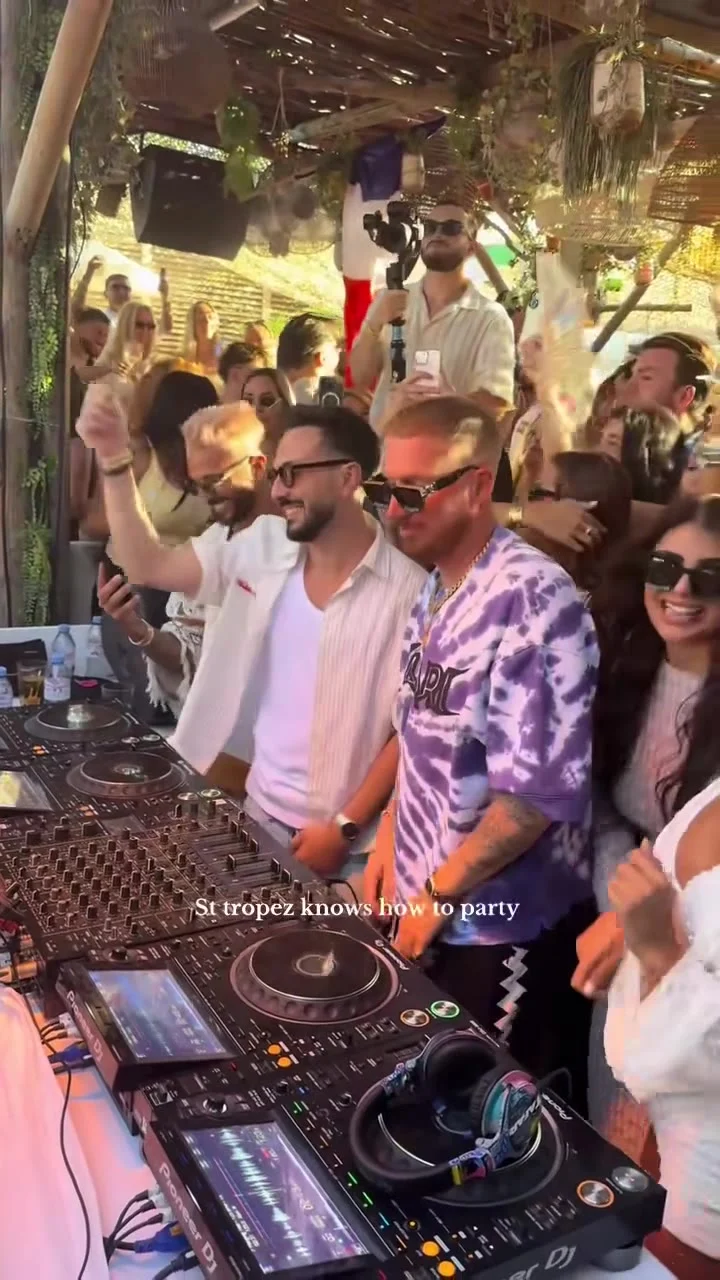
The St Tropez DJ template follows an 11-second, vertical 9:16 source clip: a DJ in sunglasses and a purple tie-dye shirt works a booth, raises both arms, claps above his head and waves toward a crowd filming him. That’s the action to watch for in your export. The other people make the shot feel busy, but the form offers only one photo slot. You aren’t casting the crowd.
Look closely at the source poster before borrowing its caption. It shows a packed booth, decks in the foreground, people holding phones and the words “St tropez knows how to party” across the lower part of the frame. The template page says that caption is removed from generated videos. A source still is a reference, not a receipt for your own export; check the lower third of the result before adding new text over it.
If you want to cast friends around instruments instead, the Desk Concert template gives the lead singer optional bandmates across a 19-second office performance. This 11-second DJ shot is the cleaner choice when the gag is you alone commanding a beach-club crowd. The booth feels like the party’s center. Your face suddenly runs it. You don’t need to pretend to know what every mixer knob does. A face that survives a fast clap is the bigger hurdle.
Give the DJ slot a usable face
The live upload form labels its single required input “Your photo: the DJ.” It asks for one well-lit person with a clear face; it does not ask you to upload a second friend or a photo of a venue. The booth and crowd belong to the reference scene. So does the clothing. A selfie in the same purple shirt isn’t required.
Pick a front-facing or lightly turned photo with both eyes visible. Harsh sunglasses, a hand over your mouth or a tiny face in a group photo make the identity harder to read when the DJ lifts his arms. Crop out distracting faces before uploading, but leave your head intact and enough room around it that you’re not asking the model to invent half your hairline. An ordinary daylight portrait is fine. Club lighting can hide half your face.
Use your own image, or get the pictured adult’s clear permission before uploading theirs. The form also requires permission for the media you use. Don’t put a celebrity, an unsuspecting friend or a child into this booth. It’s a face replacement in someone else’s reference scene, so identity mistakes can feel personal fast.
Generate for the beat, then watch the hands
- Open the St Tropez DJ creation page and upload the single DJ photo. Check the thumbnail: the intended person’s face should fill a useful portion of it.
- Choose the resolution shown in your session and read the current credit estimate before generating. The form presents 480p and 720p choices; it does not offer a second upload to fix an awkward angle.
- Review the full vertical result before saving a posting version. Pause as the arms rise, at the clap and when the DJ waves back toward the phones.
Look for a stable jaw and hairline through those cuts. Do hands cross the face without leaving an extra finger or a pasted-on edge? Is the DJ still the person you uploaded, rather than a nearby person at the booth? Watch at normal speed too. A frozen-frame glitch may be invisible on a fast first pass, while a face that flickers across three frames will read immediately on a phone.
The form specifies 11 seconds, 9:16 and source audio. That describes the template setting, not a guarantee about what your generated file will retain. Play the downloaded result with sound on and off; confirm its actual audio before you attach any licensed music in a posting editor. Don’t assume the source clip gives you rights to reuse its soundtrack, crowd footage or someone else’s recording outside the service. If you edit in an app, check its music and disclosure rules for the destination platform.
Make the caption a punchline, not an alibi
The cleanest posting angle is an obviously imaginary booking: “Me after touching one DJ controller” or “POV: they let me take the booth for one song.” Those captions match the visible joke without claiming a real St Tropez gig or promising a real crowd reaction. Label it as AI-made where your platform requires it, and avoid tagging a real venue as though it hired you. That matters more than hashtags.
Keep the text high enough to clear the controller and your app’s bottom UI, but don’t cover the overhead clap. Watch the finished vertical crop on a phone before posting. The booth fills the lower frame. Arms rise into the top half. A giant caption over the face ruins the reveal. If you’re turning this into a party series, change the joke between posts rather than recycling the same fake booking claim.
For a different one-photo party setup, the Pool Party Pet Dance guide casts an animal in a pool scene instead of a human at a DJ booth. Its photo advice isn’t interchangeable with this face-driven edit. If you need a different party template altogether, browse the trends gallery and check each live upload label before choosing photos.
Before you hit publish, let someone else watch it once without your caption. If they can’t tell which person is meant to be you, go back to the photo rather than explaining the edit in the comments. Then add the fictional POV line and check that any audio you keep is cleared for your post.