Bécane AI Video: Crop the Studio Clip for TikTok
Bécane AI video cropping starts with the mic: turn the horizontal studio performance into a vertical edit without losing the face or gesture.
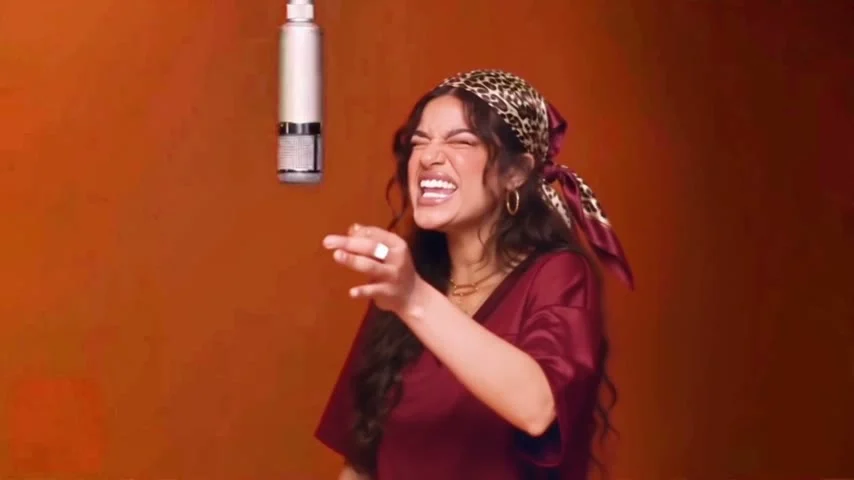
The Bécane AI video puts your face into a Yamê-inspired performance against an orange studio wall, with a hanging microphone above the singer. To post it as a phone-first clip, make a separate vertical edit of the horizontal output and check the microphone in every crop. If the mic vanishes, the whole setup loses its punch.
The microphone is part of the joke
The Bécane template recreates a studio performance from one photo. Its page describes a 27-second video in 16:9, with the song and the original performance’s lip-sync and gestures. One face replaces the performer; the orange backdrop and suspended mic tell you what scene you’re looking at. That’s the visual hook. A crop centered solely on the face feels like any other singing filter.
This is a different edit problem from the two-person Raindance clip. There, you have to preserve the relationship between two people in the wide shot. Here the relationship is between a person and a prop. Leave air above the head. Keep the mic in view. The orange wall can be plain; that’s the point. It makes a hand reaching into frame or a sudden expression feel louder.
The template page calls for a front-facing photo with the mouth clearly visible, and says it can use a person or a pet. If the goal is the face doing the singing, don’t supply a profile picture with half the mouth covered. A portrait from the chest up also gives you a better chance of keeping the shoulders and gestures readable in a vertical crop. No audition face required.
Plan two exports, not one compromise
Keep the full 16:9 version for places where a horizontal frame fits. For a vertical feed, make a second canvas and treat each shot separately. You only need position keyframes. A single center crop applied to the entire song might chop the microphone in one shot and the hand gesture in the next, even though both were plainly visible when you previewed the untouched horizontal file on your laptop.
- Watch the full horizontal clip once. Mark moments when the singer leans, reaches or turns toward the mic. Note the shot where the mic is closest to the edge of the frame.
- Open a 9:16 project and place the original video on the timeline without permanently trimming it. Add a plain background behind it while you decide where to crop.
- At the first close-up, move the frame until you can see the mouth and the mic. Zoom only as far as needed. If both won’t fit, shrink the horizontal image instead and use simple space above or below it.
- Scrub through every change in camera position. Add position keyframes where the face moves, then play the entire sequence again at phone size. Don’t let the hand gesture swing off-screen halfway through a line.
- Export the vertical version as a separate file. Keep the original so you can post it in a horizontal placement without stretching it back out.
A smaller image inside a vertical canvas is fine. The setup survives if viewers can still read the person and the hanging mic. Small can be fine. Cutting off the microphone to fill every pixel is the worse trade. This is one of those rare cases where empty orange space is doing actual work.
YouTube’s Shorts eligibility guidance says square or vertical uploads of up to three minutes, uploaded after October 15, 2024, are classified as Shorts for standard channels. The template’s 27-second duration fits within that time limit, but its original horizontal 16:9 frame does not meet the stated shape. A vertical export is a format decision. Not a magic boost in reach. Check what your particular destination calls the upload before choosing a thumbnail or caption.
Check the sound before you publish
The page says the generated performance comes with the song. That describes the output, not the permissions attached to your account or the posting platform. If you’re making a branded edit, check the music rules for that exact placement before scheduling it. An account allowed to use an audio in a personal post may have different options for a paid promotion. Don’t promise a client they can run the file as an ad just because you can play it on your phone.
Listen back after exporting. A crop shouldn’t change the audio, but a new timeline can add silence at the start or leave the final syllable hanging if you trimmed carelessly. The mouth carries the performance. When sound and image drift apart, everybody notices it. If you need to shorten the file, cut at a phrase boundary rather than slicing straight through a visible word while the mouth is open and the next camera movement is already starting.
YouTube also says a Short longer than one minute with an active Content ID claim will be blocked globally. This clip is described as shorter than that threshold; it does not follow that every use of its song is cleared. Availability and copyright treatment can vary by platform and account. Read the upload screen, especially if you’re using this for a business.
Give the caption a reason to exist
Viewers can see the orange set. You don’t have to write “orange studio singing trend” in the first line. Name the person in the edit if they’ve agreed to be named, or give the friend group the punch line that made you choose them. “My dad got one note and turned into the whole concert” works as a framing idea; don’t present a made-up reaction as something that happened. Let the video do the performance, and let the caption explain why this face is at the mic.
Keep text out of the center of the frame. The mouth and mic need room. So does that moving hand. Preview the upload in the actual app before posting. Buttons can cover the edge. So can the caption overlay. If you need a title card, put it in the surrounding vertical space instead of laying it across the singer’s teeth. Play the first seconds muted once: if the mic and face are both visible, the idea lands before the audio starts.