How to Make a Three Friends Night Selfie AI Video
Make a Three Friends Night Selfie AI video with the right photo in each role, then check the plaza dances, group frame and sound before posting.
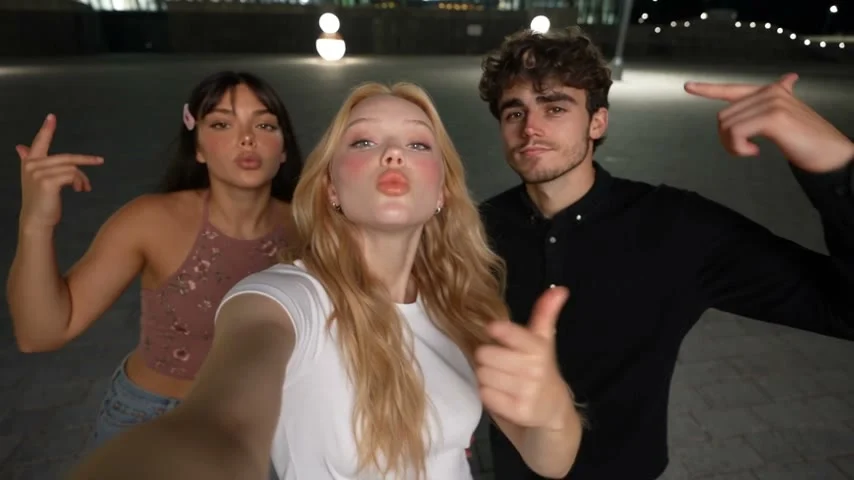
A Three Friends Night Selfie video puts one friend close to the lens, gives two others their own plaza dance moments, then pulls everyone into a final group frame. To make it on Trendai, cast the camera-facing friend first and add the two dancers in order. Check the finished clip before posting, especially the faces during the camera swings.
The scene has three different jobs
The Three Friends Night Selfie template follows a specific night-out arc: selfie-style singing, a swing toward solo dances on a lit city plaza, then a crowded reach toward the camera. It’s a group memory played like a clip somebody filmed on the way home, not a polished studio routine. The camera move does the work. If the solo shots look like three unrelated people were pasted into one night, that last frame won’t land.
The page shows a labeled sample output made with example inputs, and its cover is a frame from that sample. Neither predicts your own cast. Use the sample to understand where attention goes, not as a promise that the upload will reproduce those exact expressions or hand positions.
Unlike the Night Elevator Walk guide, which is about keeping a walking subject readable in an enclosed space, this one gives each friend a distinct camera job before the group payoff. Don’t make every portrait look like the same tightly cropped headshot. The dancers need breathing room.
Cast the selfie before the dancers
The live form opens with Person 1: films the selfie, marked required. That person holds the camera, sings into the lens and leads the group shots. Choose a single-person, front-facing picture with a clear face, ordinary lighting and no phone blocking the mouth. A low-angle party photo with a hand across the chin is tempting, but you’re asking the closest face in the video to survive a moving selfie shot. Start with a clean face.
Below it, the form groups up to two Supporting characters and labels that group optional. The visible next tile is Image 2; its help text assigns the first plaza dance and the left side of the group shots. The page’s detailed role listing assigns Person 3 the second solo and the right side. Add a different consenting person’s photo to each supporting position if you want the full three-friend story. The initial screen doesn’t present three equally required upload boxes, so don’t mistake the optional group label for a fourth cast control.
For Image 2 and the second supporting photo, favor one person pictured from head to shoes, in the clothes they’d actually want to wear in the edit. The template’s role notes explicitly call for ideally full-body shots for the dancers. Keep shoes and hands inside the source frame. If you have to choose between a dramatic cropped selfie and a plain standing photo for a solo dancer, pick the standing photo. The feet matter here.
Use separate photos of three actual friends rather than duplicating one portrait and hoping the clip invents a convincing crew. Ask each person before uploading their image, and make sure the caption doesn’t suggest the generated night out really happened. The form asks you to confirm that you own the material or have clear permission and won’t use it to impersonate somebody.
Make the video, then watch the tricky cuts
- Open the Three Friends Night Selfie creation page and put the camera-facing person in the first required slot. Add the first dancer as Image 2, then the second dancer in the next supporting slot as the form reveals it. Check the role labels again before generating.
- Read the format and credit amount on your own screen. The live form lists 21 seconds, 16:9 and with sound; its button displays a credit cost, which you should check there rather than treating an article’s old price as current.
- Generate, then review the actual file at full size. Pause on the first solo, the second solo and the crowded final reach. Check whether each dancer stays recognizable, whether hands cross faces in odd ways, and whether the first person’s close-up still looks like them after the camera swing.
The product page also describes a fixed 480p output in its how-to copy. That’s a reason to inspect the exported detail rather than pushing a heavy zoom into a dancer’s face. Keep the wide frame intact. A blunt vertical crop can cut the first dancer from the left or the second dancer from the right in the group shot; if you make a vertical version for a feed, reframe each beat separately so both sides get their moment.
The template lists sound, but the sample’s audio is not proof of what your personalized export will carry or what you have rights to post. Listen before you post. If you replace or add music in a posting editor, choose audio you’re allowed to use on that platform. Don’t imply the three friends recorded a live vocal take if the voice is synthetic.
Post it like a memory that hasn’t happened
The best hook is a hypothetical group chat premise: "Our night out if we actually made it past the group chat." Then let the selfie establish the narrator before the two solo dances break up the frame. That angle fits the obviously staged camera choreography and doesn’t pretend there’s documentary footage of a night nobody attended.
Ask them to approve the edit. Say it’s AI-made in the caption or use the platform’s applicable disclosure setting, especially if their likenesses look realistic. If a face warps at the reach toward the lens, choose a different take or trim that moment rather than hiding it behind a misleading real-life claim. A quick freeze on the final clean group frame is a better sign-off than a close crop that erases one friend.