How to Make the Unforgettable Car 24 Card Video
Make the Unforgettable Car 24 card video with one selfie. Pick the right background, check the digits and car reveal, then post a clean wide edit.
The Unforgettable Car 24 card video turns a single selfie into a wide-shot car reveal: you flash two colored cards at the lens, then back away toward a silver coupe. To make it on Trendai, upload one clear photo of yourself; an optional second image changes the street behind you, not the person in the shot.
The trick is the reveal, not the car photo
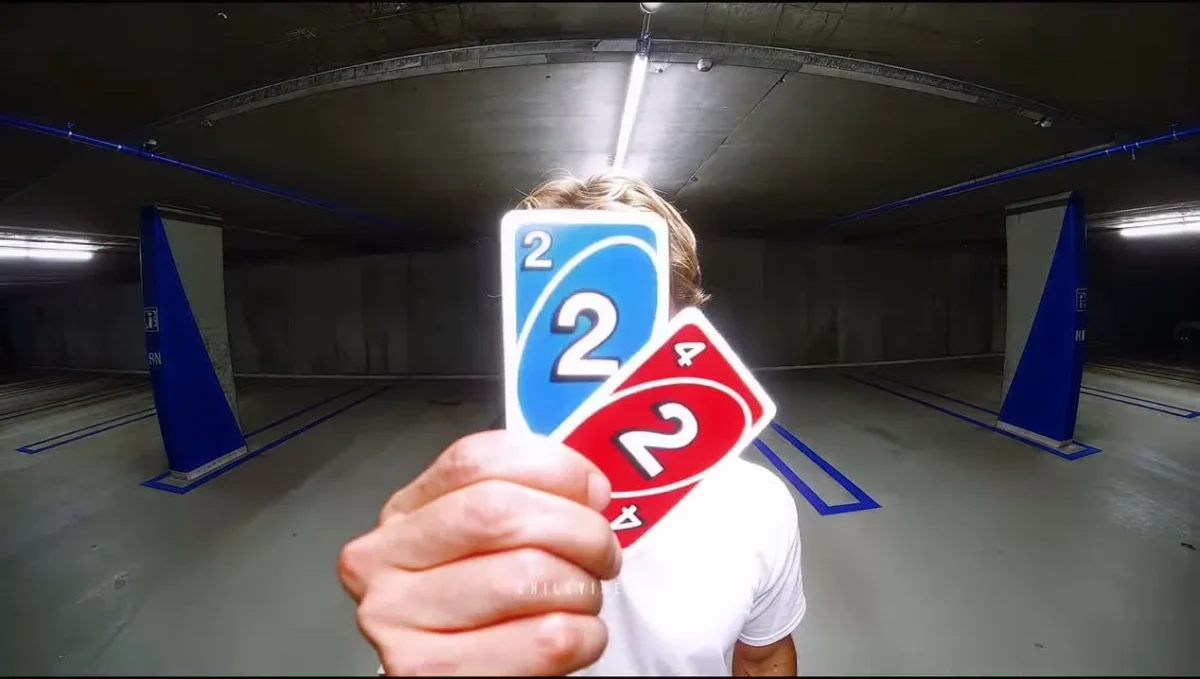
The Unforgettable Car 24 template uses one locked camera for roughly 14 seconds in a wide frame. In its source preview, someone approaches and shows the cards close to the lens. Then comes a step backward and an exit in a car with blue underglow. The default location for a new creation is a Brooklyn street, even though the poster shows a parking garage: the picture of the performer holding cards in that garage is a source-clip still, not a sample of how the Brooklyn-background export will look after you upload a different face. That distinction matters.
Watch the scale shift. The cards take over the foreground, then the performer retreats far enough to give the vehicle room. Space is the payoff. If you crop this to a vertical strip before the departure, you may keep the person and lose the coupe entirely. Keep the wide original for the first review. If you later reframe for Reels or Shorts, watch the whole 14 seconds and move the crop with the action rather than pinning it to the first face close-up.
There is a second trap in the poster: the red card visible in that frame looks like a 2. The template’s intended beat is a blue 2 and red 4. Don’t assume a number in a reference still guarantees flawless text in your result. Tiny characters held close to a moving lens are exactly where generated video needs human review.
Pick a portrait and a street that agree
The form asks for Your selfie, a required photo of exactly one person. Give it a face you can see without squinting and clothing you actually want to appear on screen. A full-body shot can help with outfit continuity, but the form says missing trousers and shoes may be filled in to match the visible clothes. It doesn’t ask you to photograph a car. No borrowed luxury-car shot needed.
Next to it is Optional: Scene 1 background, an included image you can replace. This is a location slot, not another actor or a photo of the cards. Leave it alone to use the built-in Brooklyn street. If you upload your own background, it replaces that street; it isn’t layered over Brooklyn. Pick an open road, lot, or plaza where the right side of the frame could plausibly hold a car. Check that you have permission to use the location image, especially if it came from someone else’s portfolio.
A tight selfie taken in a bathroom can still supply the face. A bathroom photo in the background slot would create a much tougher car entrance. Skip that. Separate the jobs. The photo of you casts the person; the second photo sets the place. Avoid a busy crowd in either frame, since the visual joke needs one performer and a clear vehicle reveal.
Make the clip and inspect the hard frames
- Open the 24 card video form and put your one-person selfie in Your selfie. Use a sharp image with your eyes unobstructed.
- Decide whether the included Brooklyn scene supports your story. Replace Optional: Scene 1 background only if your location offers enough visible space for the coupe.
- Choose the resolution shown in the form and review the credit amount before generating. The form offers 480p and 720p; the scene remains approximately 14 seconds and wide either way. If card legibility is your priority, the sharper option is worth considering, but it can’t guarantee correct digits.
- Generate, then watch the downloaded result at normal speed and paused on the card flash, the step back, and the car departure. If the symbols, hands, or vehicle shape fail, decide whether another paid attempt makes sense before posting.
The source preview is motion reference, not proof of a personalized output. It isn’t your result. Its camera timing is a useful guide to where a bad hand or drifting face might show up, but no article can promise your export will preserve every detail. Treat the audio the same way: preview the downloaded file with sound on and confirm what it actually contains. Don’t promise a specific soundtrack in a caption based only on the source clip.
Turn the numbers into a posting hook
Make the caption give the viewer something to wait for without explaining the last shot. Tease, don’t spoil. “Wait for the driveway” would be a weird choice if you left the Brooklyn scene in place. A better angle is a playful prediction about what arrives when the two cards hit the camera. Put that setup in the caption or the first on-screen text, then let the car deliver the payoff.
Unlike the Most Wanted BMW car-swap guide, this isn’t primarily about matching a supplied car across multiple cuts. The unusual parts here are the foreground digits and the single-shot change in scale. Prioritize a legible card beat before polishing a crop. You can browse other video trends if you want a car format with a different action.
If your version uses a custom street, don’t caption it as a real handover of a car you don’t own. A fictional AI edit reads better when you’re in on the joke. And before you publish, pause on the red card once more. A 2 where the 4 should be changes the punchline; a smaller, correctly framed video is more useful than a sharper wrong number.