BC One Dance AI Video: Cast the Breaking Solo
Make a BC One dance AI video from one full-body photo, choose the right solo length and check the fast footwork before you post.
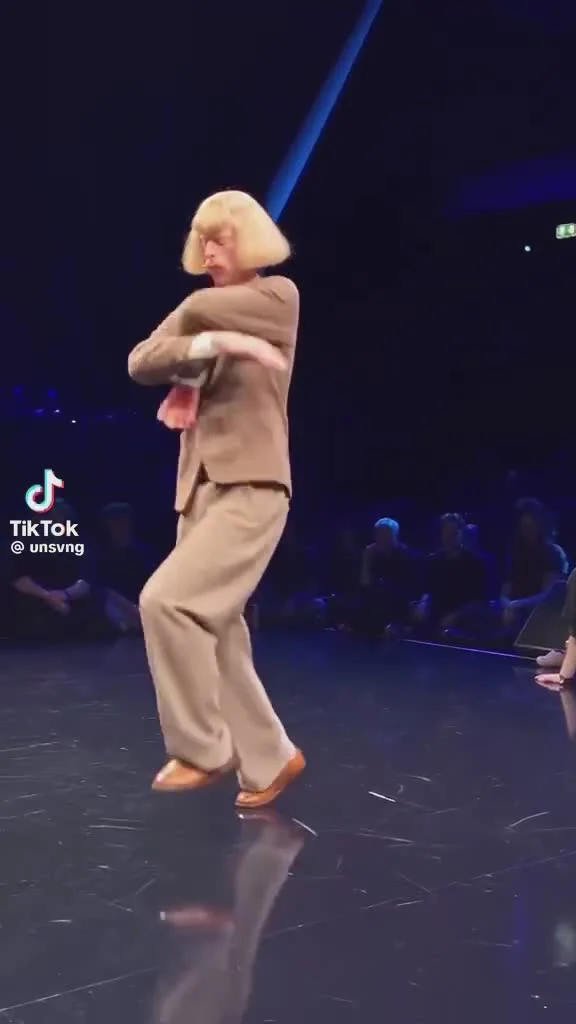
The BC One B-Boy and B-Girl dance AI video puts one person from your photo into a breaking solo on a lit competition floor. Trendai’s BC One dance template offers a short first-half cut or a longer cut of the same performance. For this one, your whole-body silhouette matters as much as your face: the footwork needs room to exist.
The solo is the hook
Look at the source preview on the template page. A dancer in a loose suit and blond wig takes the floor while spectators ring the stage. The gestures aren’t interchangeable with a neat eight-count dance: the solo mixes quick footwork and sudden freezes, with deliberately odd poses between them. That character is the appeal. Strange wins here. You don’t need to imitate the source outfit for your version to work.
The template replaces just the solo dancer with the one person you upload. The audience and stage belong to the source scene, as does the lighting. If you choose a photo of two friends, you aren’t casting a battle. The form has one required dancer slot, not a second performer slot. For a dance built around two distinct cast positions, see the Viral Club Dance Scene guide instead. Different job, different photo prep.
This is also why “I won a breaking competition” is a bad caption unless you actually did. Keep it honest. The scene is a recast performance, not proof you competed there. An honest “me entering the group chat like it’s a final round” lets the edit be funny without borrowing an achievement.
Choose a photo that can carry footwork
Start with a full-body shot of one person standing clear of the background. Shoes and both legs should be visible. A sharp portrait might look great for the first close-up, but it gives less visual information about your proportions when the dancer drops low or changes direction. If your only usable shot cuts off below the knees, find another before spending credits.
Face the camera enough that your eyes and hairline are clear. Both matter. Avoid a selfie taken at arm’s length with huge perspective distortion; the arms in the source swing across the torso, and a close selfie is a poor guide to body shape. Watch for baggy layers that merge your legs into one dark shape. You can wear a loose outfit if that’s the look you want, but make the outline of each leg readable. The photo supplies the outfit as well as your face.
Use an image you own or have permission to use. A friend’s face in a competition-style clip can look like a real performance when it circulates without context, so ask first and label the post as an AI edit. Keep the joke attached to the actual photo subject. A stranger from the audience in the preview isn’t a person you need to recast, and shouldn’t be described as your collaborator.
Pick the cut for the post you have in mind
The duration selector on the live form offers 15s and 30s. The shorter option uses the first half of the solo. The longer one covers the roughly 29-second routine and then holds the final pose briefly as sound falls silent. That’s not an extra ending move. Decide before generation whether your caption needs a quick entrance or the full character arc of the dance.
- Upload the one-person photo to the dancer slot and confirm the preview shows the person you intended. There isn’t a separate costume upload.
- Choose 15s for a tight reaction post, or 30s if the final pose is part of the joke. Select 480p or 720p; the page displays the current cost for that choice before you run it. Both versions are vertical 9:16.
- Inspect the rendered MP4 from start to finish. Scrub the low moves, arm-crossing moments and feet. Check whether the face still looks like your source photo after a turn, not merely at the opening.
The template’s notes on fast moves flag possible face drift and blurred hands or feet. If the person loses their look during a floor-level moment, a brighter full-body input is a more useful fix than piling on text. The source choreography and camera are fixed. You’re recasting a solo, not directing new steps with a caption.
Edit the post around the freeze
Don’t cover the feet with a caption bar. Put any hook higher in the frame, away from the dancer’s path, and check it against both versions if you create more than one. A good post can open with a short setup such as “the meeting starts in one minute” and let the first unexpected pose answer it. Keep the text brief enough that viewers can see the footwork.
The page distinguishes its generated Sample Output from the source preview. Neither is your result. Check the labels. Share your own export, and preview its audio before posting: the template requests synchronized source sound, but the delivered sound can vary. If you add music in TikTok or Reels, use audio available to your account and region rather than assuming the preview track is cleared for your upload.
If the longer cut leaves you with a quiet final hold, use it as space for a punchline or a clean loop point. Don’t advertise that hold as a new trick. The performer already gave you the ending pose; your job is to avoid cutting it off.