Dancing Pets AI Video: Cast the Three-Dog Trio
Make a Dancing Pets AI video from one to three pet photos. Assign the front, back-left and back-right roles, then check the motion and audio.
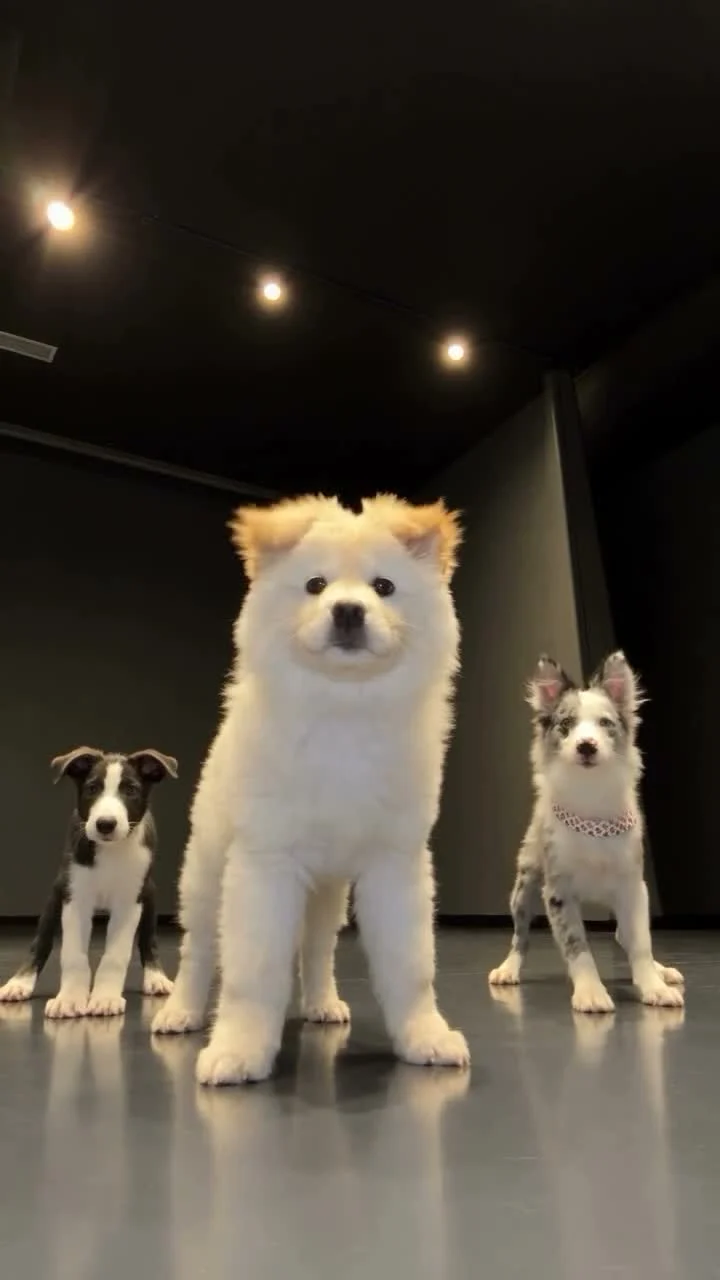
One fluffy dog takes the front of the frame while two smaller dogs dance behind it. Dancing Pets turns one to three pet photos into that 20-second vertical scene. Put your main pet in the required first slot; optional photos replace the dogs at the back left and back right in order. The animals in the source video supply the dance, not your pet’s actual moves.
The lead pet gets the big part
The Dancing Pets template starts with a simple hierarchy: one big foreground dog and two background dogs. The first photo determines who gets the close, easy-to-spot role. If you’re making a birthday post for one pet, put that animal there even if you have a sharper photo of another dog. The eye goes to the center first.
A clear full-body photo is the safest reference. The source dogs move their legs and shift weight, so a close-up of a muzzle leaves most of the dancing body to be invented. You want the viewer to recognize the face and fur markings, but you also want the model to see the legs. One animal per image. No busy group shots.
The page says the template uses a fixed 20-second, 9:16 reference clip with its own motion and room, plus its camera timing and audio. You upload pet images, not a dance video. The preview shows the original dogs, not what your own pet will look like after generation. Don’t treat it as a promise that a cat or a short-legged dog will move exactly like the dogs on screen.
For a two-person scene instead of a three-pet cast, the Raindance casting guide breaks down another set of fixed roles.
Cast the background without mixing them up
The optional pet photos are character slots, not extra angles of your main dog unless you actually want that dog in more than one position. The first extra photo replaces the pet at the back left. The next replaces the pet at the back right. If you provide just the required foreground image, both background dogs stay from the source scene. Easy to miss if you expected three copies of your pet. One photo, one swap.
You can choose three different pets to make a little group number. Give each a photo where you can see the head and body, with the fur pattern easy to spot. If two dogs look similar, pick reference photos that show their distinguishing markings. A collar can help you tell them apart in your camera roll, but don’t count on a small accessory surviving every moving frame.
Cats and other pets are allowed by the page, though the source choreography belongs to dogs. That matters. Dogs set the moves. A cat’s posture or a very different body shape may look less consistent when matched to dog movement. If you have only a cat photo, try it with realistic expectations and check the result before sharing it as a cute keepsake. Check the legs.
Make the trio and inspect the movement
- Open the Dancing Pets page and play the source clip once. Identify the large front dog and the two positions behind it.
- Upload your main pet’s photo in the required slot. Show the face, body and legs with as little obstruction as possible.
- Add up to two extra pet photos if you want to change the background cast. The first added pet takes back left; the second takes back right. Check that order before generating.
- Choose 480p or 720p and read the credit cost shown on the form. The page keeps the length at 20 seconds regardless of whether you upload one, two or three pets.
- Watch the downloaded video through with its audio. Pause when the dogs turn or lift a leg and make sure each pet still looks like the animal you uploaded. If a face or body looks off, improve that pet’s photo rather than burying the shot under a sticker.
My pick for the first upload is one clearly photographed dog, not three fuzzy pictures just because the form allows them. Start with one. A good lead makes the whole frame easier to read, particularly on a phone where the front pet is much larger than the two dogs in the back and a blurry foreground photo can make the only obvious character hard to recognize. Add the back row when you have photos worth casting.
Let the pets be the joke
A birthday caption can name the lead pet and give the background pair a quick introduction. Don’t cover the front dog’s face with a giant title. The room has dark space above the trio in the poster; that’s a better place for a short label if you need one.
This is an AI pet animation, not footage of animals trained to dance. That distinction is useful for viewers and fair to your pets. YouTube’s Shorts upload instructions allow a vertical clip up to three minutes, and the template’s 20-second 9:16 file fits that format. The template page says the reference includes audio, so listen to the finished export rather than assuming you need to add a track on top. If the beat and movement don’t line up in your own result, decide whether to post it before tagging the pets’ owners.
Look at the front dog’s paws at normal playback speed. If they move strangely, a full-body source photo may help more than any caption could.