TikTok Video Hooks for Photo-to-Video Reveals
TikTok video hooks work best when a photo-to-video reveal promises a specific change. Try three openings, fix the cut, and post with a clear payoff.
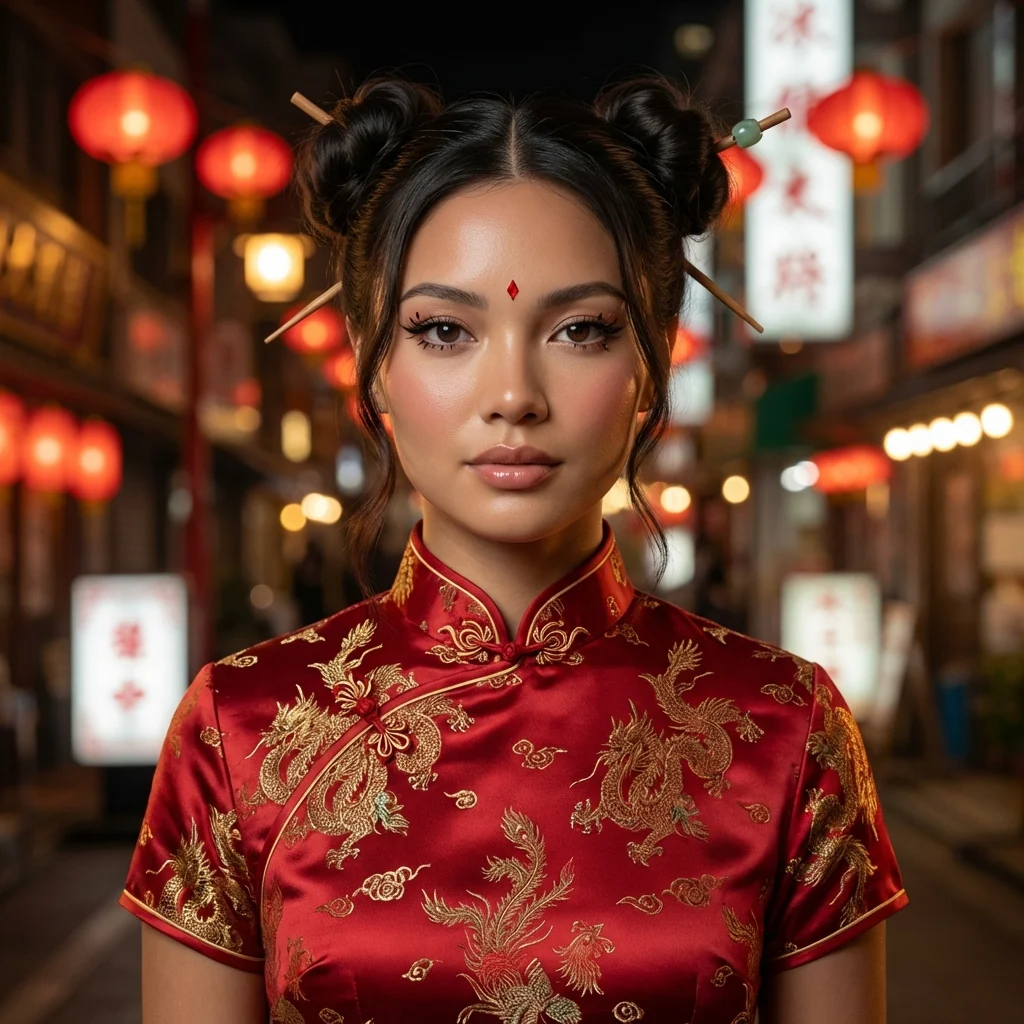
A makeup transition opens on your everyday portrait, then cuts to the dressed-up version. For TikTok video hooks, show a clue to that change in the first frame, give viewers a reason to wait for the reveal, and cut before the payoff gets stale. A plain “wait for it” caption won’t do that work for you.
The first frame needs a promise
Start with a sliver of red at the edge of the original shot. A clue. When the embroidered collar appears later, that small bit of color pays off. Or start on the final look for a blink, then snap back to the original. Either edit gives the eye something to chase without spoiling the whole change.
A good hook fits the clip that follows. “I tried a completely different look” is honest if the transformation is the point. “You won’t believe what happened” sounds like you lost the caption contest to a refrigerator magnet. Try on-screen text that names the actual tension: “Would this look work on me?” or “One portrait, two moods.” Keep the face visible. Read the caption on a phone, not a giant editing monitor.
YouTube’s Shorts conversation with creator Jenny Hoyos and product lead Todd Sherman puts the opening on a tight clock: Hoyos says you have one second to hook someone on Shorts. That’s her advice, not a universal TikTok rule, but it’s a useful edit test. Mute the clip. Scrub its first second. Can a stranger tell what’s about to change?
A bob haircut reveal gives you a concrete before-and-after clip to test these opening frames against.
Build the reveal around one photo
The Makeup Transition Video template starts from a portrait and shows a beauty transformation into a red qipao look with dramatic eyeliner and hair sticks. Use its example as a visual destination, then build your post around a real reason that destination matters to your audience. A makeup account could talk about the eye shape. A personal style account might ask whether the color suits them.
- Pick a source portrait with the full face visible. Hair covering one eye or a hand across the jaw makes it harder for viewers to read the change at a glance. Keep the source frame similar in scale to the transformed face so the cut feels deliberate rather than like a camera jump.
- Choose a hook before you render or edit. For this look, try “My usual outfit vs. the one I almost wore” if that contrast is true for your post. If it isn’t, write your own. The line has to pay off in the actual image.
- Put the starting portrait on screen briefly and make the change happen near the front. Don’t burn the opening on a logo, a long wave to camera or an intro card. Hold the finished frame long enough to see the eyeliner and collar, then leave before the motion becomes a screensaver.
- Watch the cut without sound. Look at the eye line first. Next, check the text placement. The payoff needs to read at phone size. Then watch with sound and place a beat where the visual turn actually happens, rather than letting audio dictate an awkward cut.
For a different look, browse Trendai’s trends gallery and apply the same edit test to another source photo. The trick isn’t a particular costume. It’s making the promise and the payoff belong to the same clip.
Three hooks worth testing
Use these as structures, not copy-paste scripts. The first is a flash forward: start with a split second of the finished frame, rewind to the source photo, then reveal the full look. It works best when the two faces line up closely enough that the viewer can compare them.
The second is a specific choice: put “Would you keep the red collar?” over the starting portrait, then let the transition show what you’re asking about. A question tied to a visible detail invites an actual answer. “Thoughts?” doesn’t give people much to grab.
The third is a match cut: crop both frames around the eyes, use a hand movement or blink to hide the switch, and widen out on the transformed look. This is the one I’d spend time on. A clean eye-line match beats a pile of sparkles because the viewer understands the change before they’ve finished processing the effect.
None of those edits guarantees reach. TikTok’s own explanation of the For You feed says recommendations weigh user interactions along with video information: captions, sounds and other details such as hashtags. It names finishing a longer video as a stronger interest signal than sharing a country with the creator. Watch the whole cut. That’s a reason to make the whole clip watchable, not a reason to stuff ten tags under a weak opening.
Post two cuts, not ten random versions
Export one version that opens with the flash of the finished look and another that starts with the original portrait plus a specific question. Keep the rest of the edit the same. Then you can tell which opening people seem to respond to without changing the audio or runtime at the same time. Leave the payoff alone too. Don’t post both back-to-back to the same audience and declare a winner from a tiny sample; timing and who sees each post can shift the result.
Check the first seconds while you’re editing, but judge the post by more than the hook. If comments ask where the outfit came from but nobody mentions the transformation, your caption might have pulled attention away from the actual reveal. Too quick to see the finished frame? Give it breathing room before tinkering with the first word of the overlay.
Use the caption for context the frame can’t carry: why you tried the look, what detail surprised you, or which version you’d actually wear. Don’t pretend the AI output is a real outfit you own. The reveal can still be fun when people know exactly what they’re looking at.
A practical final pass: open the exported file in your phone’s camera roll, hold the phone at normal scrolling distance, and pause on the first frame. If the promise is hidden under the app’s UI or the collar gets cropped out, move the text or reframe that shot before posting.