How to Make a Nicole Kidman Dance AI Video
Make a Nicole Kidman Dance AI video from one photo. Set up the nighttime alley performance, inspect moving faces and post without implying endorsement.
To make a Nicole Kidman Dance AI video, upload one clear photo of yourself to Trendai’s dance template, choose a resolution, and review the generated alley performance before sharing it. The name identifies the trend, not an official Nicole Kidman appearance: your photo supplies the dancer’s look while the source clip supplies the movement and camera path.
A nighttime walk that turns into a dance
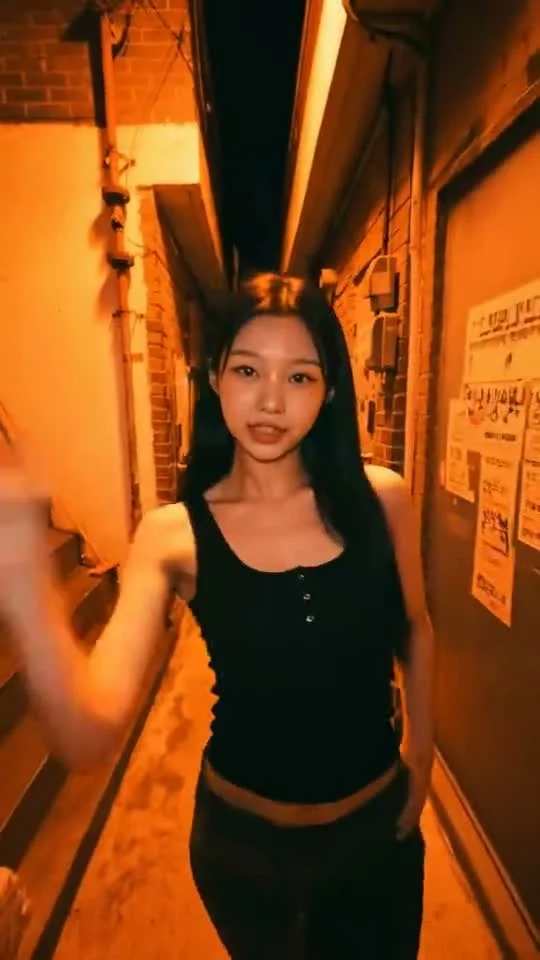
The Nicole Kidman Dance template shows a single dancer moving toward a handheld camera through a narrow orange-lit alley. In the source preview, the camera backs away while the dancer uses loose hand waves, overhead arm sweeps, and hip movement. It’s close enough for a face to matter and active enough for awkward hands to show. No hiding. That’s the edit’s tension.
The live form labels its one required upload Your photo. It asks for one person, ideally visible down to the waist or full body, with a well-lit face. There is no slot for a second dancer, street photo, or separate choreography file. The template page lists a roughly 13-second vertical 9:16 format and 480p or 720p output choices. The preview on that page is a reference, not your personalized result. Remember that distinction.
The poster shows a dark-haired performer in black framed by warm alley walls. Use that image as a clue about composition, not as evidence that a new clip will reproduce the performer’s identity. Pick your own photo and keep your own outfit in mind, since the form says the uploaded look carries into the result. Don’t style the post as if a celebrity filmed or approved your version.
If you want a crowd-backed party performance instead of this alley solo, compare the Cheba Man Techno Dance guide.
Pick a photo that survives the arm sweeps
You want one face and enough torso for the motion to read. A sharp waist-up portrait in soft light is better than a full-body screenshot where the face is barely visible. Avoid sunglasses or hair covering your eyes. If the photo comes from a group shot, crop out the other people before uploading; the form is explicitly built for a single subject.
Look at the shoulders too. Arms move up and across the face in the reference, so an image that cuts both arms off at the shoulder gives the generator less information about their starting shape. Keep them visible. That doesn’t mean you must recreate the dance in your photo. A still, front-facing pose with your face unobstructed is the practical baseline. Keep the clothing intentional: a jacket that works for a warm alley edit will look more coherent than a cropped image showing half a costume.
For someone else, ask before using their likeness. A friend may be fine with a private draft and not with a public post framed around a named celebrity trend. Consent is a quick conversation, not a checkbox hidden in a caption. Ask first.
Generate, then review the moving face
- Open the Nicole Kidman dance form. Upload a photo of one consenting person in Your photo.
- Compare the displayed 480p and 720p options and the credit amount before you press Generate Video. The 9:16 framing and approximate 13-second length come from the reference; this isn’t a manual scene builder.
- Play your result all the way through, once for timing and again for the face. Freeze frames where a hand crosses the cheek or the arms pass overhead. Watch for fingers merging, hair jumping between frames, or facial features changing as the camera retreats.
- Download and inspect the exported video with sound on before adding text or sharing. The source preview’s audio is not a license to reuse or promote a particular song, and you shouldn’t promise a soundtrack in the final export without checking it.
Try a second source photo only if the first has a fixable problem, like motion blur or a face too small in frame. Repeating a generation from the same poor crop is an expensive way to rediscover the same weak input. The preview is a map of the movement, not a before-and-after demonstration.
Post it as your edit, not a celebrity collaboration
The strongest caption describes your version: a normal photo turned into a night-alley dance, or a friend’s unexpected late-night main-character moment. The exact dance name can help someone find the template, but don’t write “dancing with Nicole Kidman” if no such collaboration happened. This is an independent AI-made interpretation of a named trend. No endorsement by Nicole Kidman is implied.
If you attach audio in a social app, use a sound you are allowed to use in that context and check the platform’s current rights controls. A track being audible in a source preview doesn’t give you distribution rights to the original recording. Keep your video marked as AI-generated where the platform requires it. The TikTok synthetic-media guidance describes how creators should label realistic AI material; check the current rules for the platform where you actually post.
The vertical frame is already suited to a phone feed. Keep any added caption away from the dancer’s face and the hand-path around the head, rather than filling the top third with a giant trend label. Watch the first silent pass too: if the dancer’s expression reads even without music, the clip is ready for a real sound choice, not a borrowed endorsement.