How to Make a Witch Flying on Broom AI Video
How to make a witch flying on a broom AI video: choose a full-body photo, follow the roadside takeoff, and keep the broom and car in frame.
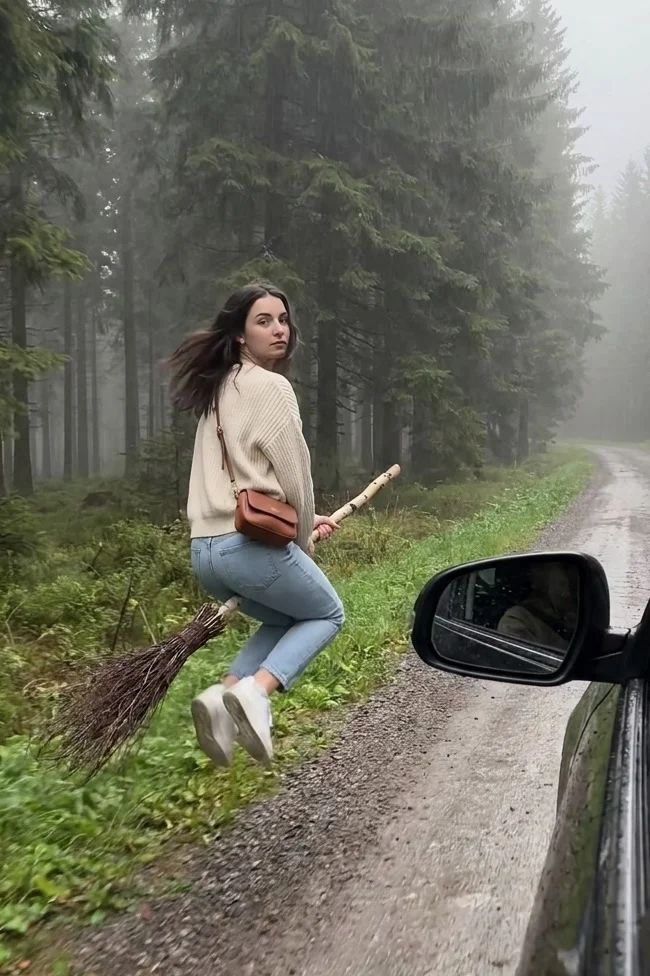
A person walks beside a car on a foggy forest road. They look back, then take off on a twig broom. To make a Witch Flying on Broom AI video, upload one clear waist-up or full-body photo to the broom-flight template. The little glance at the car is what sells the takeoff.
The roadside setup is the hook
The live Witch Flying on Broom page describes a 10-second, 9:16 clip. You walk along the verge with a broom, hop onto it, then climb above the trees. The moving-car point of view gives the scene its odd plausibility: it looks like someone in the passenger seat happened to catch the moment. A generic flying silhouette misses that setup.
The cover shows a woman in everyday clothes sitting on a twig broom next to the car’s side mirror, with a misty road and pines stretching behind her. It’s the owned template poster, not a promise that the same pose will appear in your generated file. The mirror matters. Check your export for the backward glance and the movement away from the road.
No witch costume is required here. The template page says the person keeps their photographed outfit, which makes the broom feel even stranger against a normal roadside scene. This isn’t the Witchcore parlor story: that other template adds a pointed hat, a phone call and a flying cat in a wider 4:3 scene. Use the broom version if the joke is your everyday look suddenly leaving the ground.
The Witchcore guide is a one-photo witch scene too, but its phone-call setup stays indoors instead of taking flight.
Choose a photo with enough body to cast
The form requests one clear full-body or waist-up photo of one person. It says the face and hair carry into the video, as does the worn outfit. Just one person. The optional second-person slot you might expect in a car scene isn’t here. Your friend filming from the car is implied by the camera angle, not someone you upload.
Aim for a shot where the face can be recognized from a three-quarter view and the clothing is easy to see, because the camera begins beside the car, follows the person along the road, then needs the same recognizable rider to lift into the tree-lined sky. A clear jacket outline is more useful than a tiny face lost inside a crowded group shot. Shoes and the lower half can matter during the hop, so full body is a strong choice when you have one. But don’t treat it as mandatory: the form explicitly accepts waist-up.
Pick clothes you actually want to see in the gag. A hoodie and sneakers can make the takeoff funnier than an elaborate witch outfit. Keep the photo free of heavy filters or dark glasses. Avoid someone else’s arm across your torso. Those are practical input choices, not guarantees that the model will reproduce every seam or accessory.
Generate and inspect the flight
- Open the broom-flight form and upload your one permitted-person photo. The listed output is 10 seconds in vertical 9:16 framing.
- Read the live credit amount on the generate button before committing. The duration and format are shown on the form; there’s no need to plan a manual horizontal-to-portrait conversion.
- Preview your export. Look at the face as the person turns back, the hand-to-broom contact at the hop and the moment the feet lift from the road. Download only after you’ve watched it through with sound.
The form says “with sound,” but that label doesn’t establish which audio will arrive in your own export. Don’t write a caption that depends on a particular voice or song until you’ve listened to the file. If you add a track afterward, use audio you can legitimately publish on the platform where you’re posting.
Keep the car in the story
The car mirror and road edge tell viewers where the camera sits. Crop those away and the gag becomes a person floating in the forest. Keep the mirror. When placing text, reserve the lower middle for the broom and the right edge for the car. Try your caption high enough that it doesn’t mask the moment the rider leaves the ground.
One short hook can do the work: “She said she’d meet us there.” Let the viewer discover the broom instead of naming it in the first frame. A reaction cut can come after the takeoff if you filmed one yourself; don’t insert a fake witness clip and pass it off as real evidence.
The scene is fictional. If your post could be mistaken for a real event, label it as an AI edit and use any platform synthetic-content disclosure that applies. Get permission from the person in the input photo. You can make a good joke without borrowing an unsuspecting friend’s face.
Troubleshoot the moments that break the illusion
Hands gripping thin twigs, a swinging bag and legs crossing the broom are busy shapes. Freeze the clip at the hop and at the highest point of flight. Pause there. Is the broom still under the rider? Does the road move in a way that matches the camera’s viewpoint? The page shows a cover image rather than a personalized output, so those are checks for your generated result, not claims about every render.
If the face changes on the turn, switch to a brighter photo with more of the face visible. If the person is cut off against the road, keep the original vertical export rather than zooming it further for a feed. Check it once at phone size before you add text; the car mirror should still look like a car mirror, not a black rectangle.