Ballroom Fashion AI Video: Cast the Hall and Outfit
Make a Ballroom Fashion AI Video with the hall in slot one and your full-body outfit in slot two, then check the glasses touch and hard cuts.
Ballroom Fashion AI Video puts your outfit on the lead performer and your room behind them in a short, widescreen fashion clip. Upload the empty hall first and a full-body outfit photo second. The important check isn’t whether the ballroom looks fancy; it’s whether your clothes and face stay yours through every camera cut.
The scene is already choreographed
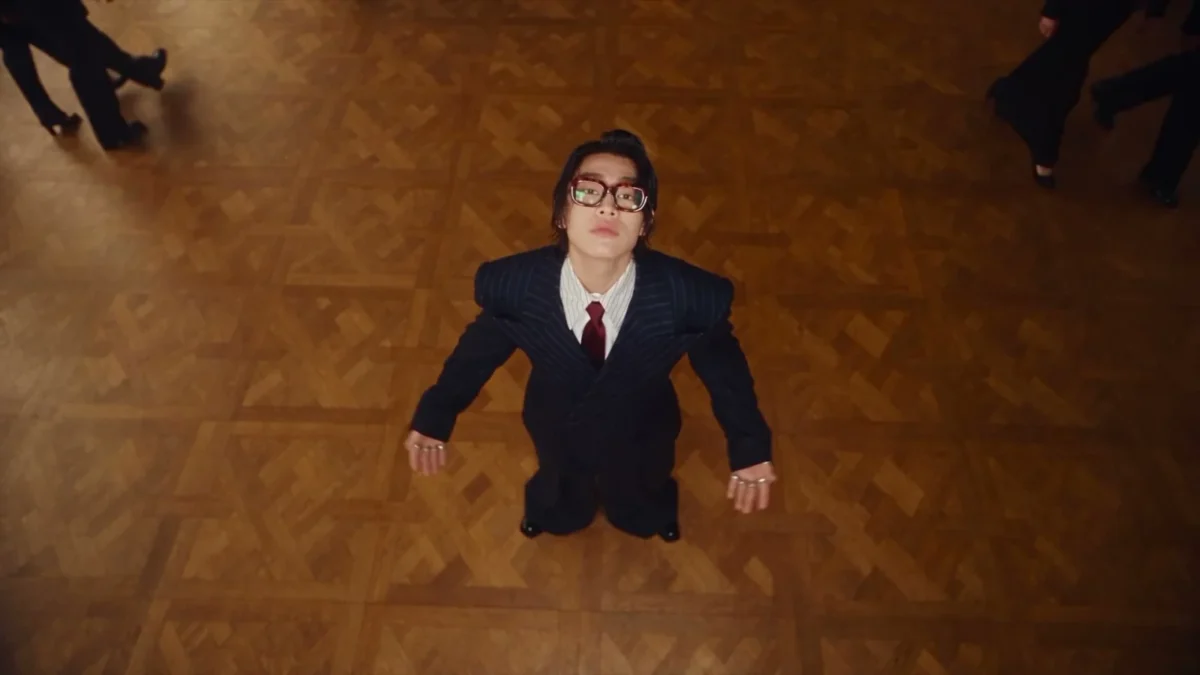
The Ballroom Fashion template follows a source clip of a performer in glasses and a pinstripe suit inside a gilded hall. People in dark suits cross behind him. He holds the front of his jacket, looks up toward an overhead camera, touches his glasses and adjusts his collar. This is a performance. The venue is its stage.
The page lists five hard-cut shots and a 7.08-second, 16:9 clip with source audio. Those cuts are the reason this template needs more care than a single portrait animation. The first shot may look fine. The overhead angle can change the face. An outfit can hold its shape until the hand reaches the collar.
The preview is original source footage, not a sample of somebody’s generated video. Watch it for the camera angle changes and the background traffic, not as a promise that your room will match its gilded walls. The clip keeps the glasses-touch gesture even if your upload has no glasses. Glasses are part of the bit. Plan for them.
For an outfit edit set on a street rather than in a room you supply, compare the Street Style Walk guide.
Give the room and the person separate jobs
There are two required upload tiles, and their order is unusually easy to get wrong. Image 1 is the hall or location. Image 2 is you, full body in your outfit. Two different jobs. Neither tile is an extra angle of the same person. Don’t put a face in the room slot and hope the model figures it out.
For the first image, stand back far enough to show a usable floor and some architecture. A centered photo with visible walls gives the tracking and overhead views somewhere to go. A chandelier close-up looks expensive. It gives the performer nowhere to stand. Pick a room with a clear floor line and lighting that lets you see the edges of furniture. If you use a real wedding venue or a friend’s home, get permission to use the photo; don’t imply you held an event there if you didn’t.
The second image has to do much more work. Show one person from head to shoes, with their face unobstructed and their actual outfit visible. If you want a long coat, photograph the coat. Show the shoes. They count here. A cropped selfie asks the edit to invent everything below your shoulders just as the camera backs away. Not worth the guess.
Avoid a group photo here. The reference already contains passersby in dark suits, but those figures are part of the source scene, not separate upload roles for your friends. If another person appears beside you in Image 2, the lead identity can become ambiguous. Crop them out before uploading, and get the subject’s consent whenever that subject isn’t you.
Build around the glasses and the cuts
Start by looking at the source preview with the sound on in your own viewing environment, then plan the outfit around its gestures. The page’s preview player is muted by default, while the live format label says the output uses source audio. Don’t assume a silent preview means a silent export. Check the actual file before posting.
A jacket or structured shirt gives the collar and lapel motions something legible to touch. A strapless look can still work, but the final adjustment may read like a hand grabbing at nothing. Glasses appear across the source performance. If you don’t wear them in your photo, the generated scene is still directed to include them; inspect the frames where fingers meet the rims, since that’s where a cool pose can suddenly look like a hand glitch.
The first tile shouldn’t show another sharply focused person, even one who happens to own the hall. Your performer comes from the second photo. A clean location image makes the intended casting obvious, especially when the shot rotates and the original background walkers cross the floor. Try to keep the hall’s light direction believable next to the light on your outfit photo. A hard noon shadow on your face and a dim indoor room may look pasted together.
Check the export like an outfit video
The form offers resolution selection, but length and framing are tied to the source. Keep the 16:9 widescreen version in mind before planning a phone-first post. If you crop it to vertical afterward, you’ll lose space on the sides while the performer moves and background figures pass. A safer vertical edit keeps the full wide frame visible with a designed backdrop rather than chopping off the shoes or the glasses touch. Use the trends gallery if you actually need a different scene built for a different framing.
Play the result once at full size and once at phone size. On the first pass, pause at each hard cut. Does the face remain the same person from the front view to the overhead view? Do the shoes still touch the floor, and does the room keep the same layout? Then watch the glasses touch and collar adjustment at normal speed. Pause there. If the error still shows at full speed, fix it.
Listen, too. The source audio should be present in the exported file, but your publishing platform may have its own rules for using music or original sound. Confirm what’s in the file and use the platform’s licensed audio tools where needed; don’t sell the scene as documentary footage of a ballroom you never visited.
Make the post about the fit, not a fake night out
I would post this as an outfit concept: start with the still that supplied Image 2, then cut into the ballroom performance at the first gesture. A caption such as “My outfit got its own ballroom entrance (AI edit)” gives viewers the joke and the disclosure in one line. If you borrowed the location photo, credit its owner when appropriate. Don’t caption it as proof you attended a gala.
Leave a beat for the overhead look instead of cutting away as soon as the face turns upward. That’s the shot that sells the switch from your everyday outfit photo to the grand staging. If the shoes vanish in a vertical crop, keep the widescreen composition and let the room do its job. The floor is part of the outfit shot here.