How to Make a Thanksgiving Parade Balloon AI Video
Make a Thanksgiving Parade Balloon AI video from one portrait, then check the rope reveal, face match and sound before posting a fictional parade edit.
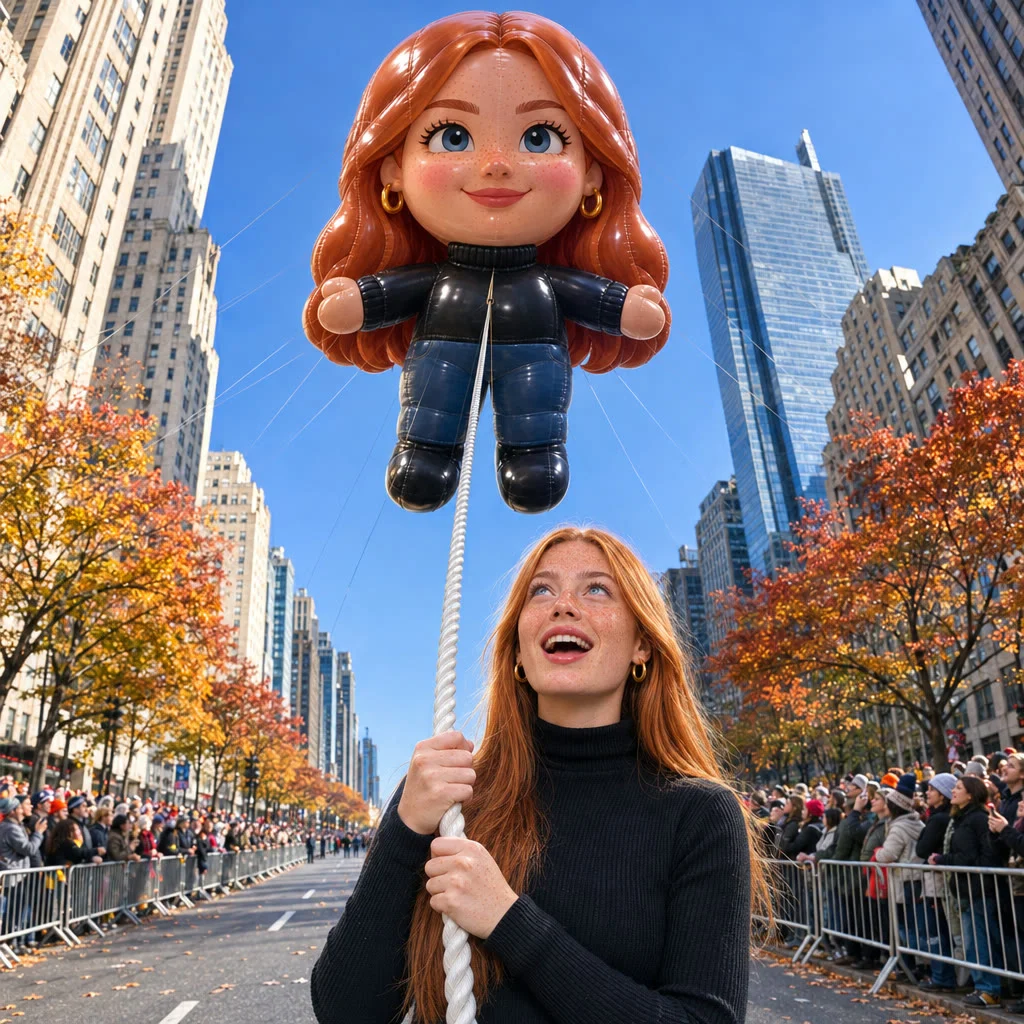
A Thanksgiving Parade Balloon AI video puts you on a city parade route holding a rope that leads to a giant balloon shaped like you. Upload one clear photo of one consenting adult, keep the face and outfit readable, then review the rope-to-balloon reveal before posting. It is a fictional holiday gag, not footage of you at a real parade.
The reveal needs two versions of you
The Thanksgiving Parade Balloon template stages a very specific joke: a person on a crowded street looks up from the rope in their hands, the camera follows it above the buildings, and the giant inflatable version of that person appears overhead. The source scene ends with the person looking back at the camera. Your face has to read twice, at street level and as an oversized cartoon.
That is the whole punchline. The rope matters. If the street shot looks like one person but the balloon looks like a different character, the joke becomes a guessing game. A striking hairstyle or a recognizable top gives both versions something to share besides a vaguely similar face. The outfit does the work. You don’t need to dress like a balloon. Please don’t.
The page shows a 10-second, vertical 9:16 video with voice and parade sound listed in the live form. It also labels a sample output made with example inputs; that’s a demonstration, not evidence of how your own photo will render. The poster shows a red-haired woman looking up at a red-haired balloon over a street with spectators and autumn trees. It is a source still, not your finished export.
Choose a photo that survives the big reveal
There is one required upload, labeled “Your photo, face clear.” The form asks for one adult with a well-lit face, no sunglasses, and a waist-up or full-body image if you want the outfit to carry through. It accepts JPG, PNG or WEBP. One upload does the casting. There are no separate uploads for the balloon, the crowd or the person holding the rope. The template builds its own character references from your single image before making the clip.
Start with a photo where your eyes are visible and your hair isn’t hidden behind another person’s head. A sharp selfie can establish your face, but an upper-body portrait is a better bet if a jacket or sweater is the thing your friends will recognize. Avoid an extreme overhead angle: the street-level character may need a body shape the source barely shows. Keep the subject alone in frame, with enough room around the shoulders that the app isn’t forced to guess which edge belongs to them.
A plain outfit can work. Color helps more. Give the balloon one identifying detail: a bright scarf, a distinct haircut or a patterned sweater. If the pattern has tiny lettering, don’t count on it being legible in a moving shot. Save the original photo so you can compare the face and clothing against the generated clip, rather than judging likeness from a thumbnail.
Use your own image or get the adult subject’s clear permission to turn their likeness into an AI parade scene. This is especially important if the caption will name them. The live page’s consent checkbox doesn’t turn a borrowed photo into permission.
Make it, then watch the rope
- Open the template and place the one portrait in Your photo, face clear. Check the preview crop before you spend credits; your face should still be recognizable at phone size.
- Choose the resolution shown in your session. The form currently displays 480p and 720p; check the generation button for the current credit amount instead of assuming a quote from an older post still applies.
- Generate the video and open the result from your library when it finishes. The page describes an identity-sheet step, a balloon-image step and a video step, so a reference image on the page isn’t the same as the final clip.
Watch the export with the sound on, then again muted. Mute reveals weak storytelling. First, check that the rope in the person’s hands appears to lead toward the balloon rather than stopping in the sky. Next, pause on the upward reveal: can you identify the balloon before the edit cuts back to the street? Look at the first and last face shots side by side. If the likeness wanders, try a clearer portrait with the same visible outfit instead of hiding the mismatch with a fast cut.
The page describes generated speech plus crowd and band ambience in its example, but the sample’s audio cannot certify what your new export actually contains. Listen for intelligible lines, unwanted voice resemblance and sound that clashes with your posting plan. If you add music in a platform editor, use audio you are allowed to post there. Don’t assume the source clip’s soundtrack is yours to reuse.
Let the caption do the holiday work
This isn’t a real parade announcement. Say that plainly. A caption like “I finally got invited to the parade. They made me the balloon” sets up the reveal without pretending you attended an actual event. Post it as an independently made AI scene and use the platform’s synthetic-media disclosure where applicable. If a friend’s face is involved, let them see the final cut and caption before it goes live.
Give the opening street shot a beat before the upward camera move. That lets viewers notice the rope, which is the setup for the giant head in the sky. A cover frame that already shows the full balloon gives away the answer; consider choosing the moment just before the reveal for the social post, while keeping the exported video intact.
If you want a holiday edit built around real faces across repeated frames rather than one oversized inflatable reveal, the Christmas Photo Strip guide tackles that different continuity problem. For this one, a useful last check is embarrassingly simple: show the muted clip to someone who hasn’t seen the template and ask whose balloon they think it is. If they hesitate, the photo needs a more recognizable face or outfit.