Street Style Walk AI Video: Get the Outfit Edit Right
Make a Street Style Walk AI video from one face photo. Learn what stays from the source outfit, how to check the turns and how to caption the edit.
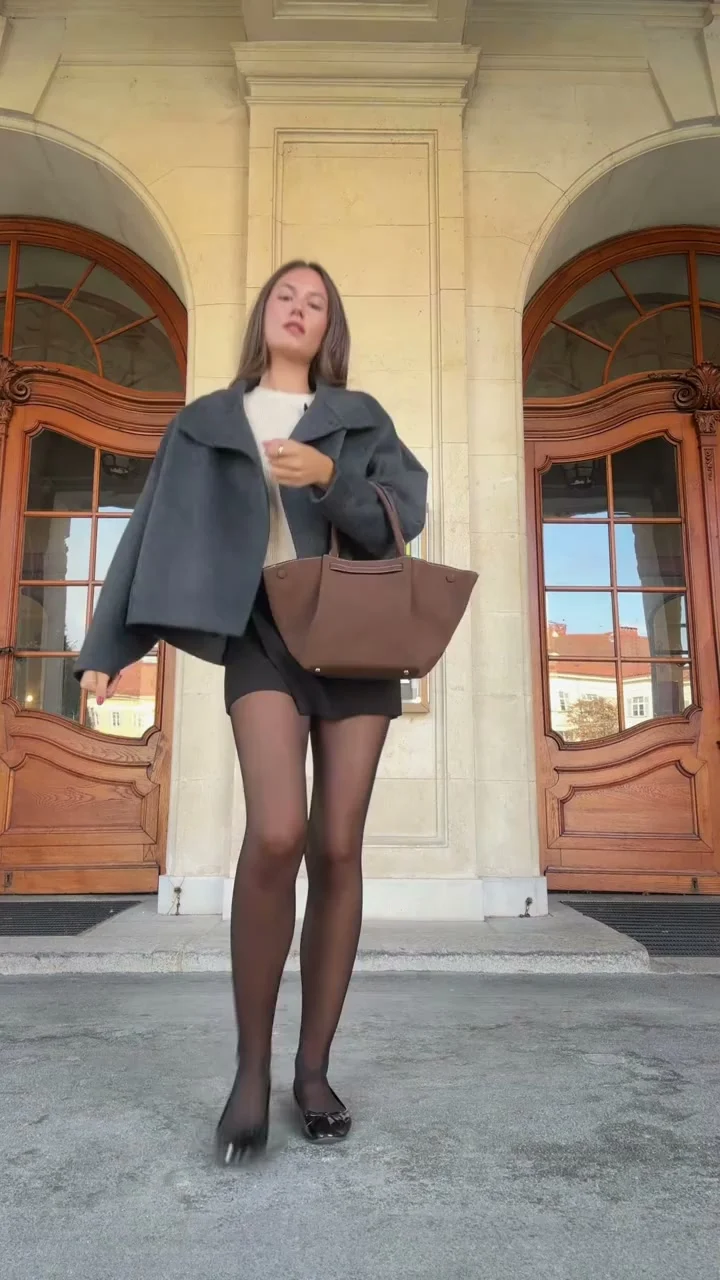
A brown handbag swings past the camera, then the person carrying it steps back for a full outfit view before turning around. That’s the Street Style Walk AI video. Upload one clear photo of yourself and the template puts your face into the built-in 15-second fashion walk; the outfit and location come from the source clip, not your closet.
Pick a face photo, not an outfit photo
The Street Style Walk template asks for one identity photo of a single person. It uses that photo for the face and hair. Eyewear carries over too. The oversized dark blazer and light top belong to the original clip, as do the shorts, tights, shoes and brown handbag. So if you upload a picture of yourself in a red coat, don’t expect the red coat to appear in the video.
That changes your photo choice. A head-and-shoulders picture with your face in even light can be more useful here than a full-length outfit shot taken across a dim street. Hair should be visible. Skip a heavy beauty filter that wipes out the features your friends would recognize in the close-up.
Glasses matter too. The form says eyewear comes from the identity photo, so use a glasses-on picture if glasses are part of the look you want. Want an unobstructed face? Pick another shot if your only option has dark sunglasses. There isn’t a second upload slot to correct the first one.
Use a photo you own or have permission to use. This is a synthetic fashion scene, not proof that the featured person modeled that outfit outside the building. If you’re posting someone else’s face, ask them first and describe the edit honestly.
Watch the walk like an outfit check
The source isn’t one static pose. It starts near the pale stone facade and ornate wooden doors, moves into a handbag approach, backs off to show the full look, turns for a rear view and closes in again. Two close views. Those make facial identity easy to judge. In the wider shot, check whether the bag hangs naturally and whether the legs stay coherent through motion.
Watch the face on the approach, then again after the turn. Same person? A convincing first frame means little if the face changes during the final close-up. Pause when the bag crosses the torso, too. A handle that melts into a sleeve will draw more attention than the shoes.
The template’s source preview shows the walk you’ll be recast into; it isn’t an example of your generated likeness. Look at it to learn where the camera moves, then judge your own exported clip separately. Don’t treat the poster as a before-and-after test.
I wouldn’t caption this as an accurate try-on of clothes you own. The template has no custom clothing upload, and the bag belongs to the fixed source scene. It’s better as a fashion-character edit: “me arriving at the meeting I only agreed to for the outfit” makes sense. “Review of my new handbag” would be misleading if that handbag isn’t actually yours.
Make the video and catch the bad frame
- Open the Street Style Walk AI video generator and upload a clear photo of one person. Check the face and hair before you generate. You don’t need to supply a street photo or a handbag image.
- Choose 480p or 720p and review the displayed cost. The live form fixes the output at 15 seconds, vertical 9:16, with the original audio. The length and format aren’t extra settings to hunt for.
- Preview the entire result at normal speed. Stop at the turn and the last close-up. If the face shifts or the bag changes shape, try a sharper identity photo before assuming more resolution will solve it.
Don’t stop early. It’s tempting to check only the first few seconds because the opening face looks fine. This edit earns its ending with the turn back toward camera. If that final close view is wrong, viewers will notice exactly when you want them to remember the look.
Listen with sound on before you add another track. The template carries source audio, so a second layer may compete with it. If you choose platform music for the post, check the rules for your account and region rather than assuming the source sound gives you unlimited reuse rights.
Make the caption match what viewers can see
Keep the first line about the persona, not a fake product claim. “POV: you dressed for the walk to the coffee shop” works because the joke is the exaggerated confidence, not the provenance of the blazer. It’s a character. A clothing brand could use the clip as mood content, but it shouldn’t label the generated outfit as a real item for sale unless a separate real image makes the actual product clear.
In a vertical feed, leave room for the bag and shoes. Placing text across the center can hide the accessory during the approach; filling the bottom with captions can obscure the full-body pose. Preview your post inside the destination app because its buttons may cover a corner of the frame even when the exported video looks clear.
If you want a post about a real accessory, use a genuine product shot after the AI edit and say which image shows the actual item. The fashion accessory UGC guide focuses on showing the real product. For this walk, the doors set the scene. Let the handbag approach and final close-up tell the fashion story without asking them to verify a purchase.