How to Make a Snowman Dance AI Video
Make a Snowman Dance AI video with the right left- and right-dancer photos, then check the twirl, faces and audio before posting your holiday duet.
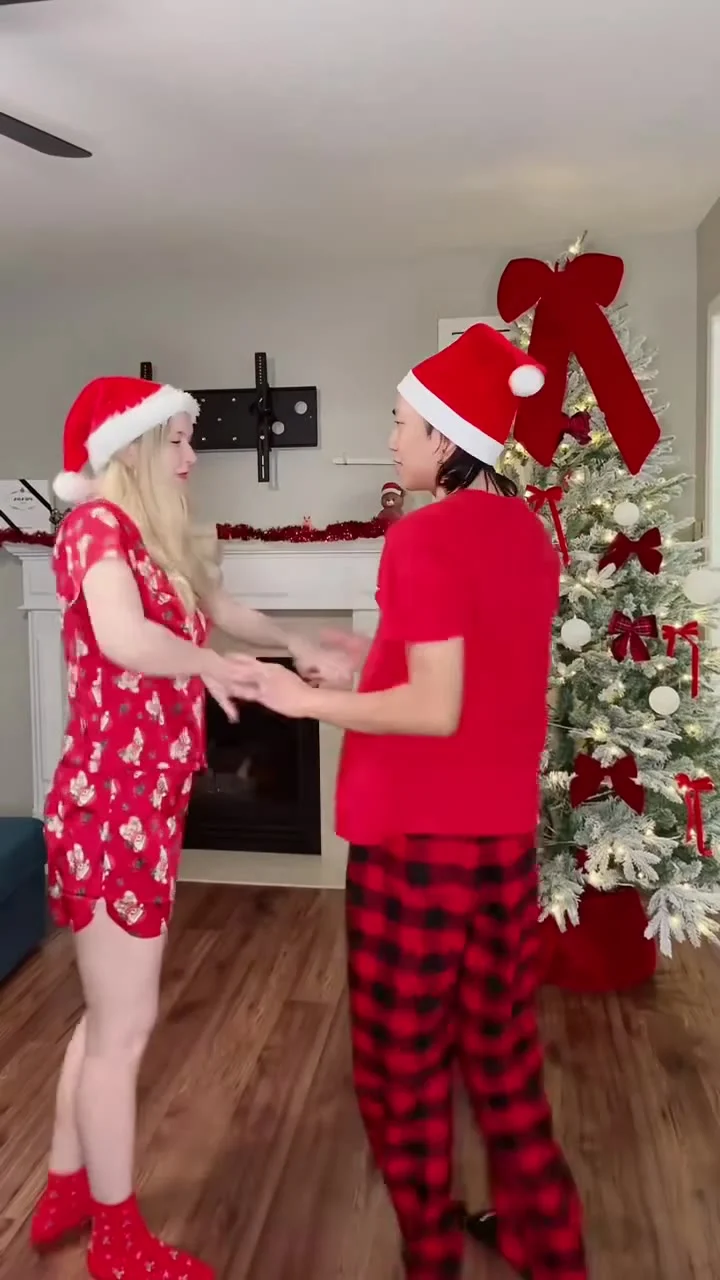
To make a Snowman Dance AI video, put a clear photo of yourself in the left-dancer slot on the Snowman Dance template, then add a consenting partner in the optional right-dancer slot if you want both faces personalized. The reference is an 11-second, vertical Christmas-tree duet, but the finished clip still needs a face and movement check, plus a separate audio check before you post it.
The scene is a duet, not a solo filter
The source preview on the template page shows two people dancing beside a Christmas tree. They start close enough to hold hands, move into a twirl and swing-out, then spin back toward a high leg kick in the partner’s arms. The page lists an 11-second 9:16 video. That clock runs fast. There’s little room to explain who the second person is once the move starts.
The opening beat has to tell the story. Make that relationship obvious. If this is your partner, try a caption about the tiny negotiation before getting them into a holiday dance. If it’s a friend, don’t write a couple joke that makes the casting confusing. The gag works when the viewer recognizes the pair before the kick, not when they spend the whole clip figuring out whose face is whose.
The poster is a still from the reference, not evidence of what your generated video will do. In that still, the dancers wear different red holiday outfits, including a printed short set and a red top with plaid pants. The form’s scene copy describes Christmas pajamas and Santa hats; check your actual export rather than treating either description or that single frame as a guarantee of clothing details.
Cast the two sides with the right photos
The live form calls its required first input “Your photo: the left dancer.” That person is described as getting twirled. Upload one well-lit picture with an unobstructed face, rather than a crowded group photo where the app has to guess which person you mean. A shoulder-up photo can work for identity, but leave enough neck and hair visible that the face doesn’t look pasted onto a stranger during the turn.
The second input is “Partner’s photo: the right dancer” and is optional. That dancer leads the twirl. If you leave it empty, the template page says the partner keeps the original look. That changes the joke. Choose on purpose: it is a different story from a personalized two-person duet. Don’t upload a second view of yourself expecting the app to treat it as a better reference for the left dancer: this slot casts the other person.
Use photos taken at roughly the same life stage and with each face pointed mostly toward the camera. No costume shopping required. You don’t need matching pajamas in the uploads; the holiday clothes belong to the reference scene. Skip sunglasses or heavy filters. Keep hands away from the mouth. Those details hide the facial features you’ll need to recognize in motion. Keep both people separate in their source images. A selfie of the two of you in each upload can make role assignment needlessly muddy.
Get your partner’s clear permission before using their photo, even for a private draft. The template’s responsible-use checkbox also asks you to confirm you have rights or permission for the uploaded material and won’t impersonate someone. Don’t cast a celebrity or a child as the surprise second dancer. A holiday joke is not a permission slip.
Make the video, then watch the turn
- Open the Snowman Dance template and add the left dancer’s image to the required first slot. Check that the preview thumbnail shows the intended person, not a cropped bystander.
- Add the right dancer’s image only if that person agreed and you want their face in the partner role. Confirm the order before generating: first is twirled, second leads.
- Review the resolution and credit amount shown in your own session before pressing Generate Video. The live form shows 480p as its selected option and also lists 720p; don’t assume the displayed cost will stay fixed.
- Play the entire downloaded result at normal speed. Pause once during the twirl and again at the leg kick. Check that each face stays with the right body, hands don’t fuse where the dancers touch and the raised leg doesn’t turn into a second limb.
Start with the left dancer’s face. Watch it through the spin. That’s the one the viewer will track through the turn. If it blurs or changes identity as the head rotates, try a cleaner front-facing source photo instead of covering the mistake with a caption. Then check the right dancer during the handoff. Hands tell on bad edits. A pretty opening frame doesn’t rescue a broken embrace at the finish.
The form labels its reference “source audio,” but that only establishes what the source preview contains. Listen to your own export before writing a beat-specific caption or promising the original song will be there. The preview videos are muted in the page player, and the page’s generic copy about keeping the song is not a test of your particular render. If you add music in a posting editor, use audio you have rights to use there; platform availability varies by account and region.
Post the holiday bit without overselling it
Keep both dancers in frame when you choose a cover. This is already a vertical 9:16 reference, so a tight face crop can erase the partner and make the twirl read like an accidental jump cut. A first-frame caption such as “I asked once. They said yes to the pajamas” gives the pair a relationship without pretending you filmed a real rehearsal. Keep text away from the faces and from the hands that explain the move.
If your feed is more about holiday setup than dancing, pair the clip with a real photo of the tree in a carousel or a separate post. Let the AI duet be the playful payoff, not fabricated proof that you actually performed that kick. Mark it as an AI-made portrayal where your platform asks for disclosure, and tell people in the caption if the scene could otherwise be mistaken for footage of the two of you. It’s a fictional holiday edit. Say so plainly.
This isn’t the same move as the November 1st Christmas Lights guide, which centers on a seasonal lights reveal rather than a two-person dance with separate left and right casting. If the duet is your angle, don’t borrow a lights-reveal hook: show the hands meeting early enough that the swing-out makes sense.
Check the final post draft on a phone before publishing. If the app’s caption or interface covers the leg at the finish, shift your on-screen words higher or shorten them. Leave the last beat visible; that’s the punchline you spent the whole clip setting up.