Skydiving AI Video: Keep the Balloon Jump Intact
Make a Skydiving AI video from one face photo. Keep the balloon backflip, cloud freefall and parachute opening readable in the vertical edit.
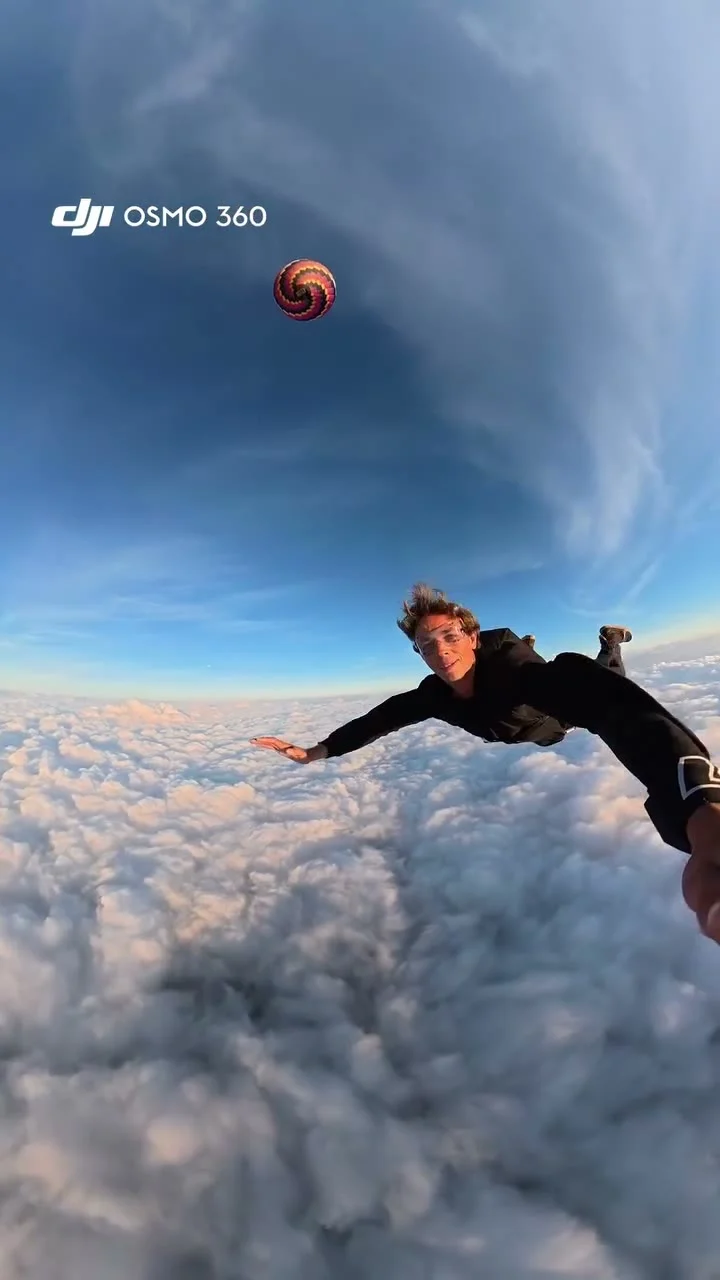
A skydiver steps off a hot-air balloon basket, flips into open air and drops past the clouds before the parachute opens. The Skydiving AI Video template puts your face into that sequence from one clear photo. It’s an edited stunt clip, not proof you made the jump. Watch the face through the spin before you share it.
Start with a face the goggles won’t hide
The Skydiving AI Video template has one required upload: a sharp, well-lit photo of one person. It uses that picture for the skydiver’s face and recognizable features. The source footage supplies the balloon and the jump, including the camera movement. No airfield photo needed. No helmet selfie required.
Pick a front-facing head-and-shoulders photo with both sides of the face visible. Don’t cover your eyes with sunglasses or a hand in the upload: the source look adds skydiving goggles later. If your starting image already hides the brow and eyes, the finished video has even less facial detail to work with when the camera swings around. If you’re choosing between a dramatic vacation photo taken against a bright sunset and a plain indoor portrait with an even view of the face, use the plain one: once the goggle strap crosses the forehead and the 360-style camera spins around the jumper, the edit needs more facial information than the sunset silhouette can provide. One person only. A second face at the edge of a group photo doesn’t belong in this jump.
The first frame is not the hardest part. The jumper changes orientation quickly, and the goggles cut across the most recognizable part of the face. If you have two candidate portraits, choose the one whose features you can still identify at small phone size. That matters more here than matching the sky or the clothes in the reference.
Keep the whole jump in the edit
On the source preview, the performer starts at the edge of a balloon basket above a cloud layer, flips away, then freefalls while the balloon recedes into the distance. The camera follows through the clouds toward fields below. A parachute opens at the end. That progression gives the short clip its shape: anticipation, a sudden flip and a landing beat without actual landing footage.
Don’t turn it into a generic freefall loop by cutting off the basket or the parachute. The balloon tells viewers where the jump starts; the opening canopy gives it an ending. If you’re trimming for a platform, watch your chosen cut from first frame to last and make sure it still reads as one event. The template itself follows a reference of about 17 seconds in vertical 9:16. It offers 480p or 720p, while the length and aspect ratio stay fixed. Check the displayed credits on the live form rather than assuming a static price.
The preview is the original motion reference, not a generated video with somebody’s uploaded face. The source page says the original audio is requested in generation, but whether it comes through depends on the model. Listen to the downloaded result before building your post around a sound cue that may be missing.
Pause after the backflip
Fast rotation is where a convincing opening can unravel. Freeze the result as the jumper leaves the basket and again when the face comes back toward the camera in freefall. Does the face still read as the person from your photo? Check the eyes, then the hairstyle. Check the goggle edges, too. They should sit on the face rather than wobble through it. A few soft frames during a quick turn are different from the entire person changing identity after the flip.
Then watch the full clip at normal speed. If the balloon jumps position, the clouds tear around an arm, or the parachute seems to appear without an opening motion, that cut may not be the one to publish. Don’t judge the video from its poster alone. The hardest frames are moving, and the final canopy is a different visual check from the face close-up.
One more detail: the reference page notes a small camera watermark in the source footage. The generation asks for no logo or text, but traces might remain. Check the top corner in your export instead of promising a watermark-free video. The preview poster itself carries camera branding; that doesn’t mean the template is affiliated with the camera company.
Caption the fantasy, not a real dive
A clip like this can work as a joke about taking a leap on a Monday or hitting “post” before you feel ready. Let the basket shot be the setup. Keep any text clear of the face during the freefall, and don’t cover the parachute opening with a huge end card. Those two beats tell the story faster than a paragraph of on-screen explanation.
If you use somebody else’s photo, get their consent before putting them into a convincing stunt. Be clear that the footage is AI-made when the platform calls for a synthetic-media label. This isn’t a tutorial for real skydiving, and the post shouldn’t claim that the person actually jumped from a balloon. For a brand account, check the rights to any audio you add, especially if the source sound doesn’t survive the generation.
If you want a different airborne action, the Wing Stunt airplane edit centers on a wing backflip. This one is about the balloon basket, the cloud drop and the parachute payoff. Make the Skydiving AI video with a clear face photo, then review those three beats before posting.